
Rate cards: 'Any stop' conditions and metrics (what, why and how)
The 'Any stop' metric on rate cards and auto-assign resource rules removes the need to specify a stop position when conditioning charges or resource assignment on stop-level attributes.
Table of contents
Summary
-
What is the “Any stop” metric?
- A new metric option on rate card conditions, rate table columns and auto-assign resource rules. It checks a stop-level attribute against every stop on the order, without requiring the user to select a specific stop position (1st pickup, last delivery, 2nd stop, etc.).
-
Why was it introduced?
- Conditioning a charge or rule on the country, ZIP code, location, stop extras or stop action type of a stop previously required selecting a fixed position. This made it impossible to express conditions on intermediate stops. It also forced the duplication of configuration lines for every possible stop position.
-
How does it work?
- Wherever a stop-level metric is used, a new ‘Any stop’ option is now available alongside positioned options like “1st pickup” and “Last delivery”. When selected, the rule passes if at least one stop on the route meets the condition. When combined with Fixed per stop rating, a separate charge is calculated for each matching stop.
Prerequisites
- Customer or contract carrier rate cards must already be configured in Rates > Customer price lists or Rates > Cost calculation load. See Rates – Rate card customers for the basic setup.
- For auto-assign use, planning resource rules must be configured in Rates > Order input > Planning resources > Resource assignment. See Planning – Auto-assign resources for the underlying mechanism.
Use cases
- Per-stop surcharges by country. A customer agreement charges a fixed amount for every unloading stop based on the country of that stop (for example, NL = 50 EUR per stop, DE = 100 EUR per stop). Previously, this required duplicating the rate card line for every possible stop position. With the “Any stop” metric, a single line per country covers all stops.
- Distance-based tolls applied per stop. Tolls such as the German Maut depend on the country a stop is in, regardless of its position on the route. The “Any stop / country” condition applies the toll automatically to every relevant stop.
- ZIP code zone surcharges per stop. A rate card with zone-based rating (for example, zone A = 75 EUR, zone B = 100 EUR) can now be configured once per zone. The surcharge is applied per matching stop instead of per fixed position.
- Auto-assigning third-party costs by intermediate hub. When a load passes through a specific intermodal hub or location at any stop, the rule can now automatically add a third-party cost (for example, a cleaning contract carrier at a transfer hub). The hub no longer needs to be the first or last stop.
- Customs cost auto-assignment. A rule that adds a customs link contract carrier whenever a load contains a stop with the Customs stop extra can now be configured directly. This avoids manual cost entry per load.
Terminology
| Term | Definition |
|---|---|
| Stop position | The role of a stop in the route, such as 1st pickup, last delivery or a numbered position. |
| Stop-level attribute | A property that belongs to a single stop, including country, ZIP code, ZIP code zone, location, stop extras and stop action type. |
| Route metric | The metric used in auto-assign resource rules to evaluate route or stop characteristics. |
| Stop extras | Configurable add-ons on a stop, used to flag actions such as customs, refrigeration or temporary storage. |
| Stop action type | The classification of what happens at a stop (pickup, delivery, transfer, empty). |
Using ‘Any stop’ on rate card conditions
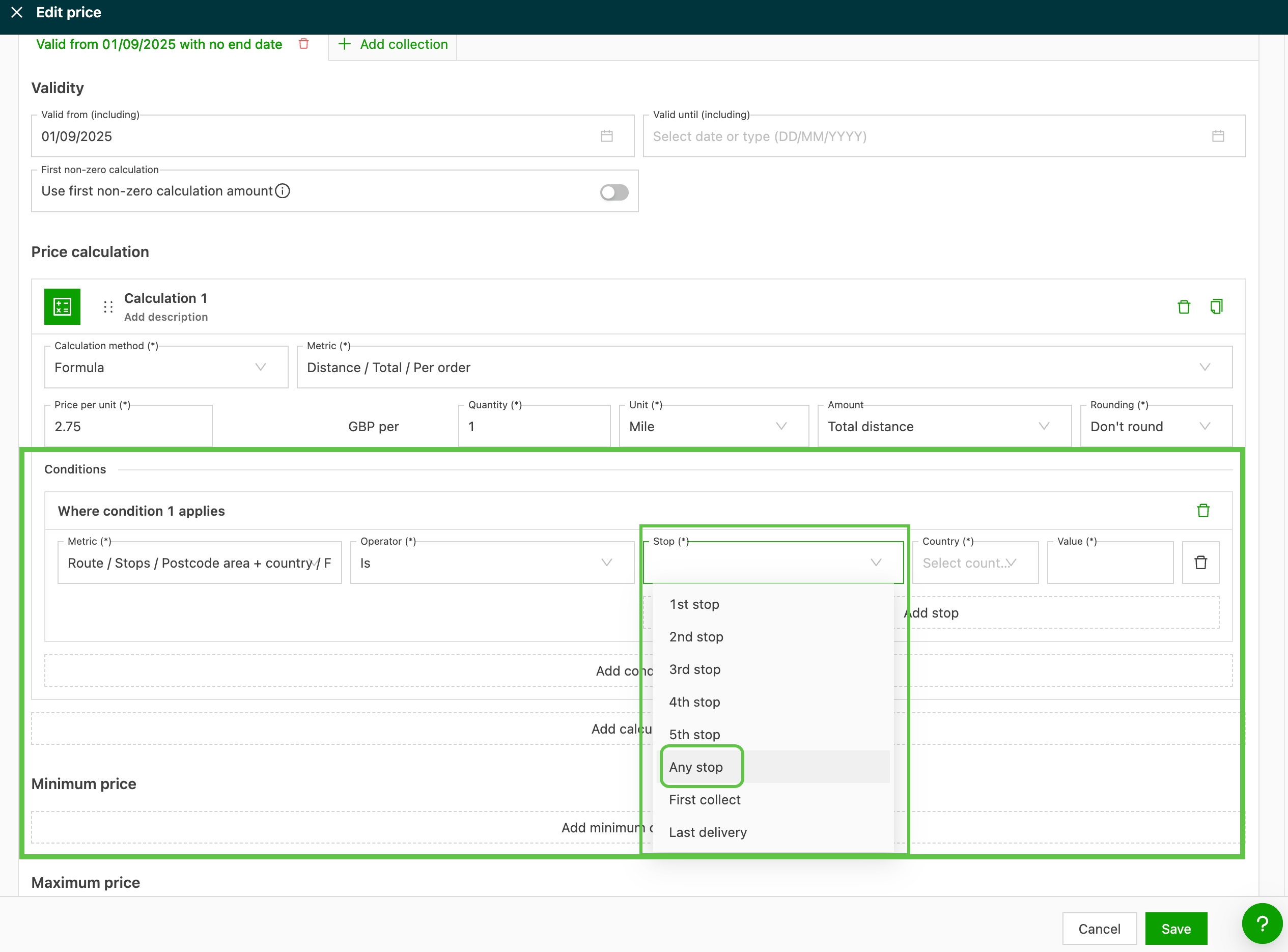
The “Any stop” option is available wherever a stop-level metric is referenced in a customer or contract carrier rate card condition.
- Navigate to Rates > Rate card customers (or Cost calculation load > Contract carrier rates for cost-side rate cards) and open the relevant rate card.
- Select the charge line that requires a per-stop condition.
- Open the Conditions panel and add a new condition.
- Choose a stop-level metric: country, ZIP code, ZIP code zone, location, stop extras or stop action type.
- Select Any stop in the position selector instead of a fixed position such as 1st pickup or last delivery.
- Configure the operator and value as usual (for example, country IS NL).
- Save the condition.
Using ‘Any stop’ in rate tables
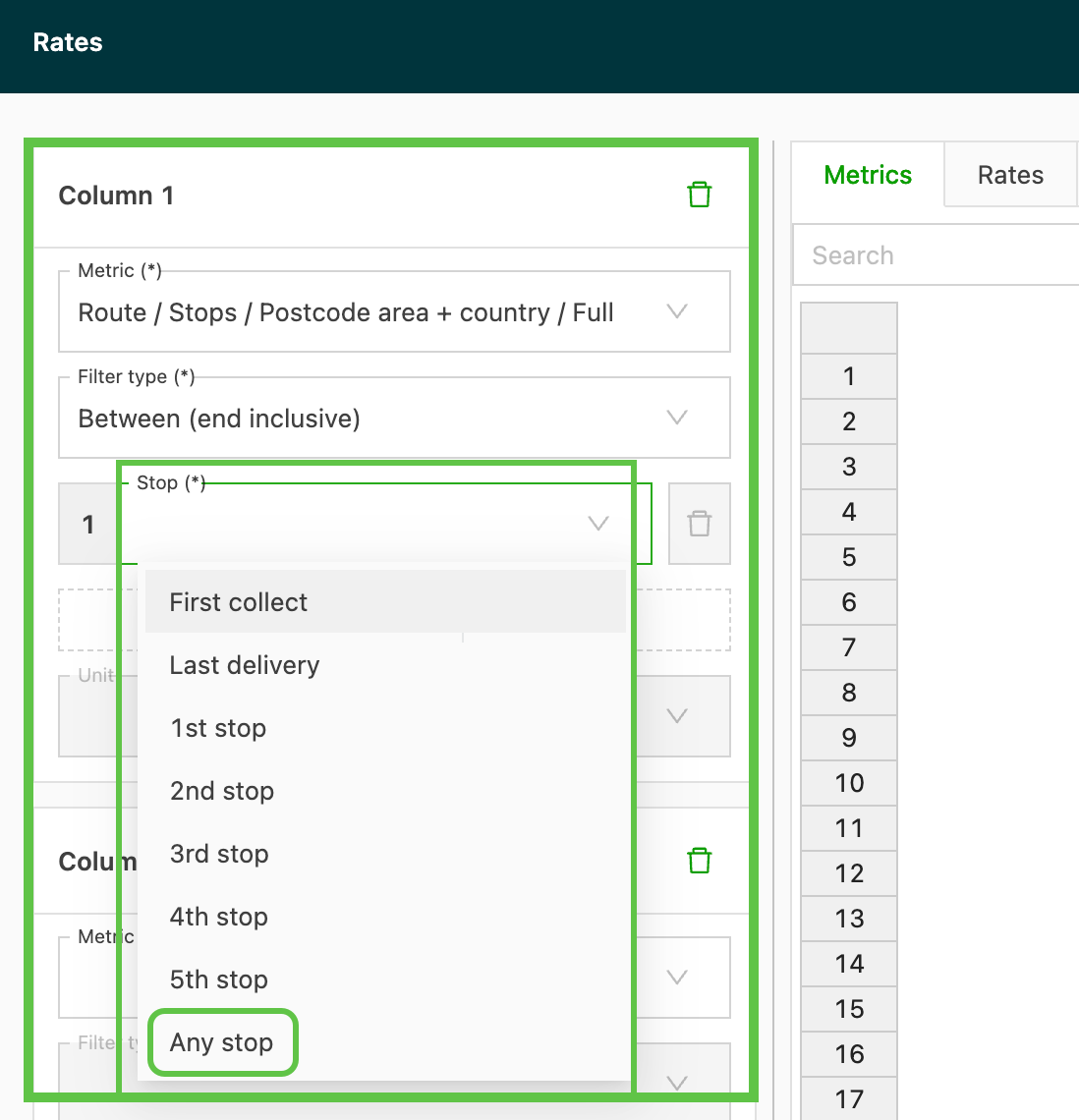
Rate table columns can also use the new “Any stop” metric. This lets the rate table look up a rate based on attributes of any stop on the route.
- Open the rate table on the relevant rate card.
- Add or edit a column.
- Choose a stop-level metric and select Any stop as the position.
- Define the lookup values (for example, country codes NL, BE, DE) and the corresponding rates.
- Save the rate table.
Using ‘Any stop’ in auto-assign resource rules
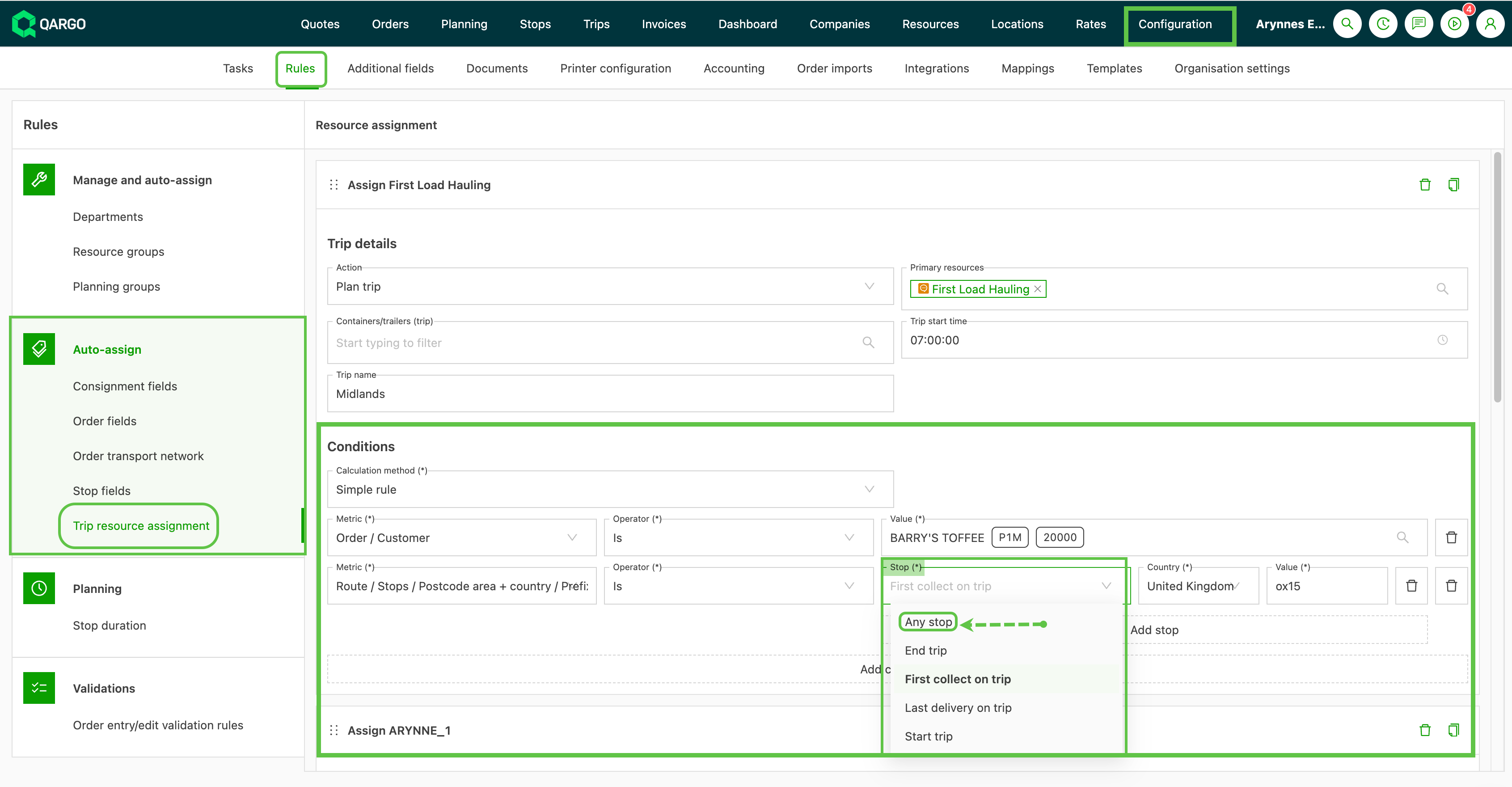
The “Any stop” concept extends to the Route metric in auto-assign resource rules. Rules can now evaluate intermediate stops that were previously out of reach.
- Navigate to Configuration > Rules > Auto-assign > Load resource assignment
- Create or edit a rule.
- Set the action and resource for the rule (for example, assign a specific contract carrier or third-party resource).
- Add a condition using the Route metric.
- Select Any stop in the position selector.
- Choose the stop-level attribute to evaluate (location, country, ZIP code/ZIP code zone, stop extras or stop action type).
- Define the condition value, for example Location = Rotterdam Hub or Stop extra = Customs.
- Save the rule.
The rule passes if at least one stop on the load matches the criteria. Where multiple stops match, the action is still performed once per load.
Troubleshooting
| Issue | Resolution |
|---|---|
| The “Any stop” option is not visible on a rate card or auto-assign rule | Confirm that the metric in use is a stop-level metric (country, ZIP code, ZIP code zone, location, stop extras, stop action type). Route-level aggregations such as “total countries on route” are not supported. |
| A charge configured with “Any stop / Fixed per stop” is applied only once instead of per stop | Check that the calculation method on the rate card line is set to Fixed per stop, not Fixed per order or Fixed per route. |
| The condition fires for routes that should not match | Recheck the operator. The IS and IN operators behave differently from NEQ and NOT IN on “Any stop” conditions. NEQ with “Any stop” passes when at least one stop does not match, which is rarely the intended behavior. |
| Existing duplicated rate card lines for each stop position still apply | The migration to a single “Any stop” line is manual. Existing duplicated lines continue to work but can now be consolidated. |
| Auto-assign rule does not trigger on intermediate stops | Confirm that the rule uses the Route metric with Any stop selected. Rules using First pickup or Last delivery continue to ignore intermediate stops. |