
Rate card: multimodal rating condition configurations
New rate card conditions apply charges and third-party costs automatically based on stage type, resource type, or a specific intermodal connection in the route.
Table of contents
Summary
-
What is included?
- Three new condition types are now available on customer price lists and contract carrier (cost) rate cards: Stage type, Resource type, and Intermodal connection.
-
Why was this added?
- Multimodal transport rating depends on what the route looks like: whether it includes a rail or sailing leg, what equipment is used, or which specific intermodal connection is planned. Without these conditions, prices and third-party costs that vary by leg, equipment, or connection had to be entered manually.
-
How does it work?
- Each condition can be added to an existing or new rate card line and combined freely with other conditions. Stage type checks the legs in the route. Resource type checks the primary or secondary resource on the load. Intermodal connection matches a specific operator + connection (for example, STDR-DUB).
Prerequisites
-
Customer or contract carrier rate cards must already be set up. See Rates: rate card customers and Cost calculation: load costs.
-
For Intermodal connection conditions, the relevant intermodal connections must be configured in Resources > Intermodal operators
- Select the intermodal operator and add Intermodal connections. See Intermodal: create and update intermodal timetables.
-
For Resource type conditions, the secondary resource (trailer, container, chassis) must be assigned to the load for the rule to evaluate as expected.
Use cases
- Road fuel surcharge based on a rail leg. A customer’s road fuel surcharge differs depending on whether the route includes a rail transfer leg. The Stage type condition allows the surcharge to be configured once and applied automatically on routes that contain a rail leg.
- Limited Quantity (LQ) surcharge on sailing legs. When a shipment is flagged as Limited Quantity and the planned route includes a sailing transfer leg, an additional LQ surcharge applies. The Stage type condition turns this into an automated rule instead of a manual addition.
- Cost rates by secondary resource type. Carrier and contract carrier cost rates differ based on whether a transfer leg uses a trailer or a container. The Resource type condition on the cost rate card differentiates rates based on the secondary resource actually assigned to the load.
- Connection-specific surcharges (revenue). A shipment to Dublin can travel via a direct sailing (STDR-DUB) or via Zeebrugge (STDR-ZEE + ZEE-DUB). With the Intermodal connection condition, each route variant can carry a different rate without manual selection.
- Connection-specific third-party costs (cost). A “Cost reallocation” or third-party resource on intermodal loads can now be rated automatically based on the planned intermodal connection. This removes the need for manual cost entry per load.
Terminology
| Term | Definition |
|---|---|
| Stage type | The classification of a transport leg in Qargo: Transfer, Pickup, Delivery, or Empty. |
| Resource type | The kind of resource assigned to a load (Trailer, Container, Chassis, Ferry resource). Applies to the primary or secondary resource. |
| Intermodal connection | A predefined route segment between two points operated by an intermodal carrier, such as STDR-DUB. |
| Contract carrier rate card | A cost-side rate card used to calculate third-party costs for a load, including reallocations and external resources. |
| Customer price list | A revenue-side rate card that defines what a customer is charged for a transport order. |
Stage type condition
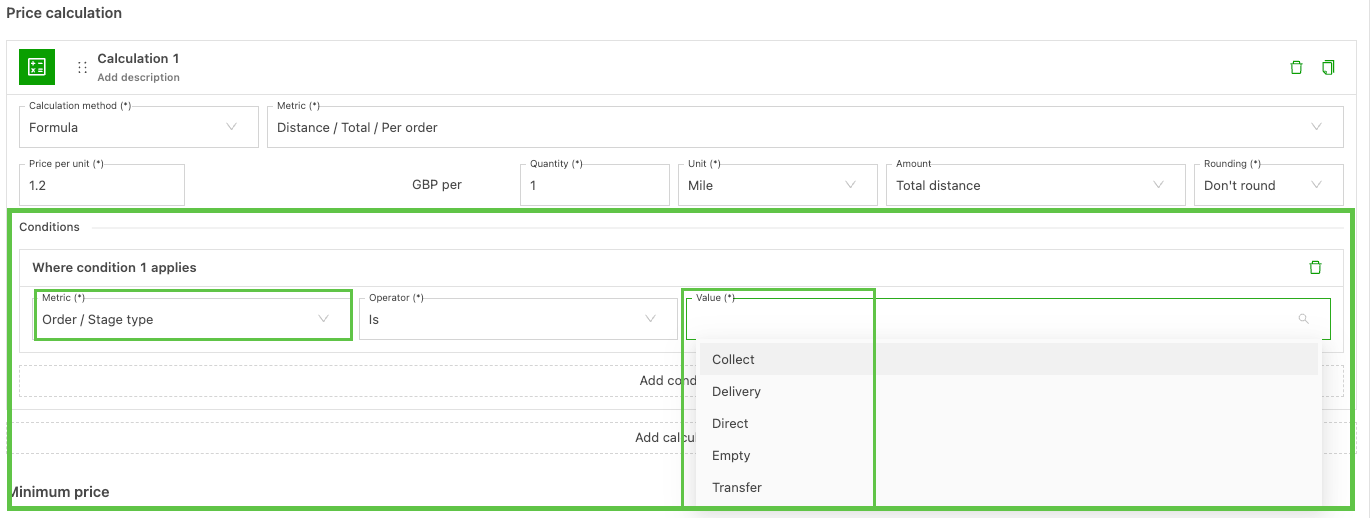
The Stage type condition triggers a charge or cost when the planned route contains at least one leg of the selected stage type.
- Open the relevant rate card in Rates > Rate card customers (revenue) or Rates > Load cost calculation > Contract carrier rates (cost).
- Select the charge line where the condition should apply.
- Add a new condition and choose Stage type.
- Pick one or more values: Transfer, Pickup, Delivery, Empty.
- Save the condition.
The condition evaluates to true if any leg in the route matches the selected stage type.
Resource type condition
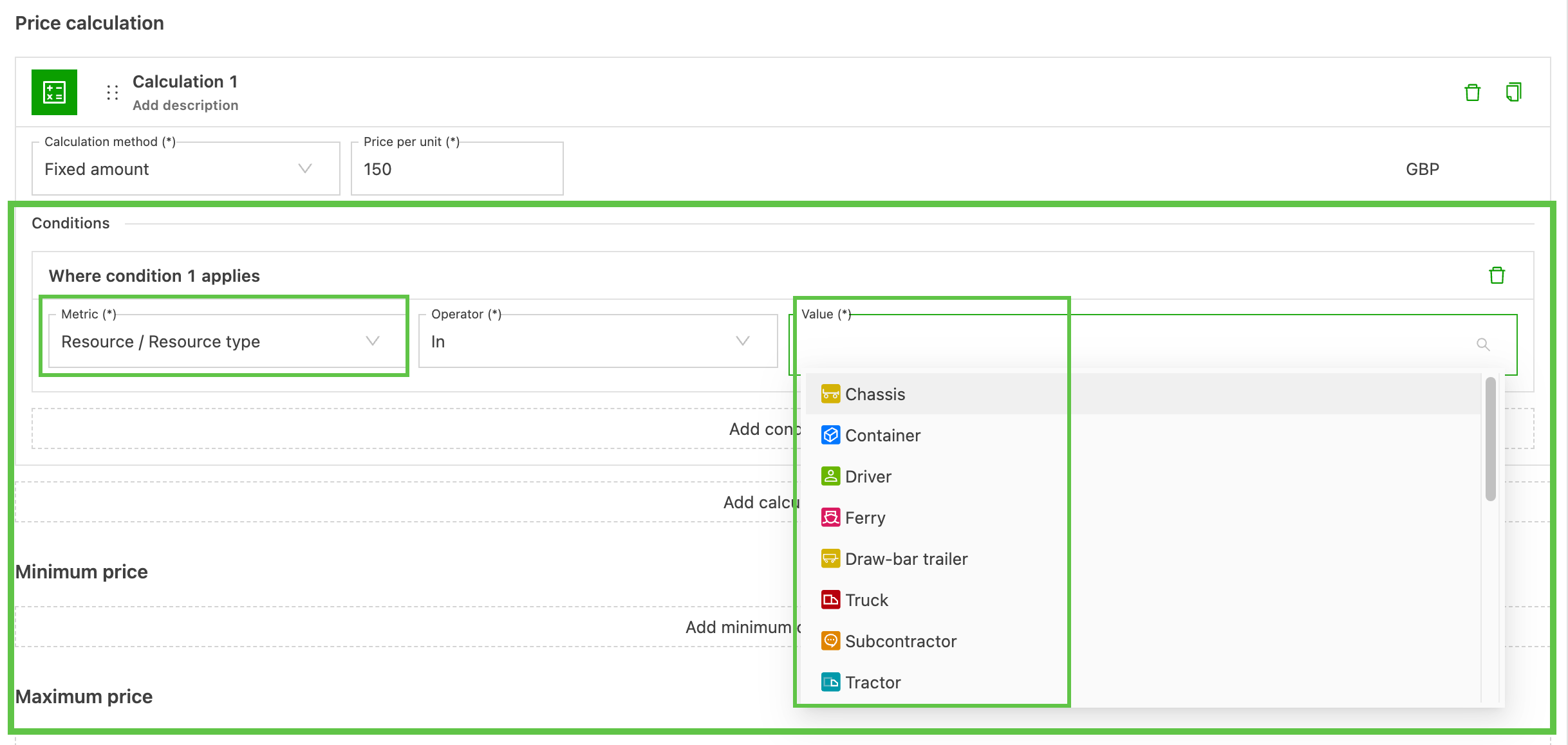
The Resource type condition checks which resource type is assigned to the load. It is available on both customer price lists and contract carrier rate cards.
- Open the rate card and the charge line.
- Add a condition and select Resource type.
- Choose Primary resource or Secondary resource, depending on which side of the assignment the condition should evaluate.
- Pick one or more resource types: Trailer, Container, Chassis, Ferry resource.
- Save the condition.
Intermodal connection condition on customer price lists
The Intermodal connection condition follows the same Intermodal > Connection pattern already used on intermodal cost rate cards.
- Open the customer price list and the relevant charge line.
- Add a condition and select Intermodal connection.
- Pick the intermodal operator first, then the specific connection (for example, P&O > STDR-DUB).
- Save the condition.
Intermodal connection condition on contract carrier rate cards
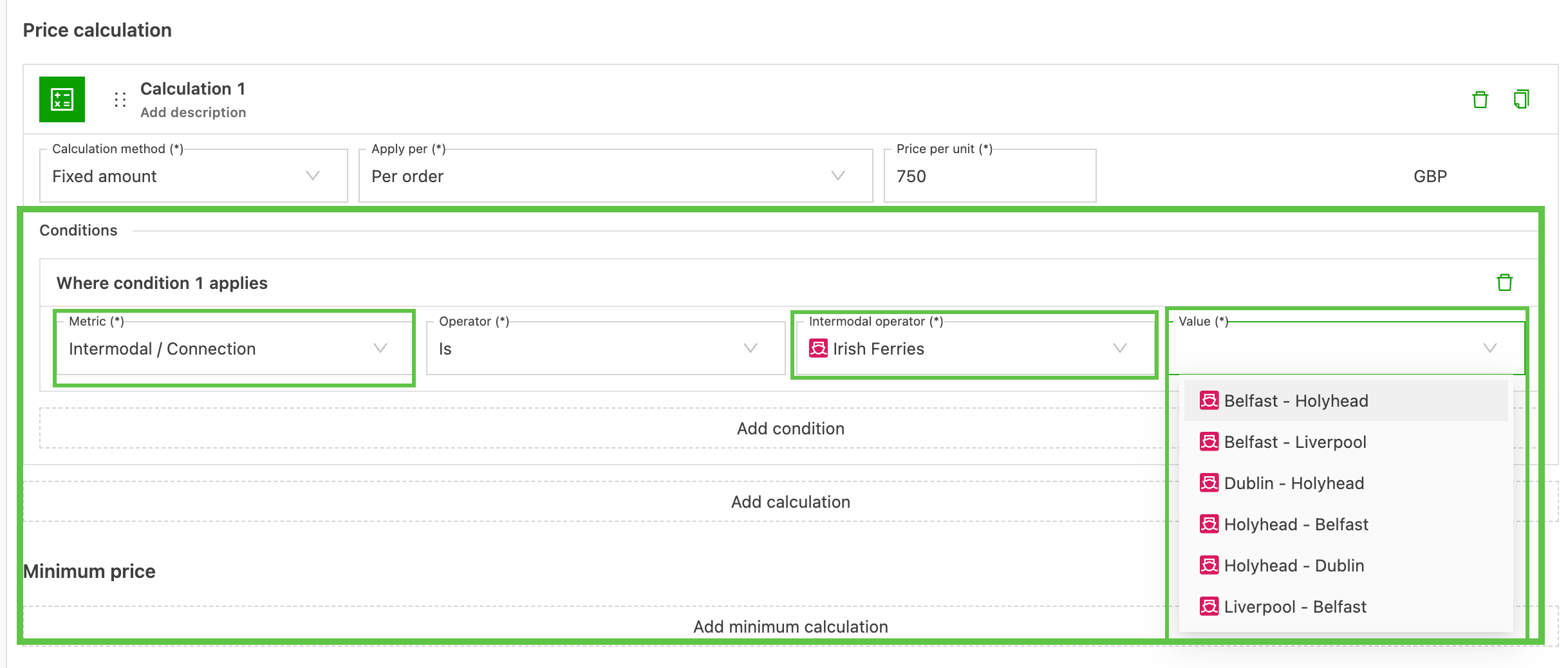
On contract carrier (cost) rate cards, the Intermodal connection condition is paired with additional fields that refine the match.
- Open the contract carrier rate card and the charge line.
- Add a condition and select Intermodal connection.
- Pick the intermodal operator and the specific connection.
- Configure any additional fields that apply: Accompanied, Number of drivers, Resource type, Temperature plugin, Vehicle/container length, Is loaded.
- Save the condition.
Combining conditions
All three new conditions can be combined with each other and with existing rate card conditions. A typical combination on a contract carrier rate card might be:
- Stage type IS Transfer
- Intermodal connection IS P&O / STDR-ZEE
- Resource type IS Container
The charge applies only when all conditions evaluate to true on the planned route.
Troubleshooting
| Issue | Resolution |
|---|---|
| The condition does not appear in the rate card editor | Confirm that the rate card is a customer price list or a contract carrier rate card. Intermodal connection is supported on intermodal-eligible rate cards. |
| The Resource type condition does not match | Make sure the secondary resource is assigned to the load. The condition cannot evaluate before planning is complete. |
| Stage type matches when only one leg should trigger the charge | The condition evaluates across all legs in the route. Combine it with a Resource type or Intermodal connection condition to narrow the match. |
| Existing rate cards still use manual entries for connection-specific costs | New conditions must be added manually. There is no automatic migration tool, and orders that were already invoiced or costed are not recalculated retroactively. |
| The intermodal connection list is empty in the picker | Check that intermodal connections are configured in Resources > Intermodal operators > Intermodal connections and that the operator is linked to the relevant rate card. |