
Rate cards – dependent calculations: what, why & how.
Rate card calculations can now be conditional on the results of other calculations or charges on the same price list. This removes the need for duplicate rate tables and manual exclusion workarounds.
Table of contents
Summary
What
Two new mechanisms for creating dependencies between rate card calculations:
- Pick first matching calculation: evaluates the calculations on a charge from top to bottom and applies the first one that produces a non-zero result.
- Other charge dependency: a condition metric on a calculation that makes it conditional on whether a specific other charge on the same price list meets a defined threshold.
Why
Rate card calculations previously ran independently. There was no way to suppress one charge based on the result of another. This forced workarounds such as duplicating rate tables across multiple surcharges or maintaining complex manual exclusion conditions.
How
Enable Pick first matching calculation directly on a charge to set up fallback rating logic. Add Other charge dependency as a condition on an individual calculation. Then select the reference charge and set the comparison operator and threshold.
Use cases
- Transport companies with route-specific fixed rates can set up a primary rate table calculation and a fallback calculation that only applies when the primary returns zero. This removes the need for duplicate rate tables per surcharge.
- Companies with fixed rate overrides can suppress surcharges (ADR, fuel, toll, waste) when a fixed rate charge has already applied. This replaces complex manual exclusion conditions.
- Operations that need surcharges to apply only when a transport charge was successfully auto-rated can configure this directly as a condition, instead of duplicating rate tables across each surcharge.
Terminology
| Term | Definition |
|---|---|
| Pick first matching calculation | An option on a charge that evaluates calculations in order and applies the first one producing a non-zero result |
| Other charge dependency | A condition metric that makes a calculation conditional on the result of another charge on the same price list |
| Waterfall evaluation | Sequential top-to-bottom evaluation where the first successful calculation is used and the following ones are skipped |
| Circular dependency | A configuration error where two charges reference each other as conditions, creating a loop that cannot be resolved |
| Price list | A rate card configuration containing one or more charges, each with one or more calculations |
Configuring a ‘Pick first matching’ (waterfall) calculation
- Navigate to Rates > Rate card customers and open the relevant price list.
- Open the price list to update.
- Select the charge to configure.
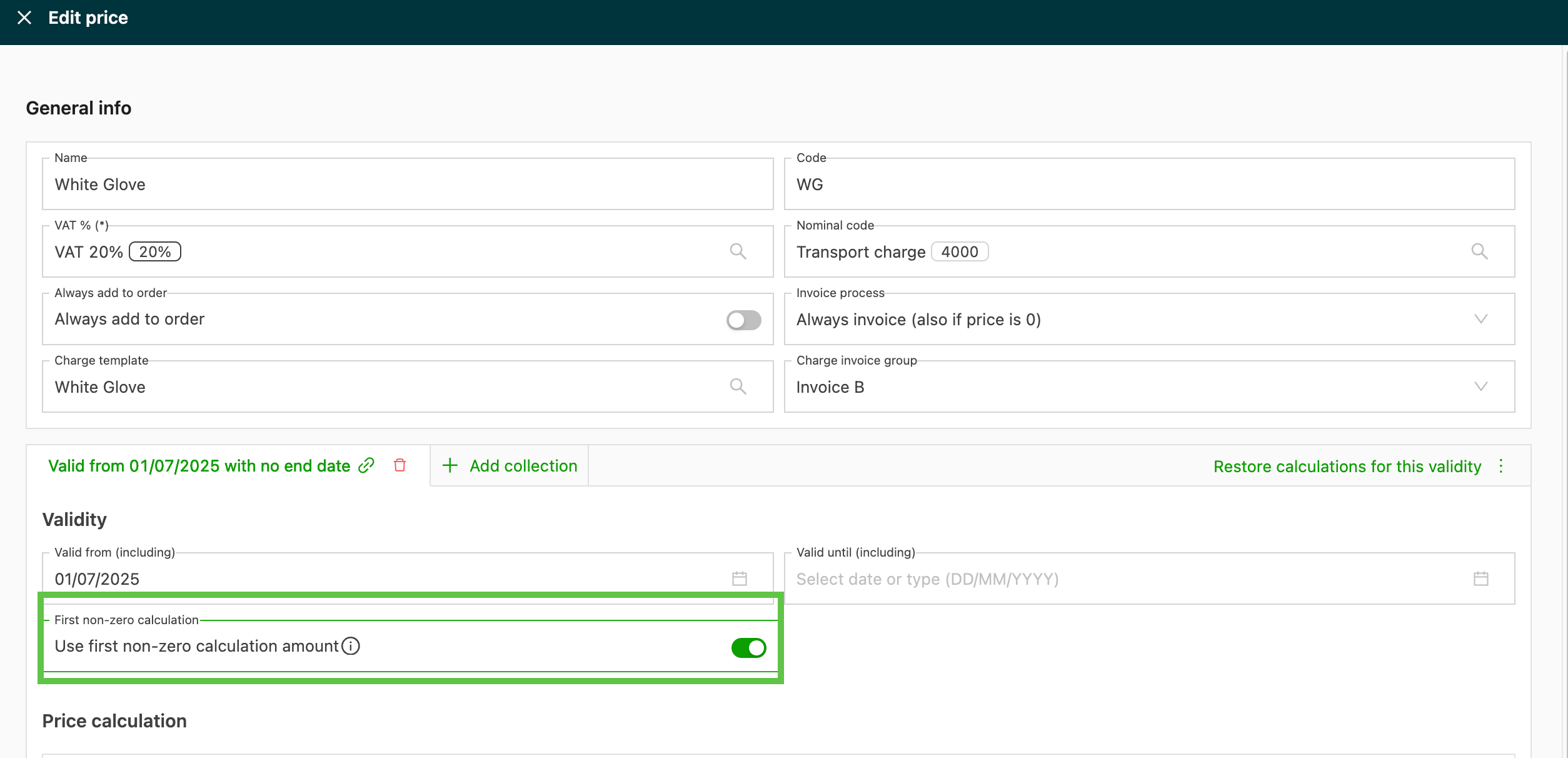
- Enable the Pick first non-zero calculation amount toggle.
- Arrange the calculations in the desired evaluation order. Calculations are evaluated from top to bottom, and the first one returning a non-zero result is applied. The following calculations are skipped.
- Save the price list to apply the changes.
Configuring an other charge dependency condition
- Navigate to Rates > Rate card customers and open the relevant price list.
- Select the price list containing the charge to make conditional.
- Open the charge line calculation and navigate to the Conditions section.
- Add a new condition and select Other charge dependency as the condition metric.
- Select the reference charge: the charge whose result will be evaluated. The reference charge must be on the same price list.
- Set the operator (=, ≠, >, <, ≥, ≤) and the threshold value (e.g., 0).
- Save the price list to apply the condition.
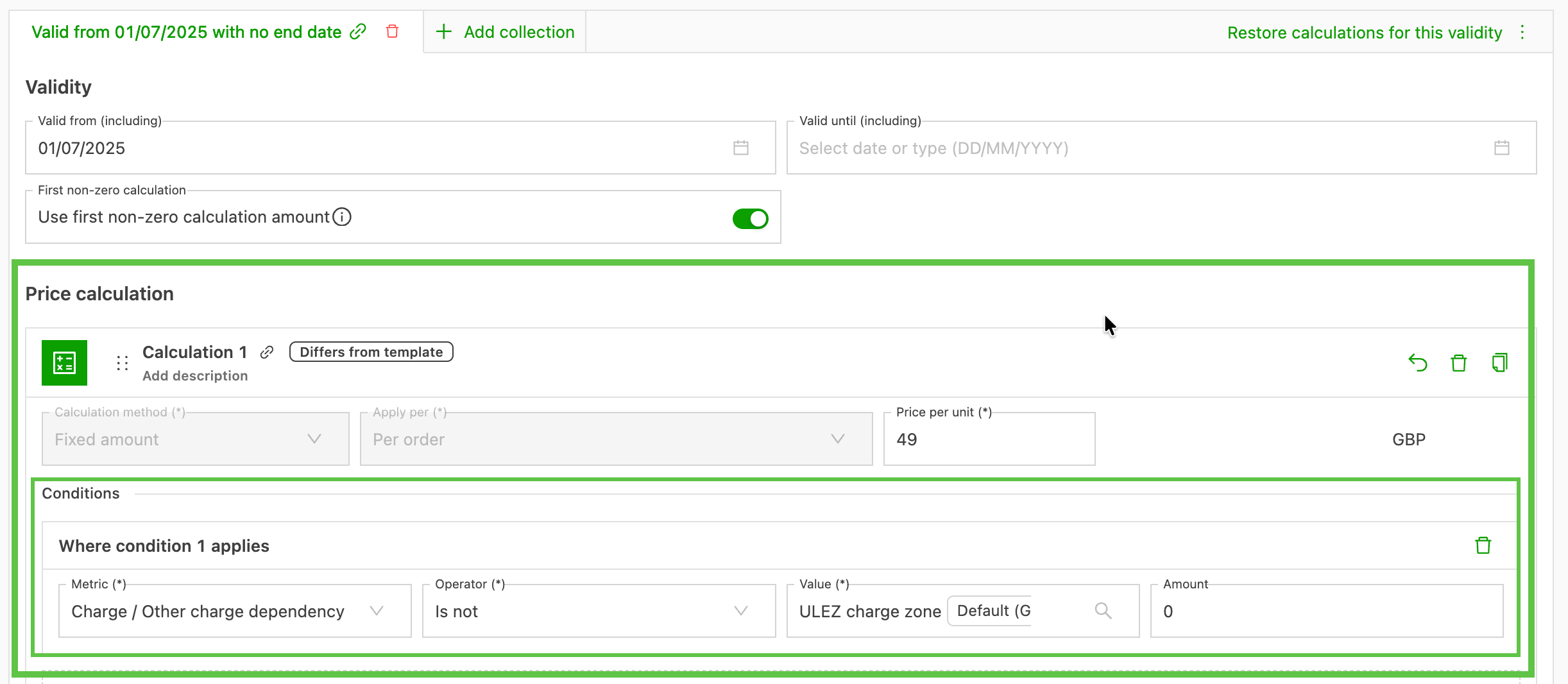
Example: To suppress a surcharge when a fixed rate applies, select the fixed rate charge as the reference charge, set the operator to ≠, and set the value to 0. The surcharge calculation will only apply when the fixed rate charge returned no result.
Troubleshooting
| Issue | Possible cause | Solution |
|---|---|---|
| Circular dependency error on save | Two charges reference each other as conditions | Review the condition references and remove the circular link between the two charges |
| Waterfall not applying the expected calculation | Calculations are not in the intended order | Reorder the calculations on the charge so the primary calculation appears first |
| Other charge dependency not filtering correctly | The reference charge is on a different price list | Conditions across price lists are not supported. Both charges must be on the same price list |
| Condition references the wrong charge after copying a price list | Condition references were not remapped during the copy | Check that the condition on the copied price list references the intended charge |