
Dashboard: container and trailer count per location dashboard
The dashboard provides an aggregated, near-real-time view of container, trailer, and chassis counts per location, with status breakdowns for resources at a location, planned to arrive, and out of service.
Table of contents
Summary
What: A Container-Trailer locations tab in the Dashboard tab shows aggregated resource counts per location or terminal. Resources are grouped into states such as At location - empty, At location - assigned to order, At location - out of service, Planned to arrive - not assigned to order, and Planned to arrive - out of service.
Why: Fleet managers and planners working with large container or trailer fleets need a centralized, at-a-glance overview of where equipment is located and how many units are available at each terminal. Until now, container and trailer information was only available as a flat list in Container planning, with no aggregation per location and no breakdown of available versus assigned units.
How: Open the Dashboard tab and select the Container-trailer locations Dashboard tab. Filter by resource type, country, location, or status to narrow the view.
Use cases
- Fleet manager checking how many containers are currently available at a terminal before accepting new bookings
- Planner identifying terminals where empty containers are accumulating and need repositioning
- Operations team reviewing fleet distribution by country at the start of each day
- Yard manager planning parking capacity by reviewing what is currently on site and what is incoming over the next few days
Terminology
| Term | Definition |
|---|---|
| At location - empty | The resource is at a location (based on its last completed stop), is not flagged as out of service, and has no upcoming planned stop. Available for new planning |
| At location - assigned to order | The resource is at a location based on its last completed stop and has a subsequent planned stop. Outgoing movement |
| At location - out of service | The resource is at a location and has an active unavailability, or has an unavailability scheduled within the next 7 days |
| Planned to arrive - not assigned to order | The resource has a planned arrival stop at a location and no out-of-service flag within the 7-day horizon |
| Planned to arrive - out of service | The resource has a planned arrival stop at a location but is flagged as out of service or will be within 7 days |
| Total fleet | All active containers, trailers, and chassis in scope, regardless of state |
Opening the dashboard
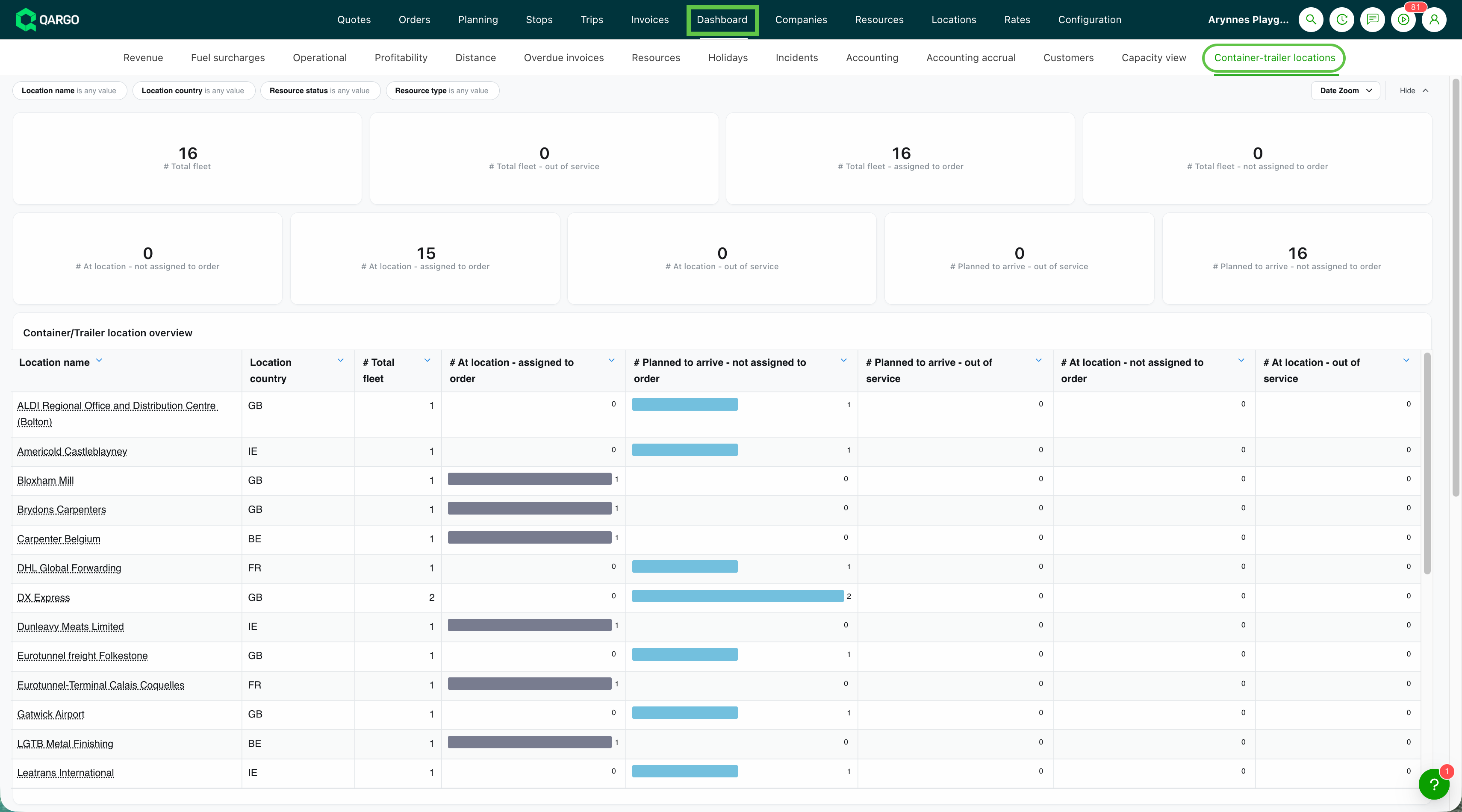
- Open the Dashboard tab.
- Select the Container-trailer locations tab.
The dashboard loads with the default view: all resource types, all countries, and all statuses.
Reading the dashboard
Summary cards
The cards at the top of the dashboard show the total fleet count plus breakdowns:
- Total fleet: count of all containers, trailers, and chassis in scope
- Total fleet - assigned to order: resources with an active order assignment
- Total fleet - not assigned to order: resources with no current order assignment
- Total fleet - out of service: resources flagged as out of service now or within the next 7 days

Location table
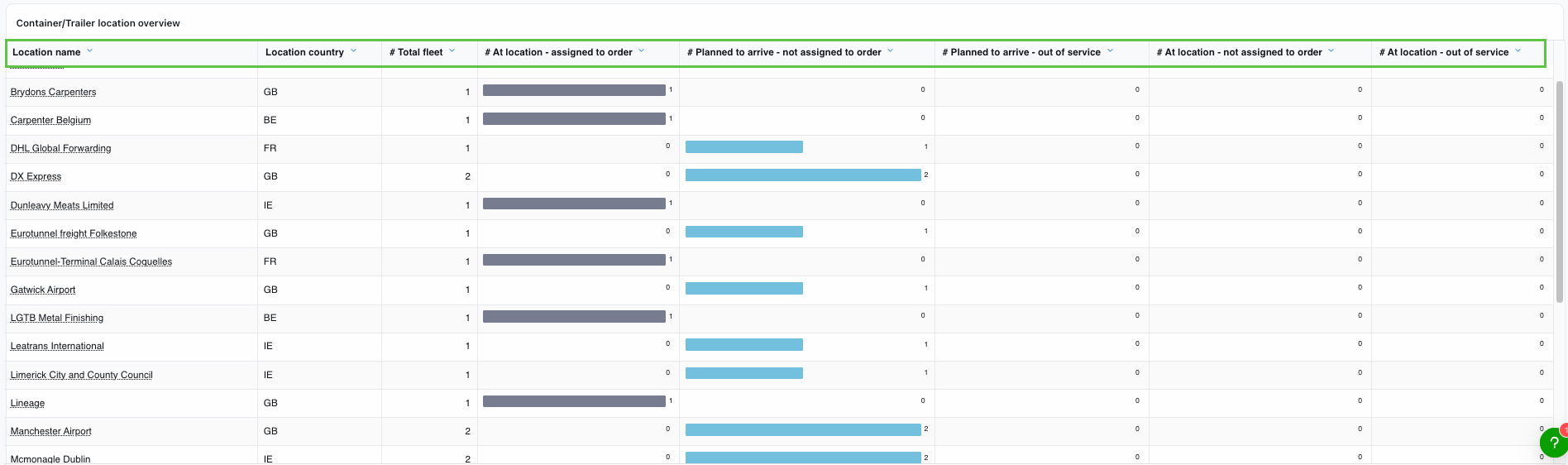
Each row in the table represents a location or terminal. Columns include:
- Location / Terminal name
- Country
- Total resources at this location
- At location - empty count
- At location - assigned to order count
- At location - out of service count
- Planned to arrive - not assigned to order count
- Planned to arrive - out of service count
Filters
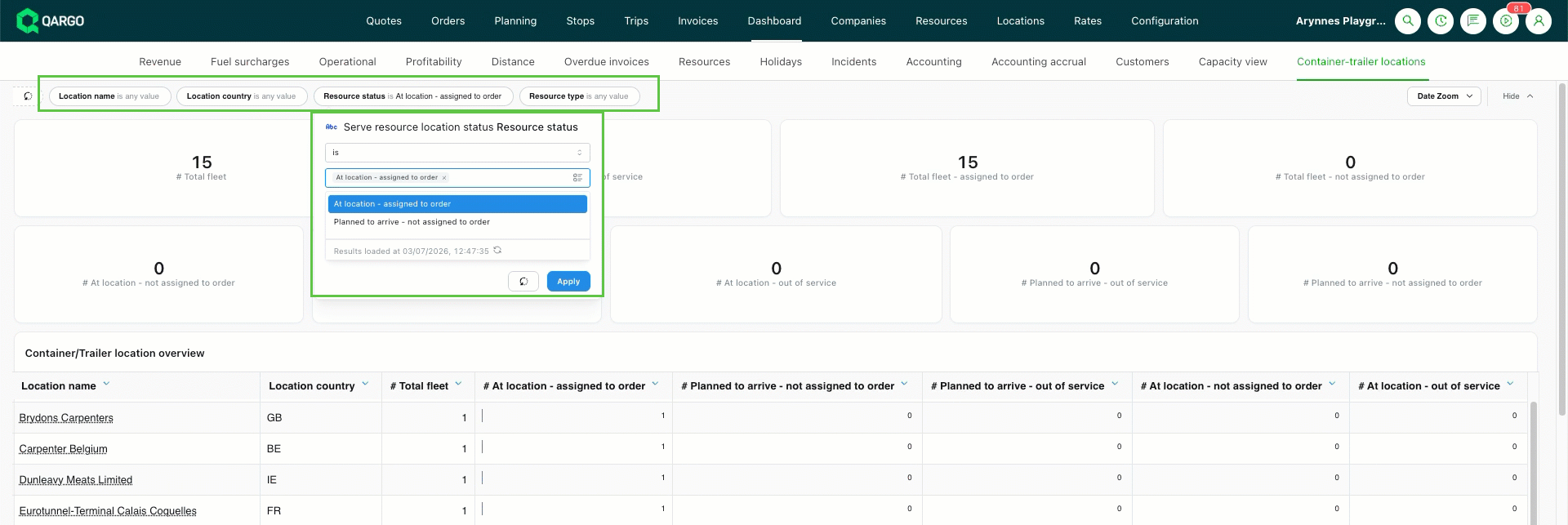
The following filters are available:
- Resource type: All / Containers / Trailers / Chassis
- Country: filter to one or more countries (for example, Belgium, UK, Netherlands)
- Location name: free-text search
- Status: All / At location - empty / At location - assigned to order / At location - out of service / Planned to arrive - not assigned to order / Planned to arrive - out of service
Data source and refresh
| Aspect | Detail |
|---|---|
| Update frequency | Approximately every 2 to 3 hours, depending on location |
| Current location source | Derived from the resource’s last completed stop. Resources with no completed stops fall back to their starting location |
| Next location source | The most recent to-plan or planned stop, by maximum timestamp |
| Arrival vs. departure | Determined by the stage of the stop (pickup, delivery, empty pickup, empty delivery) |
| Out-of-service horizon | A 7-day forward-looking window on the resource’s unavailability records |
Limitations
| Limitation | Detail |
|---|---|
| Per-container detail panel | Detailed status, repair info, clean status, or notes per container are not part of this release |
| Configurable horizon | The 7-day out-of-service horizon is fixed and not configurable per tenant |
| Manual yard movements | Container or trailer locations are derived from completed stops. Manual yard movements outside of Qargo are not reflected |
| Empty container returns | Empty returns must be planned as standalone loads. A terminal drop bundled with another activity will not be reflected as an empty return on the dashboard |
| Location filter behavior | When filtering by country or location, a resource whose next planned activity is at an unfiltered location will drop out of the view. This is a known side effect of per-location aggregation |
| Max capacity per location | Max capacity is configured manually on the location record and is not automatically derived from physical slots or historical occupancy |
Troubleshooting
| Issue | Resolution |
|---|---|
| A resource appears in the wrong location | The current location is derived from the last completed stop. Confirm that the most recent stop has been marked as completed in the planning board |
| Counts seem outdated | The dashboard refreshes every 2 to 3 hours. Recent changes in the planning board may not yet be reflected |
| Resource is missing from the dashboard | Confirm the resource is active, not archived, and of a supported type (Container, Trailer, or Chassis) |
| Filtering by country hides expected resources | A resource whose next planned activity is at a location outside the filtered country will be excluded. Broaden the country filter or remove the location filter |