
Planning – Trailer and container availability status on the resource board
Table of contents
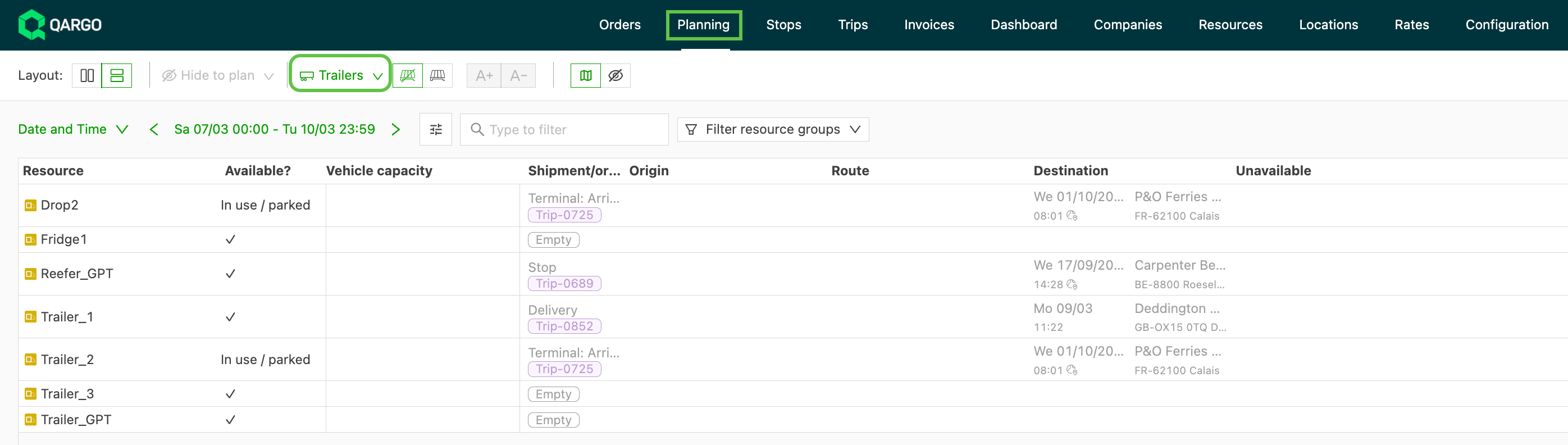
The resource board now reflects real-time availability for trailers and containers. As soon as a load is marked as completed, the linked trailer or container immediately shows as Available. There is no need to wait until the end of the day.
How availability status works
Trailers and containers on the planning resource board show one of the following statuses:
| Status | Meaning |
|---|---|
| Available | The resource is free and can be assigned to a new load |
| In use | The resource is assigned to an active (not yet completed) load |
| Parked | The resource is parked and not currently in active use |
Status update on load completion
Previously, a trailer or container stayed marked as In use or Parked for the rest of the day, even after its load was completed. This made it unclear whether a resource was actually free for reassignment.
Now, the availability status updates immediately when a load is completed:
- As soon as a load is marked as completed (via the driver mobile app or manually by a planner), the linked trailer or container switches to Available on the resource board
- Planners can reassign the resource to a new load right away
How to mark a load as completed
A load can be completed in two ways:
- Driver mobile app: The driver marks all stops as delivered in the Qargo mobile app
- Manually by a planner: Open the load in Qargo and update the load status to Completed
Once either action is taken, the trailer or container linked to that load immediately appears as Available on the resource board.
Limitations
- The status update depends on the load being properly marked as completed in Qargo. Loads that are not yet completed continue to show the resource as In use, even if the load has physically ended.
- Manual yard movements made outside of Qargo (e.g., moving a trailer without creating or completing a load in the system) are not tracked and do not update the availability status.
- This applies to both the trailer planning and container planning views.