
Rate card – girth-based rating: what, why and how
Girth ((Width + Height) x 2 + Length) is a composite dimension metric available in Qargo rate cards. It enables automatic classification of shipments, such as loose colli vs. pallet freight, for accurate, dimension-based billing.
Table of contents
Introduction
What is girth-based rating?
Girth is a composite measurement calculated from a freight item’s three dimensions: (Width + Height) × 2 + Length. In Qargo, girth is available as a rating metric in three areas of the rate card system: formula-based price calculations, rate table lookups, and chargeable weight conversion conditions.
Why use it?
Many transport companies apply different billing rules depending on whether a shipment qualifies as loose colli (billed on cubic meters) or pallet freight (billed on loading meters). This classification often depends on girth. A shipment below a girth threshold qualifies as loose colli, and one above it is billed as pallet freight. Without a native girth metric, this distinction could not be configured automatically in rate cards. Users had to rely on manual workarounds or separate price lists.
How does it work?
Qargo calculates girth automatically from the freight item dimensions (Width, Height, Length) already captured per goods line on an order. Girth can then be used:
- As a metric in formula-based calculations: the price is multiplied by or derived from the girth value per freight item.
- As a metric in rate table lookups: girth ranges define the rating tiers.
- As a condition on chargeable weight conversion factor lines: girth thresholds determine which conversion factor (e.g. cubic meters vs. loading meters) is applied.
Terminology
| Term | Definition |
|---|---|
| Girth | A composite dimension metric calculated as (Width + Height) × 2 + Length per freight item. Computed automatically from goods line dimensions. |
| Loose colli | A shipment classification for smaller, individually packed items, typically billed on cubic meters rather than loading meters. |
| Per good | A calculation method where the formula or metric is evaluated individually for each freight item, rather than once for the whole order. |
| Chargeable weight conversion | A configuration that converts goods metrics (weight, volume, loading meters, etc.) into a single chargeable weight value used for rating. |
| Conversion factor line | A single line within a chargeable weight conversion. It defines the input metric, the multiplier and, optionally, a condition for when it applies. |
Using girth in formula-based calculations
Girth can be selected as the calculation metric when setting up a Formula calculation on a price list. This is useful when the charge amount is derived directly from the girth measurement per freight item, for example a per-centimeter rate applied to each item’s girth value.
How to configure
- Navigate to the relevant customer rate card and open the price list to configure.
- Select the calculation method Formula.
- Open the Metric dropdown. Under the Goods (ordered) tier, select Girth (for a per-item calculation).
- Enter the formula rate and any additional options (offset, rounding, percent adjustment) as required.
- Save the calculation.
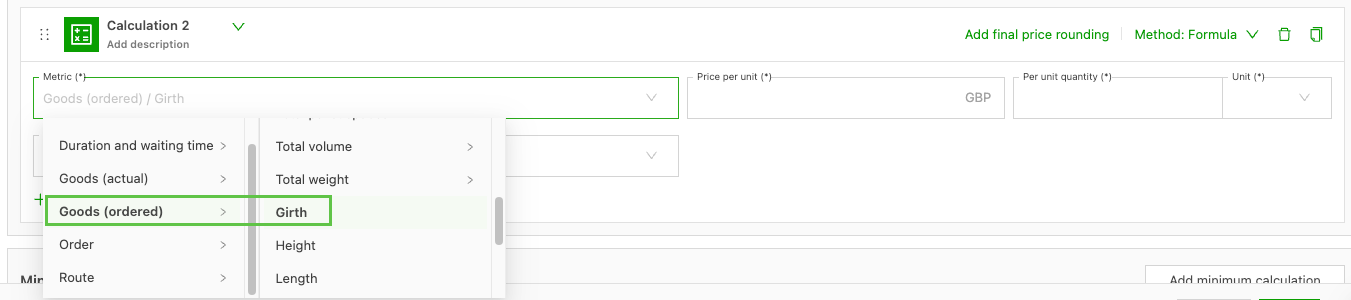
The calculation is evaluated per freight item, using the same evaluation method as other individual dimension metrics such as height, width, and length. This means that if an order has three goods lines, the formula runs three times and the results are summed.
Using girth in rate table lookups
Girth can be used as the row metric in a rate table to create girth-based rating tiers. This is the recommended approach when the charge depends on which girth band a freight item falls into. For example, a lower rate applies to items with girth ≤ 200 cm and a higher rate above that threshold.
How to configure
- Navigate to the relevant price list and select the calculation method Rate table.
- Choose Girth as the rate table metric.
- Define the girth ranges and corresponding prices in the rate table rows.
- Save the rate table.
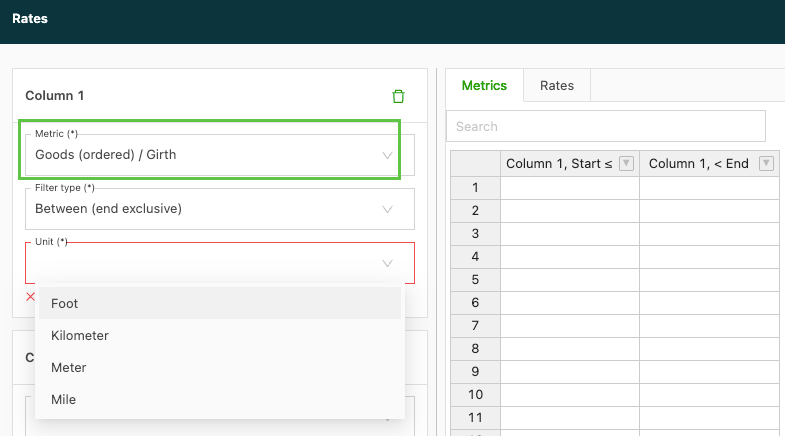
As with formula calculations, girth in rate tables is evaluated per goods line. Make sure all freight items on orders using this price list have Width, Height, and Length filled in. Otherwise, a calculation error will appear on the charge.
Using girth as a chargeable weight condition
Girth can be added as a condition on chargeable weight conversion factor lines. This is the primary use case for the loose colli classification. A conversion factor line for cubic meters is applied when girth falls below a threshold, and a loading meter conversion applies when girth exceeds it.
How to configure
- Navigate to Rates > Chargeable weight conversions and open the relevant conversion (or create a new one).
- Add a conversion factor line for the loose colli case, for example input: volume, factor: 1, condition: Girth ≤ 300 cm.
- Add a second conversion factor line for the pallet freight case, for example input: loading meters, factor: 875, condition: Girth > 300 cm (or leave it without a condition as a fallback).
- Verify the line order. The system evaluates lines from top to bottom and applies the first matching condition per input specification.
- Save the chargeable weight conversion.
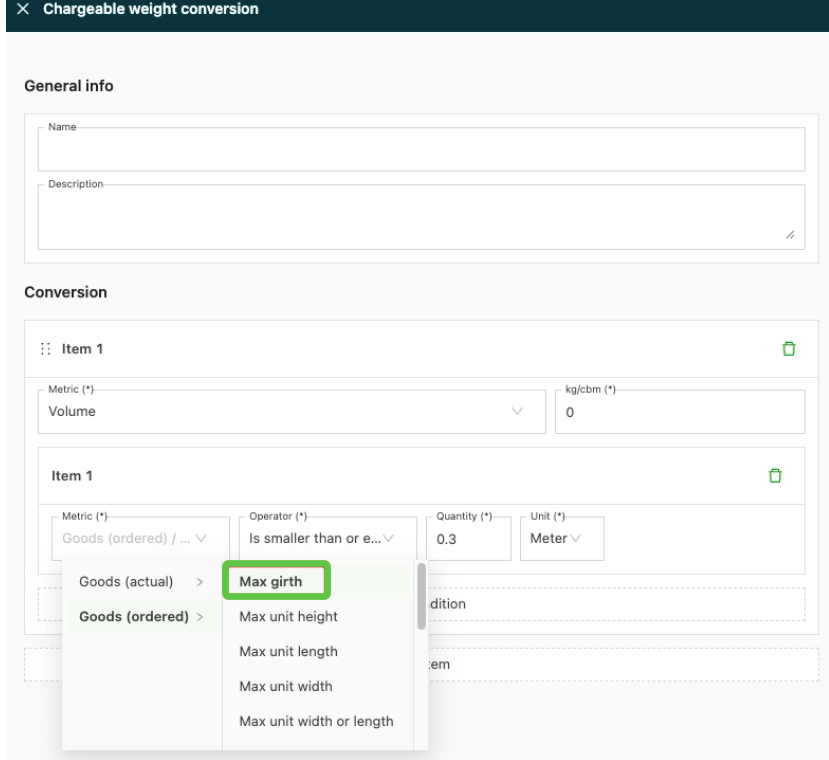
Note: For chargeable weight conditions, use Girth for per-item evaluation. See the article Rates – chargeable weight conversions – add conditions for a full guide to configuring chargeable weight conditions.
Example: classifying loose colli vs. pallet freight
A transport company applies the following rule: if a shipment line has a max weight ≤ 23 kg, a max length ≤ 320 cm, and a girth ≤ 300 cm, it qualifies as loose colli and is billed on cubic meters. Otherwise, it is billed on loading meters.
Configuration:
Two conversion factor lines in the chargeable weight conversion:
| Line | Input | Factor | Condition |
|---|---|---|---|
| 1 | Volume (m³) | 1 | Girth ≤ 300 cm AND weight ≤ 23 kg AND length ≤ 320 cm |
| 2 | Loading meters | 333 | (no condition – fallback) |
Result on a mixed order:
- Cardboard box (W: 60 cm, H: 40 cm, L: 80 cm → Girth = 280 cm, weight 10 kg, length 80 cm): matches Line 1 → billed on volume.
- Euro pallet (W: 80 cm, H: 120 cm, L: 120 cm → Girth = 520 cm): does not match Line 1 → falls through to Line 2 → billed on loading meters.
Limitations
- All three dimensions are required. Girth can only be computed when Width, Height, and Length are all filled in on the goods line. If any dimension is missing, the system shows a calculation error on the charge rather than defaulting to zero.
- The formula is fixed. Girth is always calculated as (Width + Height) × 2 + Length. Custom composite formulas or variations on this formula are not supported.
- Goods-level metric only. Girth is evaluated per individual freight item. It is not aggregated or averaged across goods lines on an order; each item gets its own girth value.
Troubleshooting
| Issue | Resolution |
|---|---|
| A calculation error appears on the charge | One or more goods lines are missing Width, Height, or Length. Make sure all three dimensions are filled in for every freight item on the order. |
| Girth does not appear in the metric dropdown | Confirm that the calculation method is set to Formula or Rate table. Girth is only available under the Goods (ordered) or Goods (actual) tier, not at the order or route level. |
| The girth condition in the chargeable weight conversion is not applied correctly | Check the order of the conversion factor lines. The system applies the first matching condition per input specification. Place more specific conditions above more general ones or fallback lines. |
| An order with mixed goods is billed incorrectly | Review each goods line individually. Girth conditions are evaluated per item, so each line is assessed independently. Confirm that the girth values for each item match the expected tier. |