
Chargeable weight conversions
This article gives an overview of what a chargeable weight conversion is and how to set up a conversion table and price list.
Introduction
Chargeable weight is the weight used to calculate shipping costs. It’s the higher number between the actual weight (how much the shipment weighs) and the dimensional weight (how much space the shipment takes up, converted to weight).
Example:
A pallet weighs 500 lbs but takes up a lot of space: 96” x 48” x 48”. Using a dimensional weight formula, the space is equal to 1,590 lbs. Since 1,590 is greater than 500, the chargeable weight is 1,590 lbs.
This ensures rating reflects both the shipment’s weight and the space it occupies.
📖 Key terminology
- Physical metric: the raw, measured attributes of what is being shipped. Typical inputs include physical weight (kg/lb), dimensions (L×W×H), pallet count, item count, volume (m³/ft³), or distance. Physical metrics describe reality and are captured from the order or load.
- Chargeable metric: The metric actually used to calculate the price after the rating rules are applied. It may equal the physical weight/units, or it may be a converted/derived value such as volumetric weight, pallet-to-weight, density-based weight, or a minimum charge unit. The carrier/seller is paid based on the chargeable metric.
Set up a chargeable weight conversion table
The first step to begin using chargeable weight conversions is to create the conversion table.
-
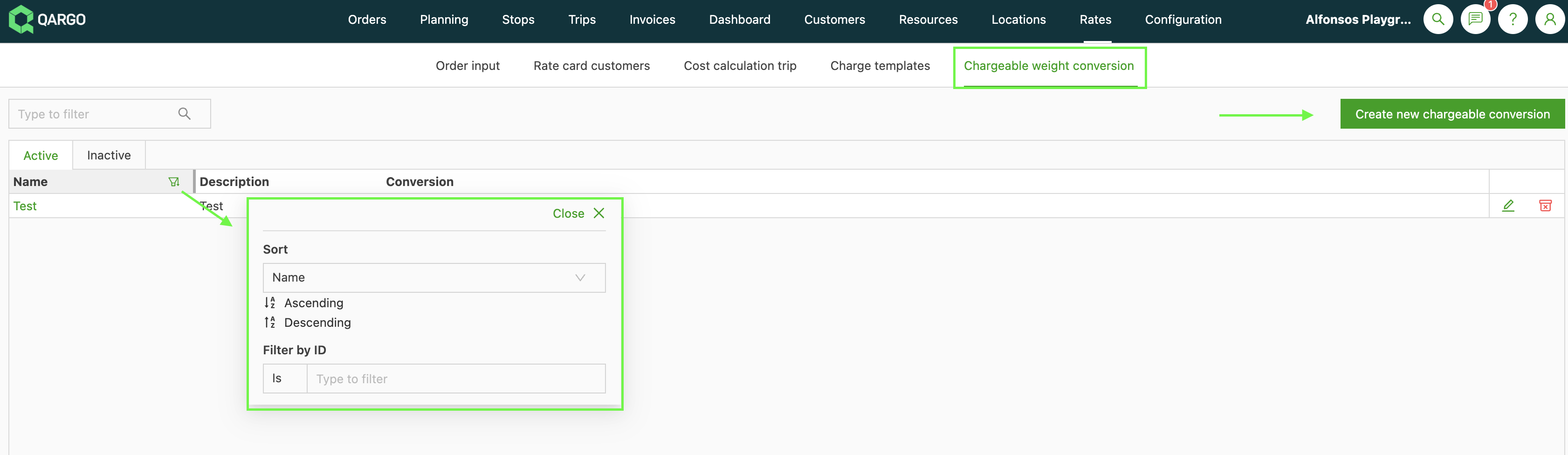
Navigate to Rates and select the submenu ‘Chargeable weight conversion’. The default view lists all active conversion tables. There are also tabs for Inactive and All. To view all tables (both active and inactive), it is possible to filter on the Name and Description column headers. To begin setting up a new table, click ‘Create new chargeable conversion’.
The Chargeable weight conversion screen opens. Give the table a name (mandatory). A description is also helpful, especially if there are multiple tables. Select the metric from the dropdown menu, and enter the conversion factor in the next field. Options include:
-
Loading meters
-
Packaging type*
-
Predefined packaging size*
-
Volume
*The selection pulls from the options set up in the Order input configuration.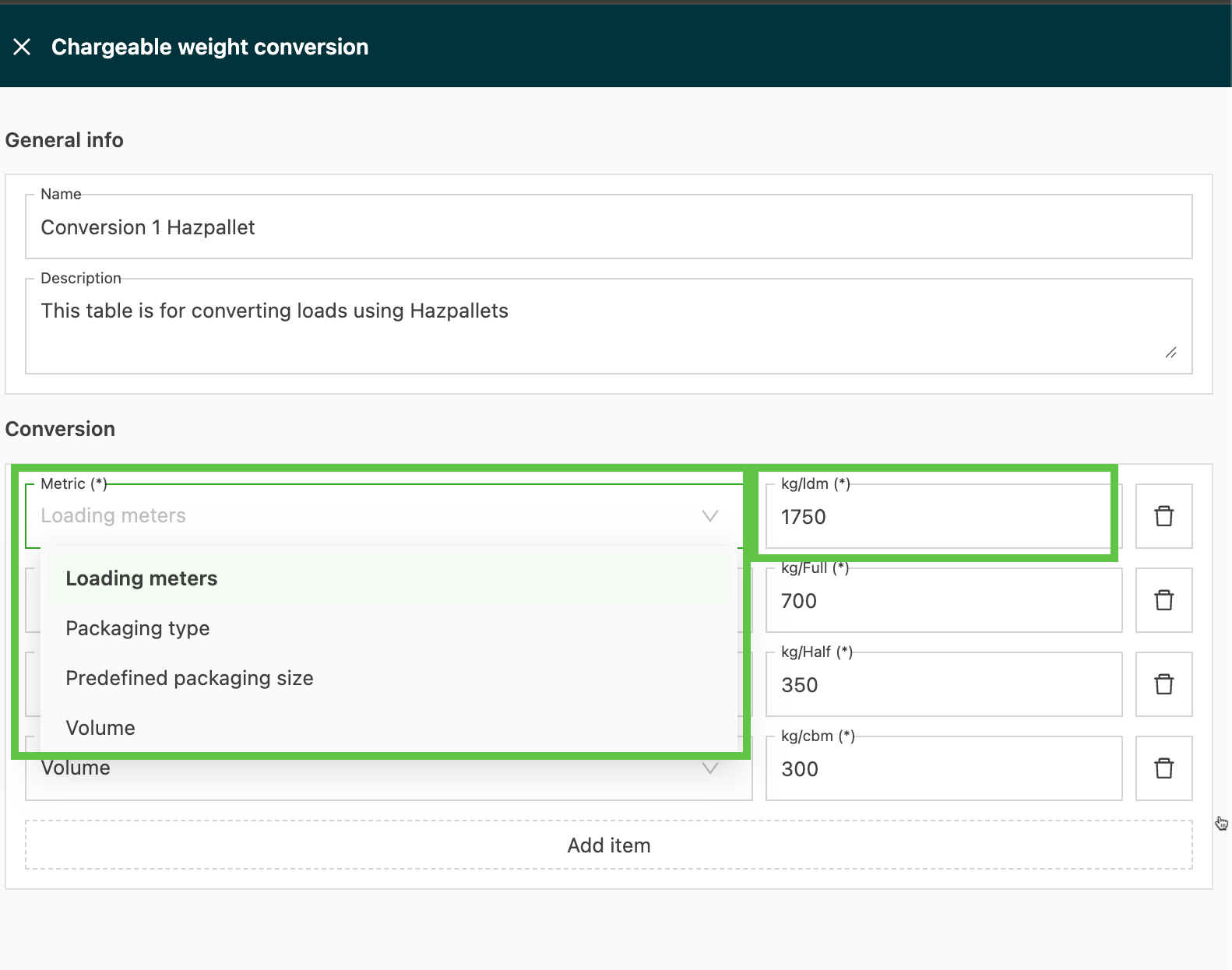
-
Use ‘Add item’ to add more options to the table. Click Save once all required options are added.
The new table is added to the list of active tables and can be selected for use in the rate card.

Create a customer rate card using the chargeable metric table:
\
Create a cost rate card using the chargeable metric table: {#h_ff750862cb}
To add a chargeable weight conversion calculation to a cost rate card:
1. Navigate to the Rates module. Click the Cost calculation load tab and select the relevant cost rate card for the chargeable metric table addition
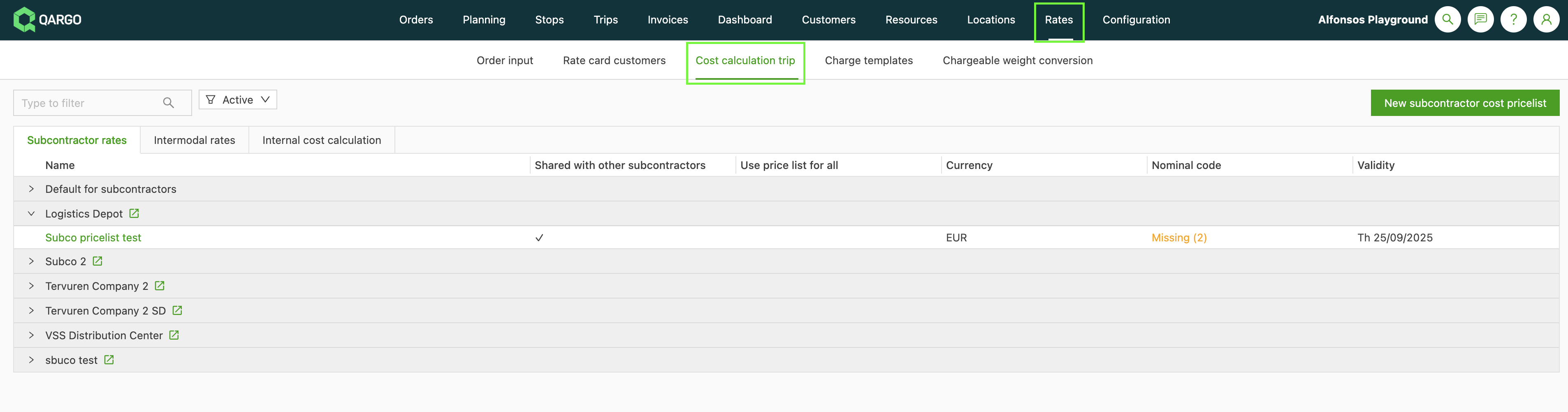
2. From the selected rate, go to the Prices section and click the charge for the chargeable weight conversion calculation, or create a new charge.
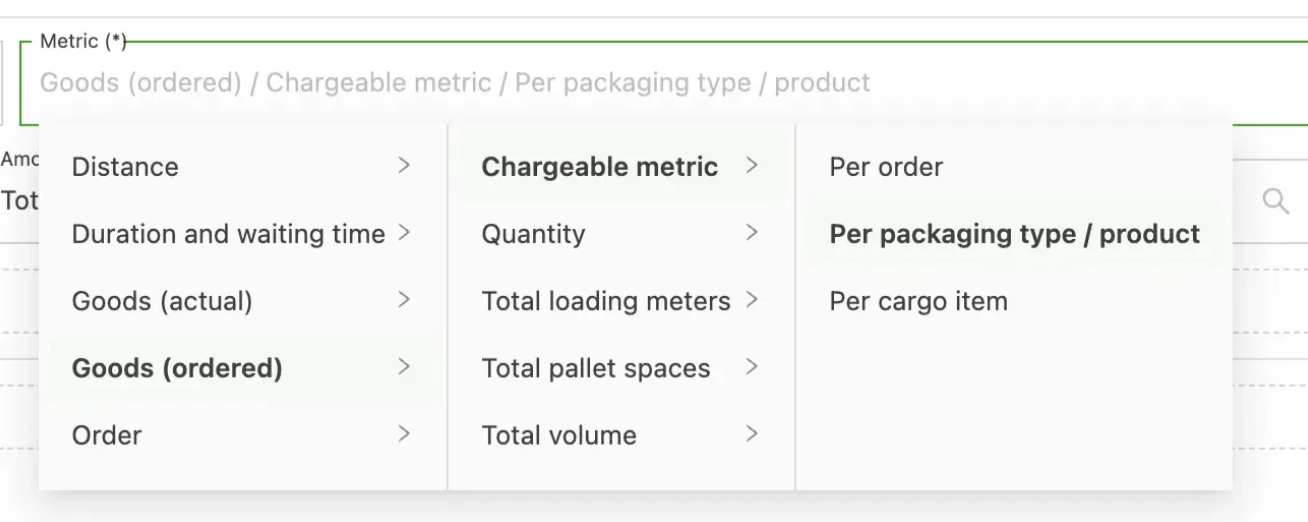
3. Choose a Cost calculation method (e.g., formula). Configure it to use the chargeable metric at the chosen scope (e.g., per packaging type/product), then pick the chargeable conversion table.
When conversions are applied
Conversions are applied when a rating rule says “charge by X” and X differs from the physical metric, or when a rule transforms the physical metric before rating. Common cases:
-
Volumetric/dimensional conversion
Converts volume or dimensions into a “volumetric weight” using a divisor (e.g., kg = (L×W×H)/6000 in cm). Chargeable metric = max(actual weight, volumetric weight), or “use volumetric weight” if configured that way. -
Pallet-to-weight conversion
Maps pallet size or type to an equivalent weight for rating. Chargeable weight = pallet_count × weight_per_pallet_or_size_table. -
Density-based conversion
Uses mass/volume thresholds to derive a billable weight or class. If the density is below the threshold, it converts to a higher billable weight. -
Unit normalization
Converts cases, items, or half-pallets into a standard rating unit according to the conversion table. Example: 2 half-pallets → 1 pallet. -
Minimums and thresholds
If the computed chargeable metric is below a minimum billable unit, it rounds up to the minimum. Example: minimum 1 pallet or 100 kg. -
Rounding rules
Rounds up to the next increment for rating. Example: 123 kg → 130 kg with 10 kg increments.