
Rates: consolidating fixed resource costs across multiple loads (what, why, and how)
Spread a fixed daily or weekly resource cost evenly across all loads that share the same resource, instead of charging it in full to every load.
Table of contents
Summary
-
What is it?
- A new Consolidation: split fixed cost over loads setting on cost rate cards (internal and contract carrier) under Rates > Contract carrier costs. It mirrors the existing Consolidated rating on the sales side.
- The fixed day or week rate is split equally across the loads in a group.
-
Why use it?
- Fixed daily and weekly resource costs (driver, vehicle, trailer) were applied in full to every load. A resource running several loads in a day had its cost counted multiple times, which made profitability reporting unreliable.
-
How does it work?
- Loads are grouped by the same resource and the same day or week.
- The matched fixed rate is divided across the loads in the group, and the split amount is shown in the Resource costs section on each load.
Prerequisites
- Super admin access to enable the Consolidation: split fixed cost over loads option and pick the grouping criterion on the relevant cost rate card under Rates > Internal costs (or Rates > Contract carrier costs). See Cost calculation load for how cost rate cards are set up.
Use cases
- A driver on a fixed daily rate who runs several loads in one day, where the full day rate should be shared across those loads rather than charged to each one.
- Spreading a fixed weekly resource cost across all loads run by that resource in the same calendar week.
Terminology
| Term | Definition |
|---|---|
| Consolidation: split fixed cost over loads | The cost rate card setting that spreads a fixed resource cost across grouped loads. |
| Grouping criterion | The rule used to group loads: same start date, same end date, same start week, or same end week. |
| Fixed rate | A fixed daily or weekly amount on a cost rate card, as opposed to a metric or formula-based rate. |
| Resource costs | The section on a load that displays the cost allocated to that load, including the split amount. |
Configuring cost consolidation
- Navigate to Rates > Internal costs (or Rates > Contract carrier costs) and open the relevant cost rate card.
- Open the Consolidation: split fixed cost over loads dropdown and select a consolidation mode (the default is No consolidation).
- Select a grouping criterion: same start date, same end date, same start week, or same end week.
- Select Recalculate on each affected load to apply the split (the split is not applied automatically).
- Verify the split amount in the Resource costs section on each affected load.
Conditions are supported (for example, a different fixed rate per resource group), and the matched fixed rate is divided across the loads in the group.
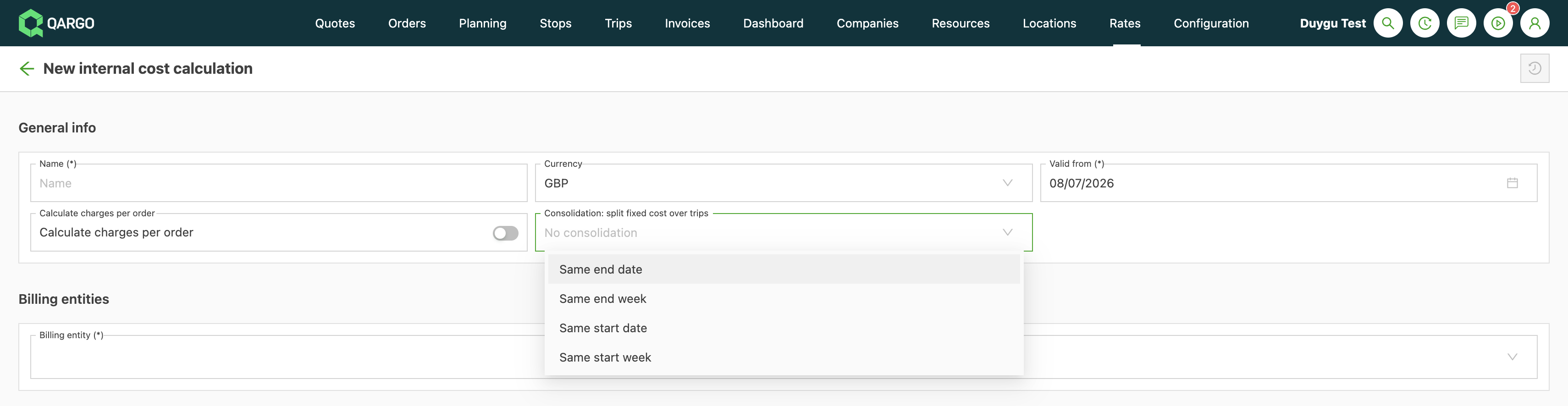
Worked example
A driver costs 475 EUR per day and runs 3 loads on Monday. Without consolidation, each load is charged the full 475 EUR, so the day reports 1,425 EUR, almost three times the real cost. With consolidation set to same start date, the 475 EUR is split equally across the 3 loads. Each load is charged 158.33 EUR, and the day correctly totals 475 EUR.
Troubleshooting
| Issue | Cause / resolution |
|---|---|
| A per-km or formula-based cost is not split. | Only fixed amounts are consolidated. Metric or formula-based rates are not split across loads. |
| Night-shift loads crossing midnight are not grouped as expected. | Grouping uses whole calendar days. Loads are grouped by their start date or end date; there is no time-range option. |
| Week grouping does not match the operational week. | Week grouping uses the calendar week. A configurable working-week length (5, 6, or 7 days) is not supported. |
Limitations
- Only fixed amounts are consolidated; metric or formula-based rates (for example, per km) are not split.
- The split is equal across loads, or fully assigned to the first load; there is no weighted split by distance, time, or freight.
- Duration-based cost (start of the first load to end of the last load) is not included and is deferred to v2.
- Week grouping uses the calendar week; a configurable working-week length is not supported.