
Rates: consolidated rating
Table of contents
Consolidated rating allows price lists to be configured with an option to group orders that match set consolidation criteria. Grouping these orders allows for more favorable rating and automatically applies the enhanced rate.
Configuration
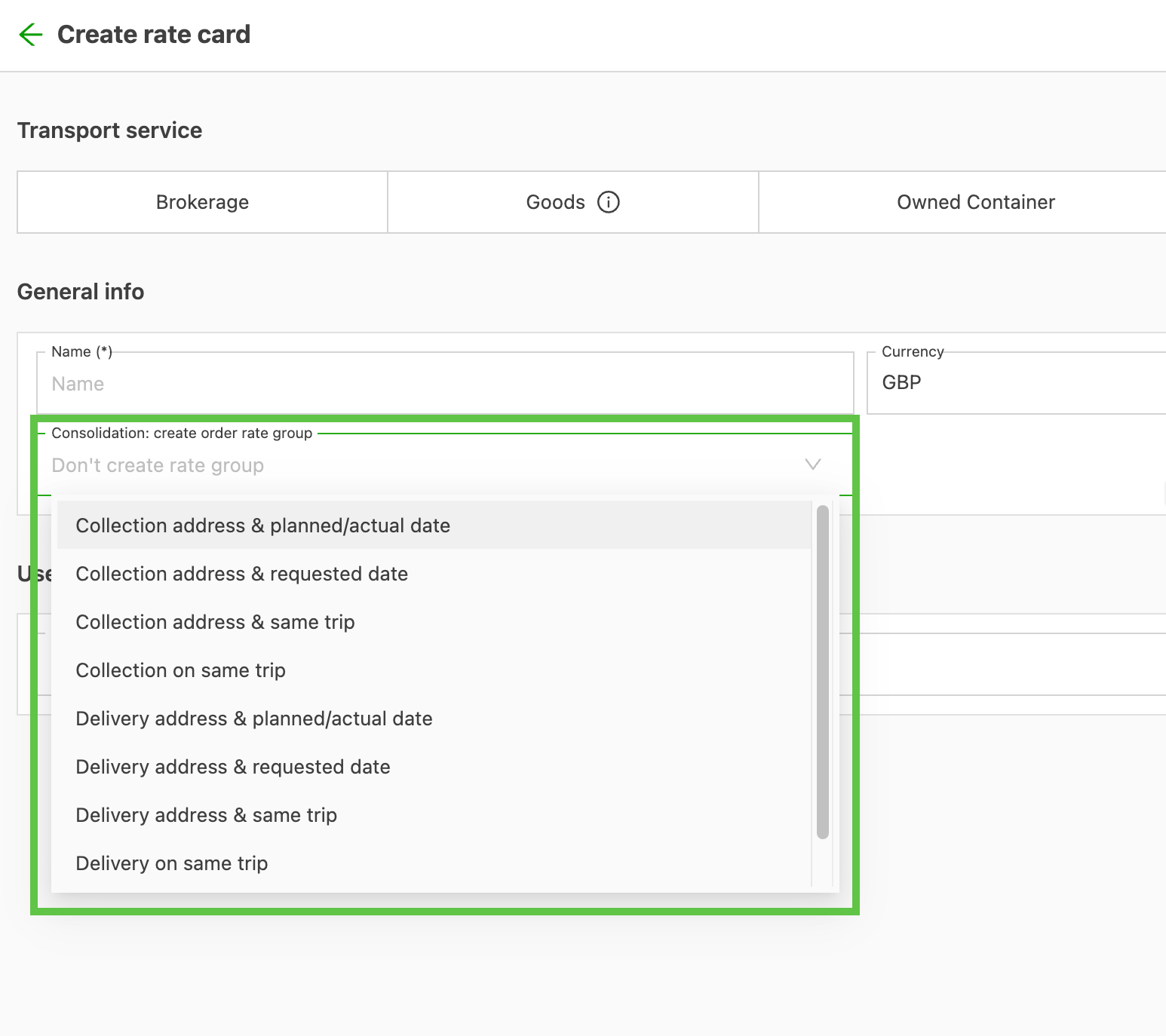
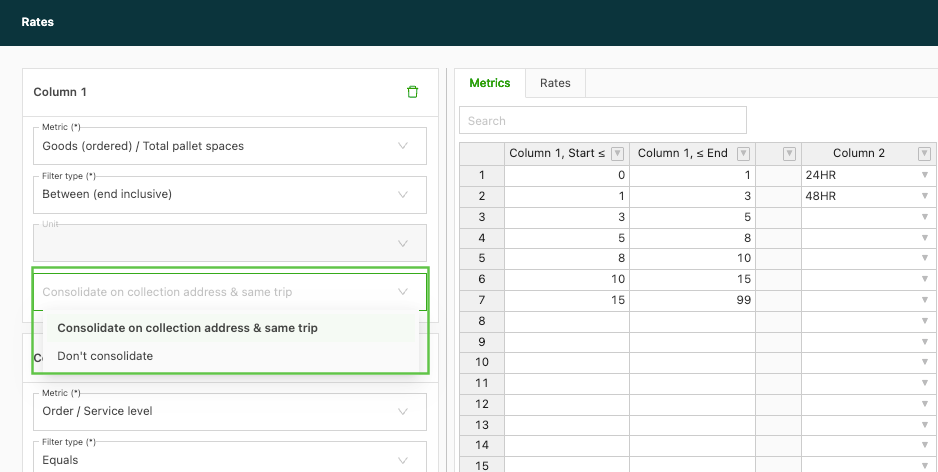
When creating a new rate card, the user can specify which consolidation method to use.
When adding charges, under certain conditions, the consolidated metric can be selected within rate tables
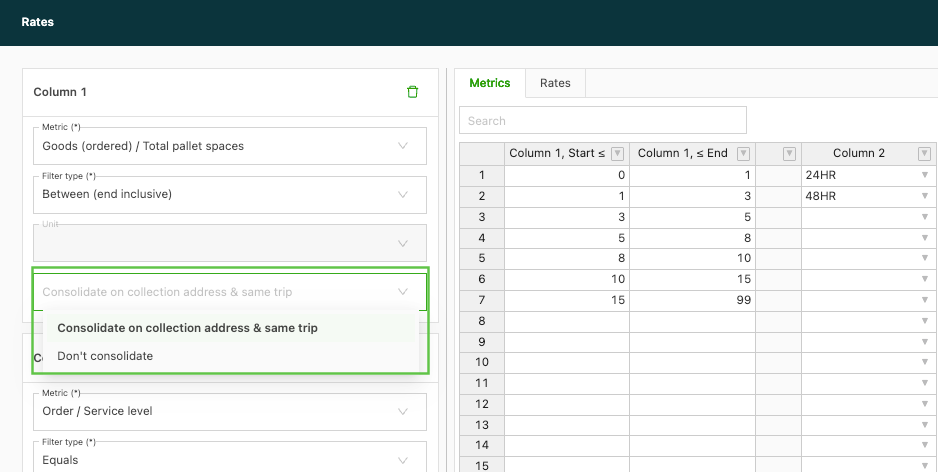
Selecting the consolidated version of the metric is only supported if all of the following conditions are met:
- The rate card has a consolidation method selected
- It’s within a rate table that is evaluated as Fixed amount or as Per metric per order
- The selected metric in the column of the rate table is a Goods metric
Consolidation by load
2 options for consolidating by load:
- Pickup address / Delivery address & same load: Requires orders to share the same location
- Pickup / Delivery on same load: Same load, even with different locations, as long as they share the same pickup or delivery load.
What the user actually selects
Because an order can be linked to multiple loads, “Load” alone is not specific enough; a second selector tells the system which load relationship to use:
- Same pickup load: consolidate orders whose pickups are planned on the same load.
- Same delivery load: consolidate orders whose deliveries are planned on the same load.
This also covers direct stage loads that contain multiple orders.
What happens after selecting it
When one of those options is chosen, the system will:
-
Find all orders that match the chosen load rule (same pickup load or same delivery load).
-
Create one “order rate group” for those orders for rate calculation.
-
Allow setting one price for the group, which is then used to consolidate / distribute the charge across the grouped orders.
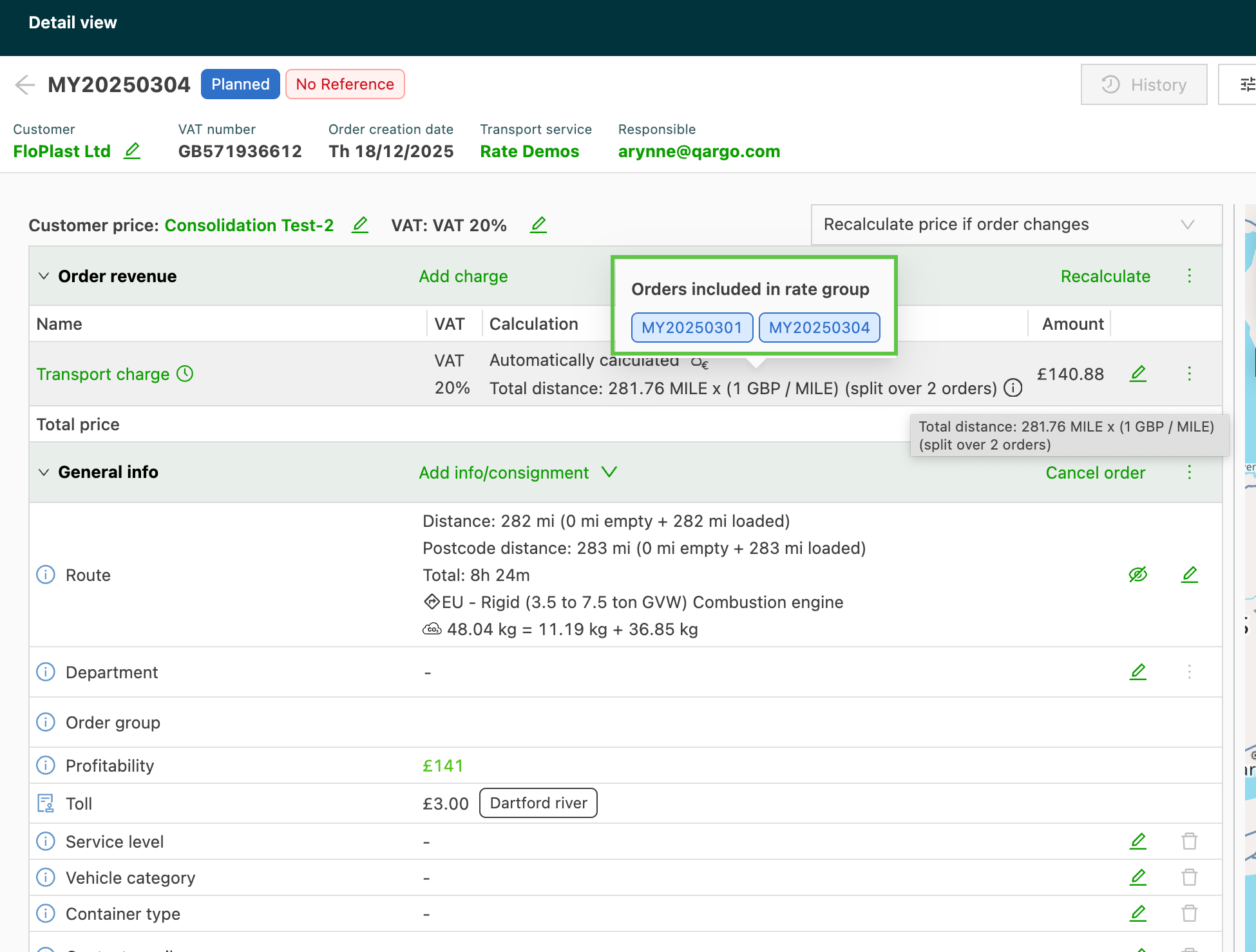
Consolidation of charges for order groups
Consolidation of charges is supported for two main types of calculation methods:
1. Fixed calculation methods: For charges with a set, fixed amount.
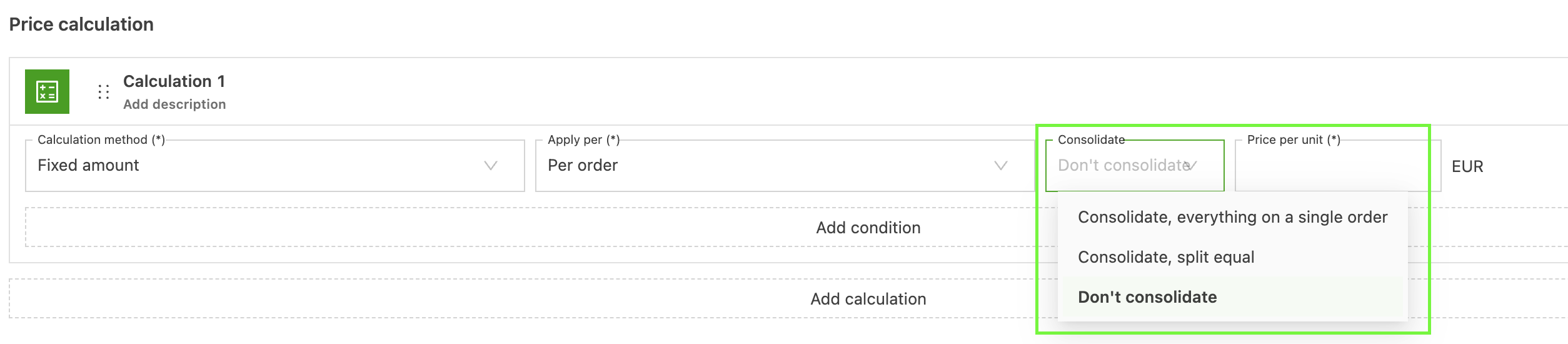
When a fixed amount price calculation is used, Qargo offers flexible distribution: the total fixed charge can be split equally across all linked orders, or the entire amount can be assigned to a single order within the group.
2. Metric-based calculation methods: For methods using a formula or a rate table that is calculated based on a specific metric (e.g., distance, time) measured per order or per stop.
Metric per stop
When using a metric per stop, it is only possible to choose between:
- Consolidate: the total price of all orders will be added to each order
- Don’t consolidate

Metric per order
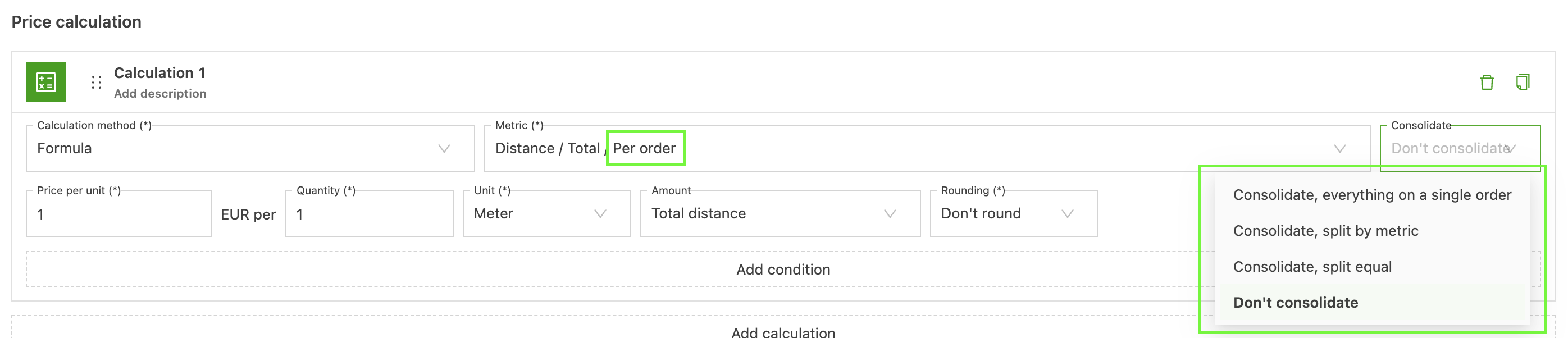
When using a metric per order, it is possible to choose between:
- Consolidate, everything on a single order: the total price of all orders in the order group will be added to only one order.
- Consolidate, split by metric: the total price of all orders in the order group will be divided among all orders based on the metric. I.e., if the metric total distance per order is used, the total price will be divided based on the total distance of each order.
- Consolidate, split equal: the total price of all orders in the order group will be divided equally among all orders in the order group.
- Don’t consolidate
How does consolidation work?
Once an order is assigned to a load, Qargo looks for other orders that match the consolidation method selected on the order’s rate card. The customer and rate card of the orders also need to be the same. These orders are then grouped together in order to access the grouped goods metrics in the rate tables.
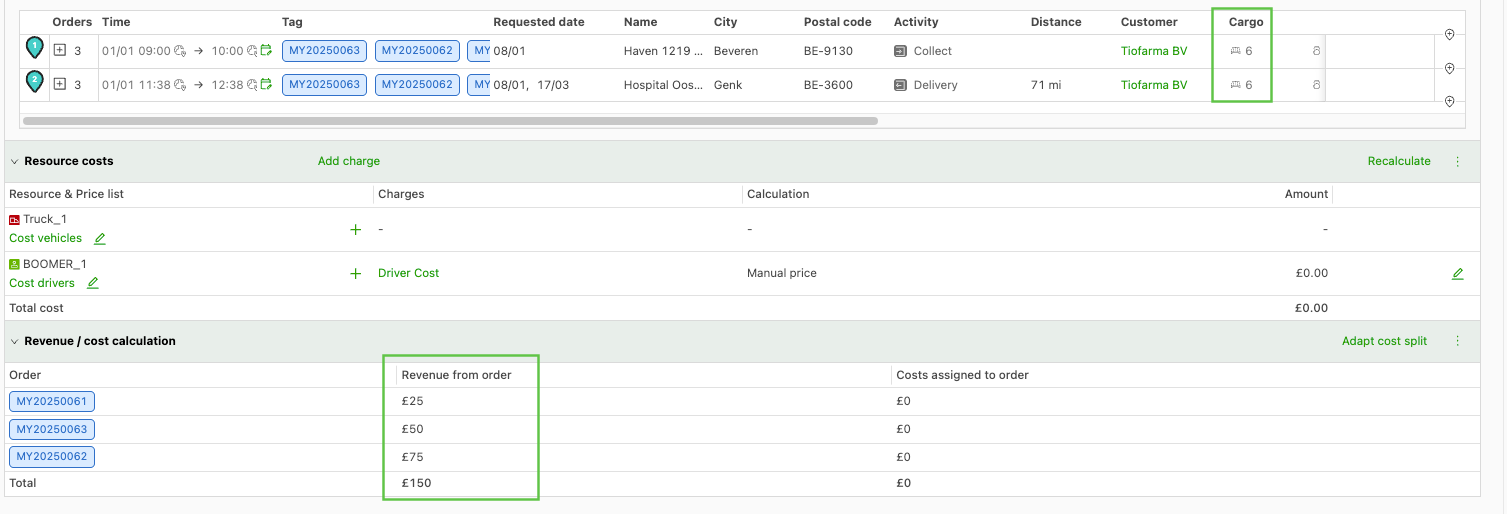
In the examples below, there are 3 orders that match the consolidation criteria, in this case Same pickup address & same load (in addition to the same rate card and customer). This matches the consolidation method on the rate card of those orders, so they are grouped together.
Fixed amount rate table result
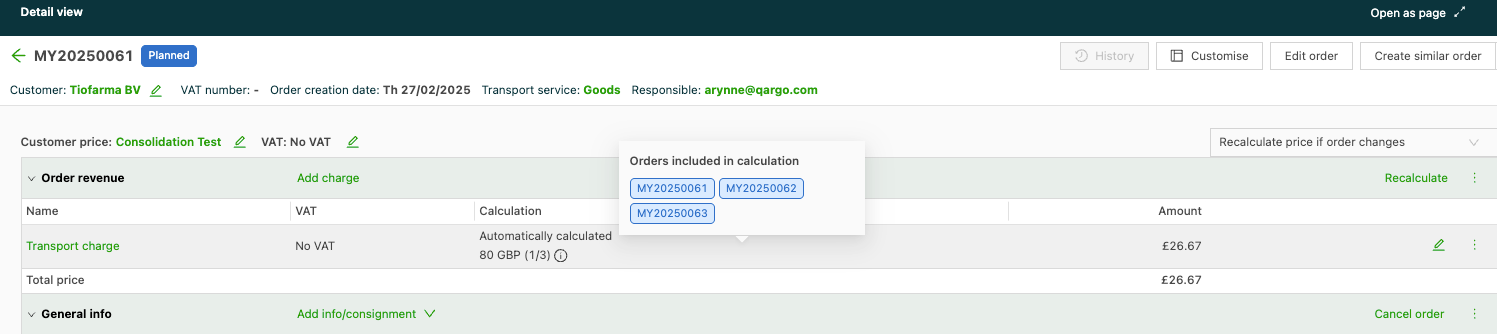
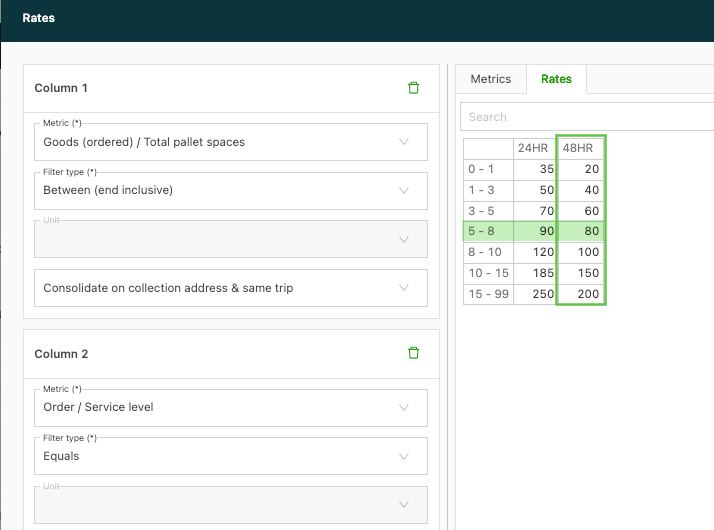
The transport charge uses a fixed amount rate table and uses the consolidated quantity of the goods to select the price from the table. The result of the table is 80 GBP, but since it’s a fixed amount, this amount is distributed equally across the orders in the group.
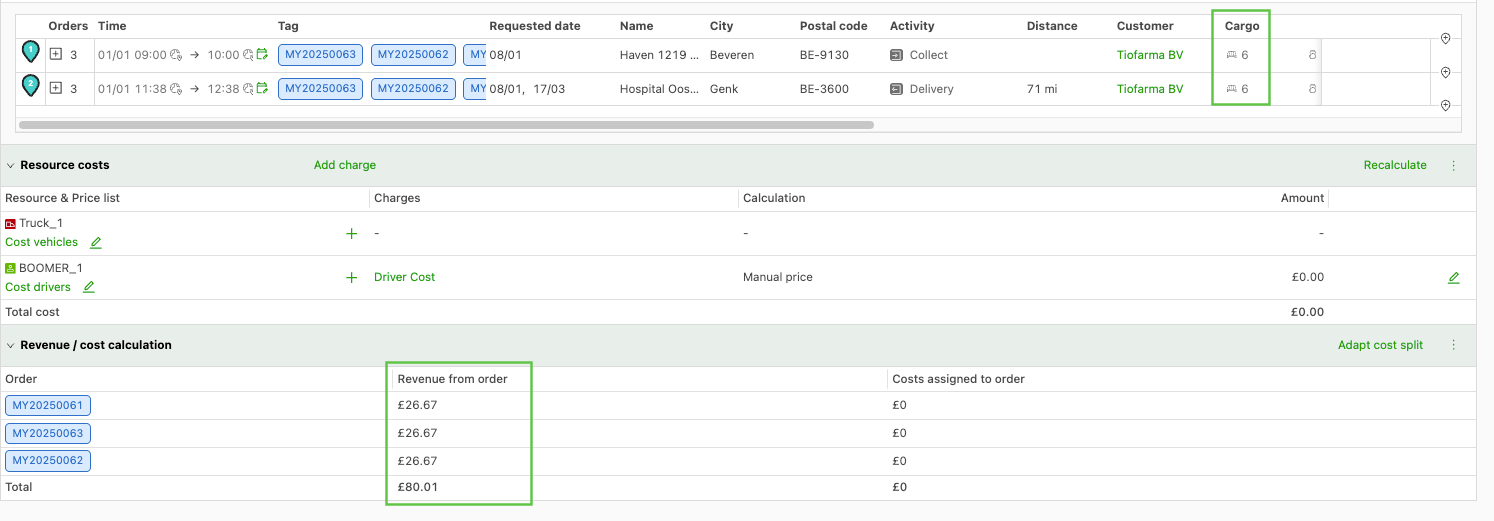
Multiplied by a metric per order result

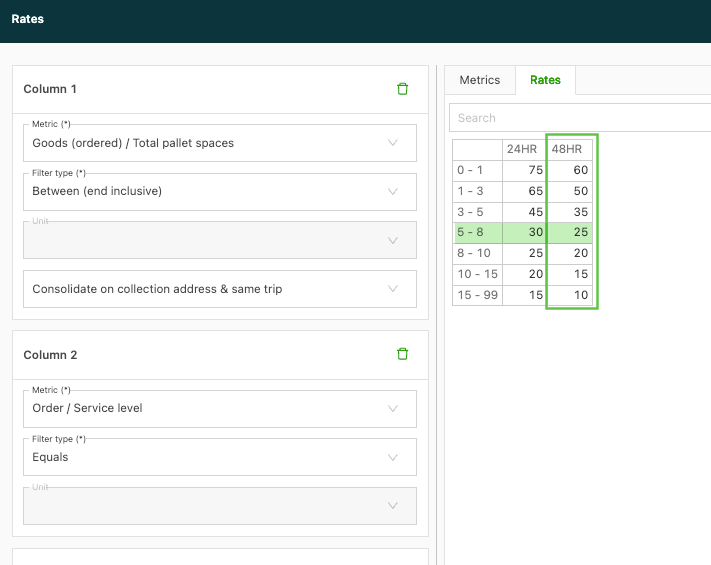
When a rate table is used where the result is multiplied by a metric of the order (in this case, ordered quantity), the quantities of goods are combined and this value is used to select the appropriate rate in the rate table. This form of consolidation allows all orders to benefit from the volume discount. In this rating model, each order is rated separately using the adjusted rate.
👇 Important information
The consolidated price can be outdated
For performance reasons, Qargo does not recalculate the rating of all orders within one consolidation group if one of the orders in the group is adjusted.
Right before billing, Qargo recalculates the orders with the ‘Ready to bill’ task, so it can be used as a synchronization point for the orders within a group.
The consolidation method on the rate card cannot be adjusted after creation
Consolidation is only available for fixed amount rate tables and for multiplied-by-metric rate tables per order
It is not available for conditions.
It is not available for formulas.
It is not available for rate tables where the result is evaluated per stop, per good or per country.
Consolidation assumes the orders are billed on the same invoice at the same time
Since charges can become locked once billing starts, all consolidated orders should be billed at the same time to avoid issues. Orders on an invoice are still taken into account for consolidation.
A charge might not be present on all consolidated orders if it needs to be added manually
Avoid adding charges manually where possible, since consolidation does not take into account whether the charge is on the order when adding it to the consolidation group.
For example:
- Order A: has transport charge + surcharge X
- Order B: has transport charge + surcharge X
- Order C: has transport charge
According to their price list consolidation method, all orders are within the same group. The transport charge will use the consolidated metrics of the entire group. But surcharge X will also use the consolidated metrics of the entire group
Consolidation is only available on the main shipment pickup/delivery stops
So it is not possible on the pickup/drop/hook stops for empty containers/trailers
Consolidation is currently not compatible with payant pour/pour en pay configuration
Payant pour/pour en pay cannot be combined with order consolidation.
Multi-shipment order consolidation might lead to undesired results
The pickup/delivery address used for grouping orders is the first pickup/last delivery of the order.
With multiple shipments, it becomes ambiguous which consolidation group the order belongs to. It is therefore advised to have 1 shipment = 1 order.