
Feature release December 2025
This article highlights the new features and enhancements released by Qargo this month.
Week 1
Accounting API – Multi-entity billing support
Planning – Route calculations: Load durations with working hours
Planning – Route display control in Timeline & Block views
Rate cards – Flexible cost allocation
Week 2
Planning – Conditional cell highlights
Planning – Add activities in bulk
Planning – Enhanced resource details for faster planning
Planning – Filter on trailers/containers
AI document scanning – Improved company name matching
Week 3
Pallet network – Hazchem delivery image visibility
Rates – ZIP code-based route charge calculation
Rates – Consolidate by same pickup/delivery on the same load
Week 1

🔒 Accounting API – Multi-entity billing support
This feature introduces crucial support for multiple billing entities within the Accounting API. Organizations can now maintain secure, segregated invoice management across different entities.
What’s new
Previously, API access was global. This was unsuitable for organizations managing finances for several distinct entities.
- Dedicated billing entity field: Billing endpoints now include a
billing_entitysection, clearly linking each invoice to its rightful entity.
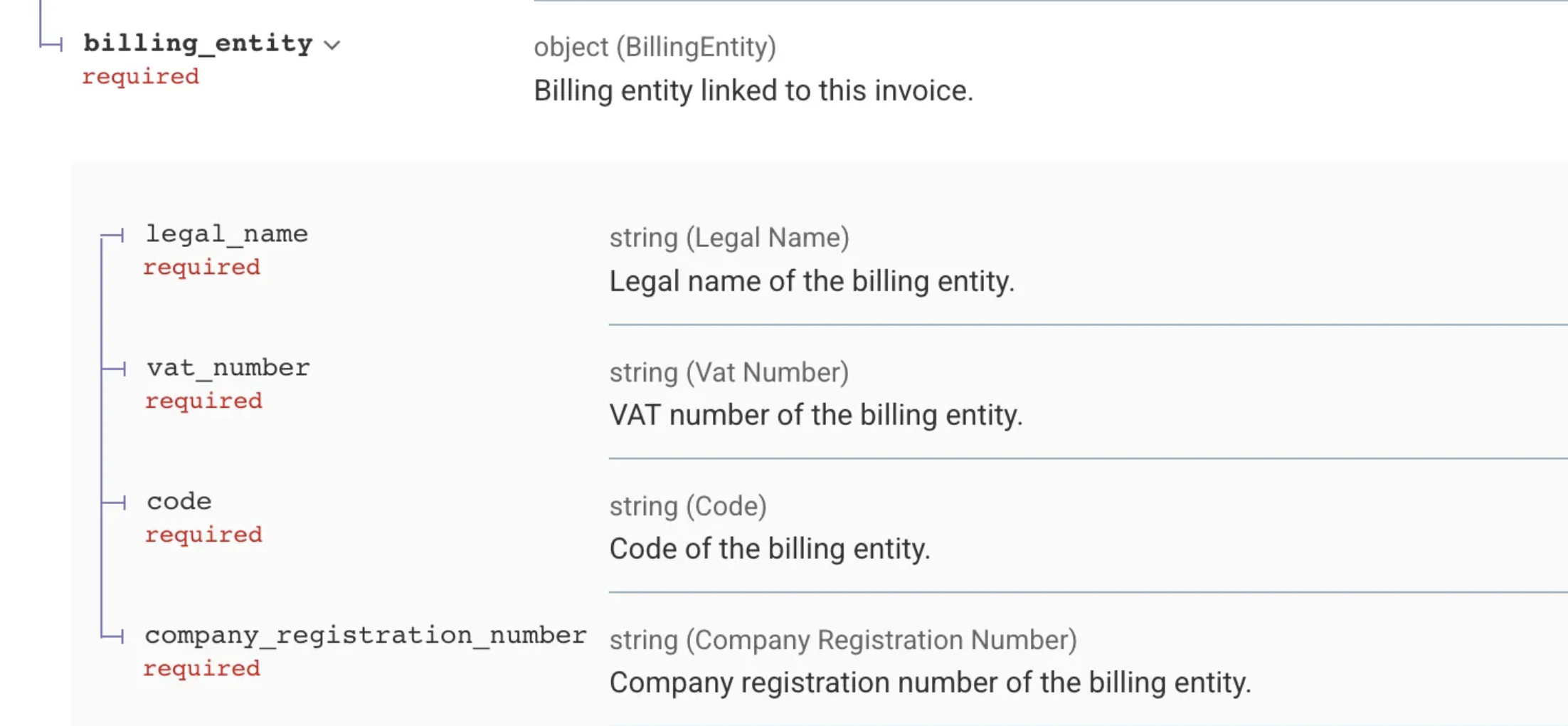
- Segregated integrations: Multiple Accounting API integrations can now be created and managed, each tied to a specific billing entity.
- Restricted posting access: External integrators can now only complete/post invoices that belong to the billing entity associated with their API credentials, enhancing data security.
- New credential requirement: To post invoices, API clients must be created on the Accounting API integration settings page to ensure they are linked to the correct billing entity.
Limitations
- Viewing only: Users can still see (but not post) invoices not related to their billing entity, subject to existing viewing permissions.
- Onboarding configuration: Integrators must use the new dedicated settings page for credentials if they need to complete/post invoices. Credentials from Organization settings are restricted to viewing.
🚚 Planning – Route calculations: Load durations with working hours
Route calculation previously provided only theoretical driving time, resulting in inaccurate load durations. This new feature incorporates mandatory rest and break times for highly accurate scheduling.
What’s new
- Working hours presets: A predefined Working hours mode preset can be selected in Organization settings. This preset dictates parameters like break duration, maximum daily driving time and daily rest time, aligning with regulatory profiles.
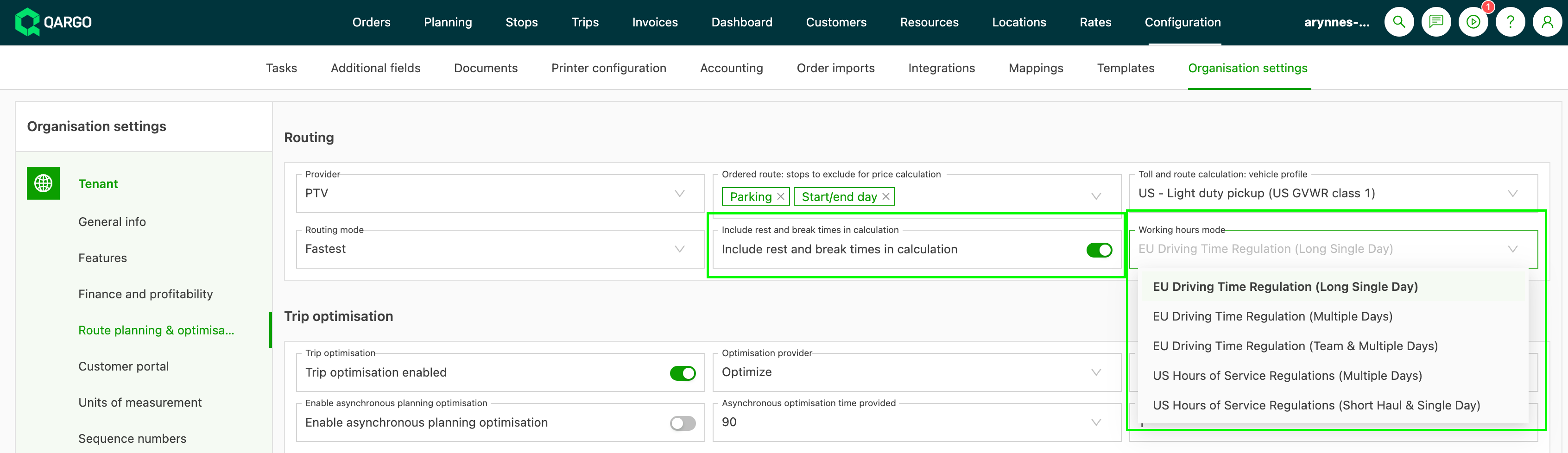
- Accurate calculation: The system automatically factors the mandated rest times into the route, ensuring the total duration is realistic.
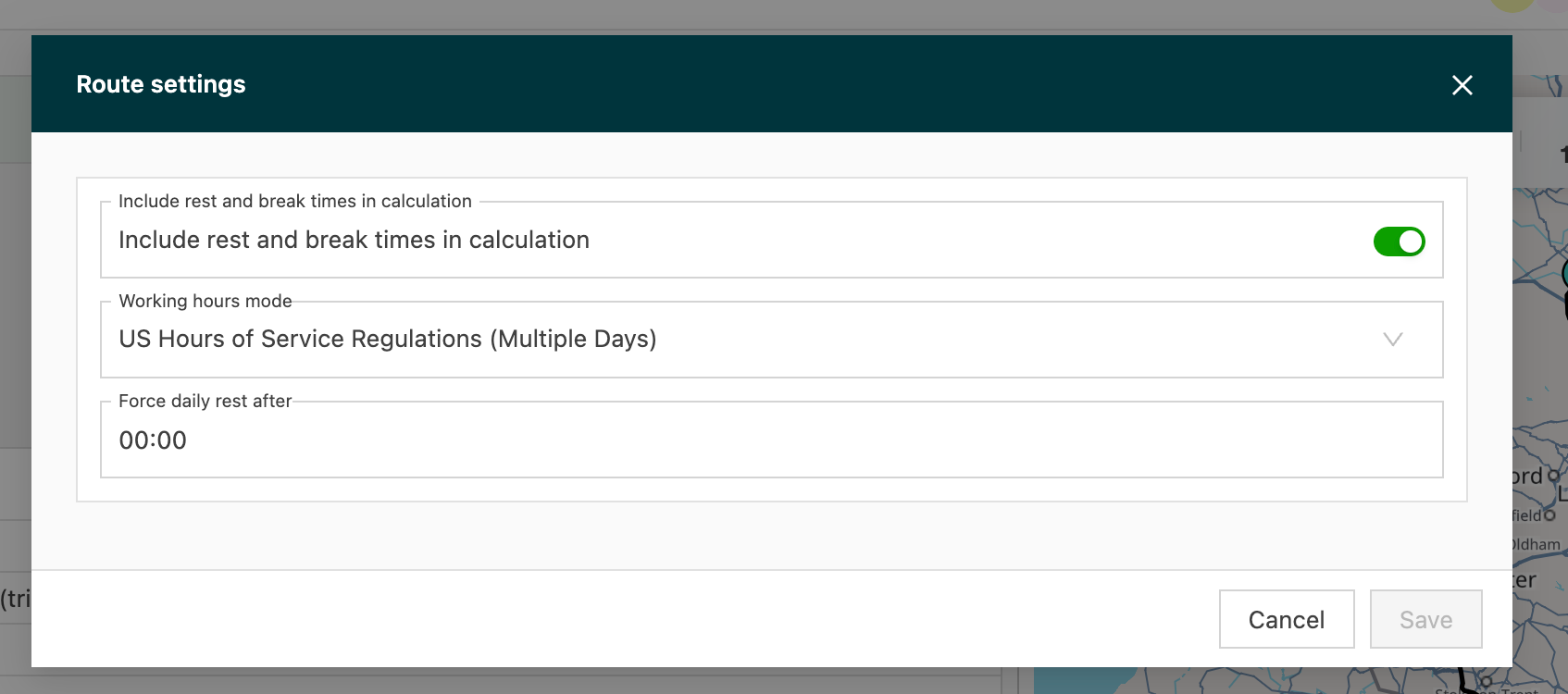
- Load customization: In the ‘General info’ panel, the load’s Route settings allow overriding the organization preset, toggling rest time inclusion and forcing daily rest after a specific time
Why this helps
- Improved accuracy: Realistic ETAs and total load durations, by including all necessary driver downtime.
- Compliance: Routes meet legal driving and rest requirements based on the selected professional profile.
Limitations
- Accuracy relies on selecting the correct Working hours mode preset for the driver.
- The system calculates mandated rest; it does not account for non-mandatory delays.
🔎 Planning – Route display control in Timeline & Block views
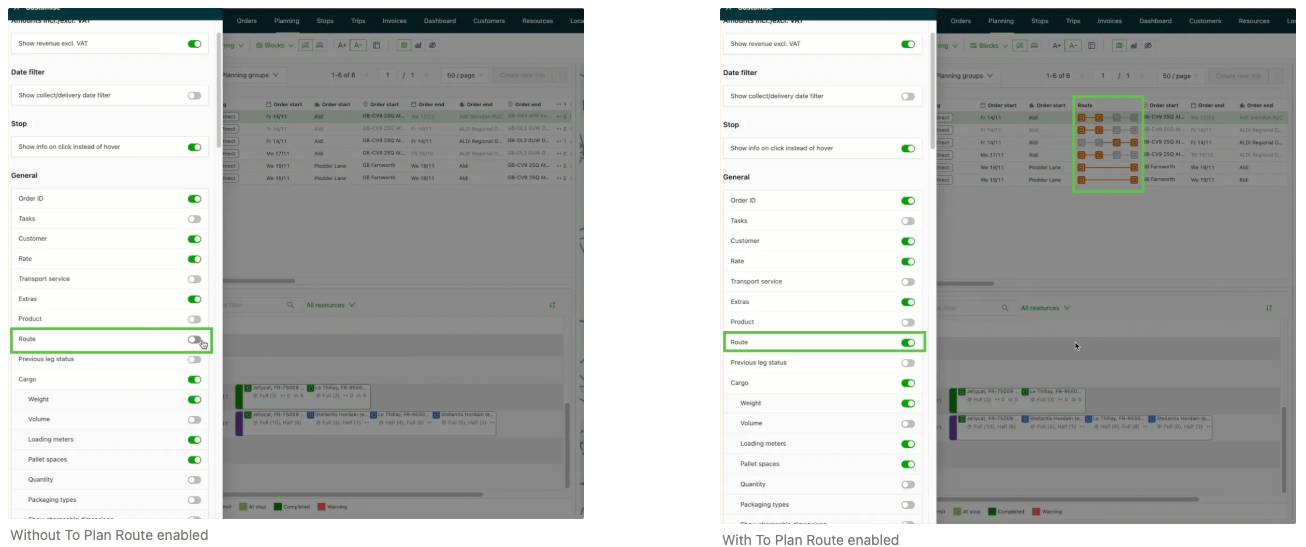
Using the Customize button, planners can now decide whether the Route element appears in load summary details. Toggle to hide the Route section in:
- Timeline view
- Block view
This allows planners to simplify the load card and prioritize other load data.
Available on both A+ and A- layouts.
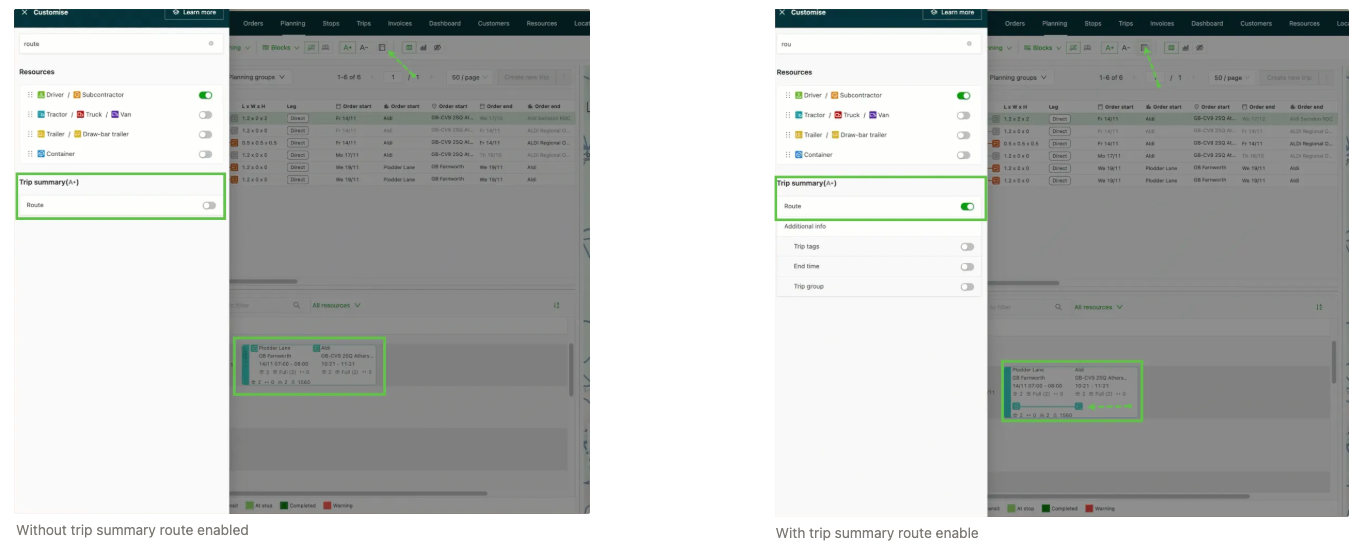
Also available in the To plan panel
The same option is now available when viewing orders in To plan.
Removing the route from the order card gives extra space to display other key information. This is especially useful when working with limited screen space or when route information is not needed during planning.
Why this helps
- Reduces visual noise on the planning board
- Maximizes usable space on smaller screens or multi-panel setups
- Allows planners to tailor the interface to their workflow
- Ensures only the most relevant data is shown when making decisions
🏷️ Rate cards – Flexible cost allocation
This feature enhances cost price list flexibility by allowing individual charges within a per-order cost price list to be designated as either per-order or non-per-order. This enables mixed calculation methods within a single list.
What’s new
New functionality simplifies how complex cost agreements are structured:
- Individual charge allocation: When a cost price list uses the ‘Per order’ calculation option, internal settings for individual charges can now be modified.

- Mixed cost price lists: This enables the creation of a single cost price list that contains a mixture of per-order charges (e.g., volume-based) and non-per-order charges (e.g., flat fees).

- Granular control: Provides granular control over how each specific cost element is allocated and calculated, better aligning the digital structure with complex agreements.
Limitations
- Change restriction: The individual allocation setting (per-order vs. non-per-order) cannot be changed once the charge has been used in a calculated cost. If a change is required, a new charge must be created to replace the old one.
Week 2

Planning – Conditional cell highlights
Manually scanning hundreds of rows for critical information is no longer necessary. A powerful new feature instantly enhances the visual distinction in the To plan table, dramatically increasing planning speed and accuracy.
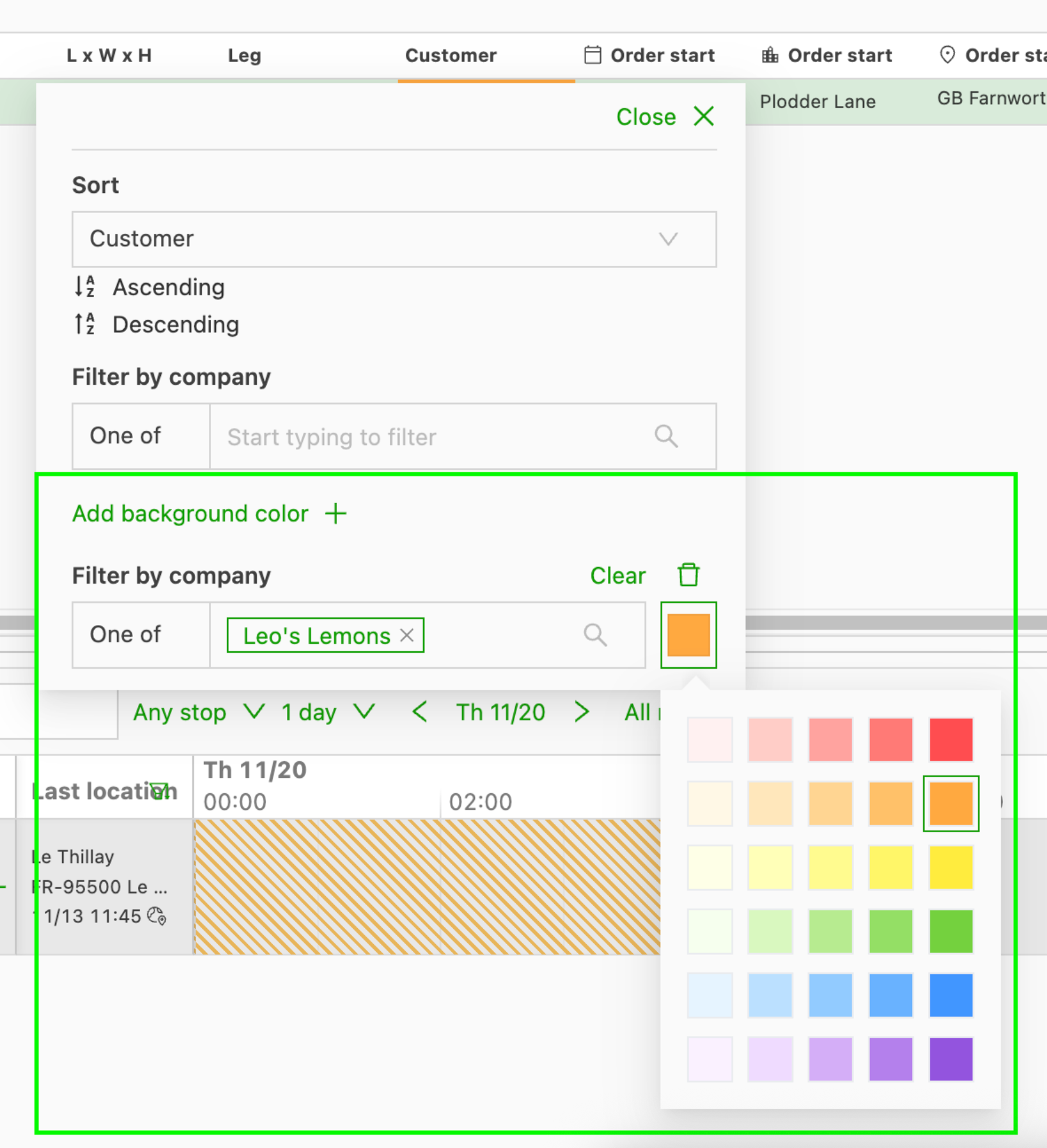
This update enables individual users to set custom background color rules for cells based on their specific values.
What’s new
-
User-level custom highlighting: A new “Highlight cells” section is available in the column configuration menu (the gear icon on the table). Rules set here apply only to the user’s personal view, so the screen is optimized for the user’s own priority planning workflow.
-
Conditional coloring logic: Rules can be set based on logical conditions (e.g., ‘is one of’, ‘is not one of’, numeric ranges) for a variety of supported columns.
-
Broad column support: Highlighting is initially available for key planning metrics, including:
- Time & location: Order/leg start/end time and location, ZIP code.
- Order attributes: Service level, planning group, customer, customer reference.
- Freight metrics: Weight, pallet spaces, volume and more.
Limitations
- Color precedence: If a cell meets the criteria for multiple color rules, only the first matching rule listed in the configuration menu is displayed. To change the displayed color, the order of the rules must be adjusted, or the desired rule deleted and re-added so it appears earlier in the list.
🚚 Planning – Add activities in bulk
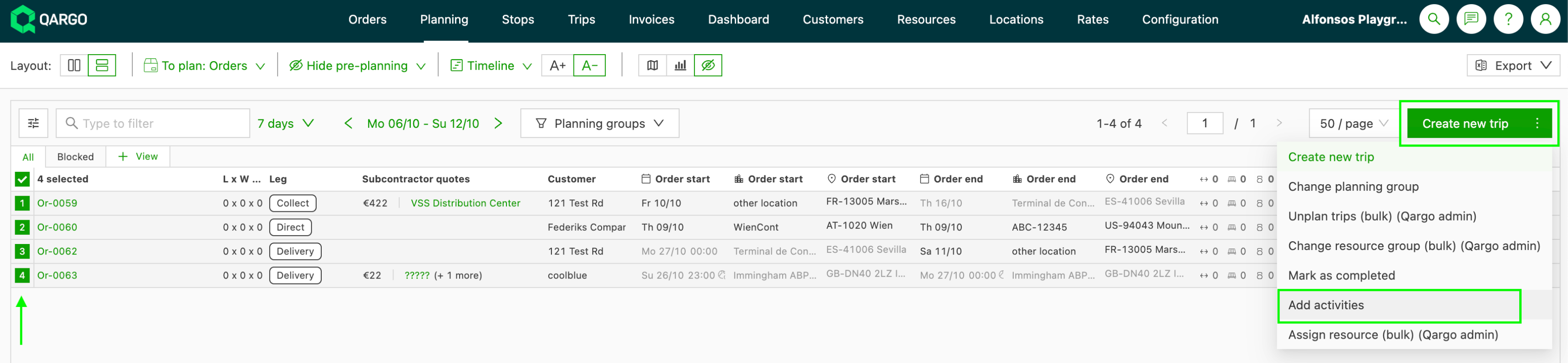
A significant enhancement to the planning workflow is now available. Common activities, such as terminal visits or intermodal stops, can now be added efficiently to multiple orders directly from the Planning > To plan table.
This feature matches the bulk activity capabilities previously only available in the Orders table, enabling planners to streamline scheduling and reduce manual effort.
What’s new
- Bulk activity addition in ‘To plan’: A batch of unassigned orders can now be selected in the Planning > To plan table and an activity applied to all of them at once.
- Multi-page selection: All matching orders across multiple pages can be selected for bulk operations, so large queues of orders can be processed quickly.
⚠️ Limitations
- Selection limit: A maximum of 100 rows can be selected at once for the bulk action.
- Visibility dependent: Functionality is limited to the orders visible in the To plan table based on the current filters and permissions.
🗺️ Planning – Enhanced resource details for faster planning
To boost planning efficiency, the resource information displayed directly on the planning board has been expanded. More comprehensive contact and location data for resources is now immediately accessible, without navigating away from the planning screen.
What’s new
- Home address added: The resource’s home address is now immediately visible alongside their name and phone number on the planning board.
- Improved readability: Each piece of information (name, phone number, home address) is now displayed on its own line, providing maximum clarity and ease of reading.
- Enhanced resource details: The overall information displayed for each resource has been expanded to support more comprehensive planning decisions.
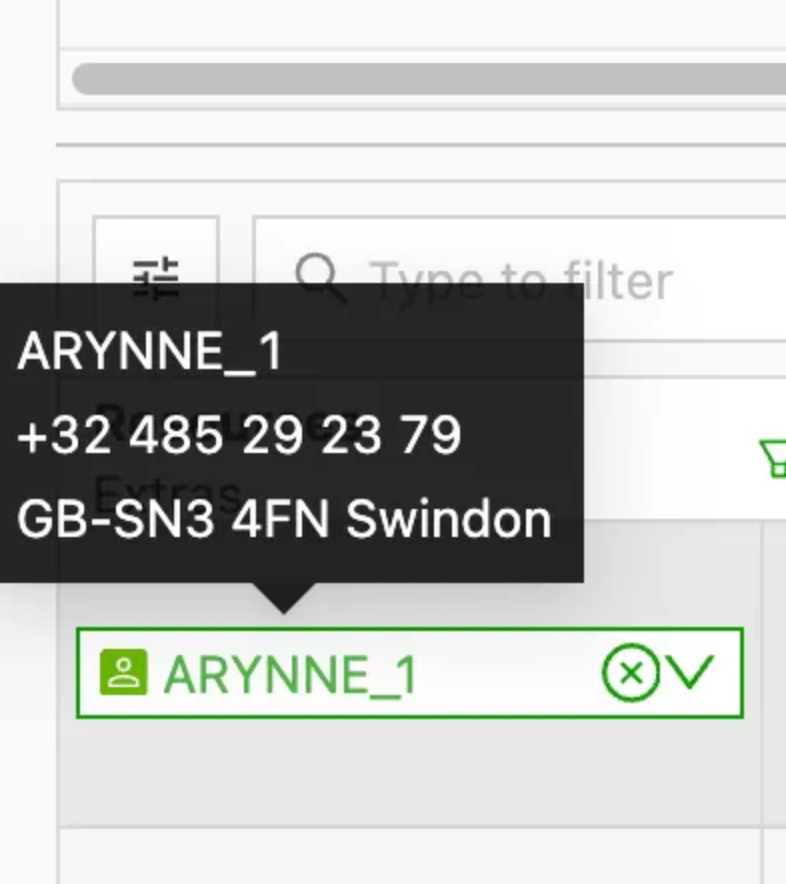
All key contact and location information is visible at a glance, improving efficiency and enabling faster, more direct communication with resources.
🚛 Planning – Filter on trailers/containers
Planners can now work even faster and with more clarity thanks to a new filter on the Trailers/Containers column in Planning > To plan: Orders. This brings the column in line with existing table filters, offering familiar multi-select and search-as-you-type behavior.
What’s new
- A dedicated column filter on Trailers/Containers
- Works consistently with all other table filters
- Quickly refines results without scrolling through long order lists
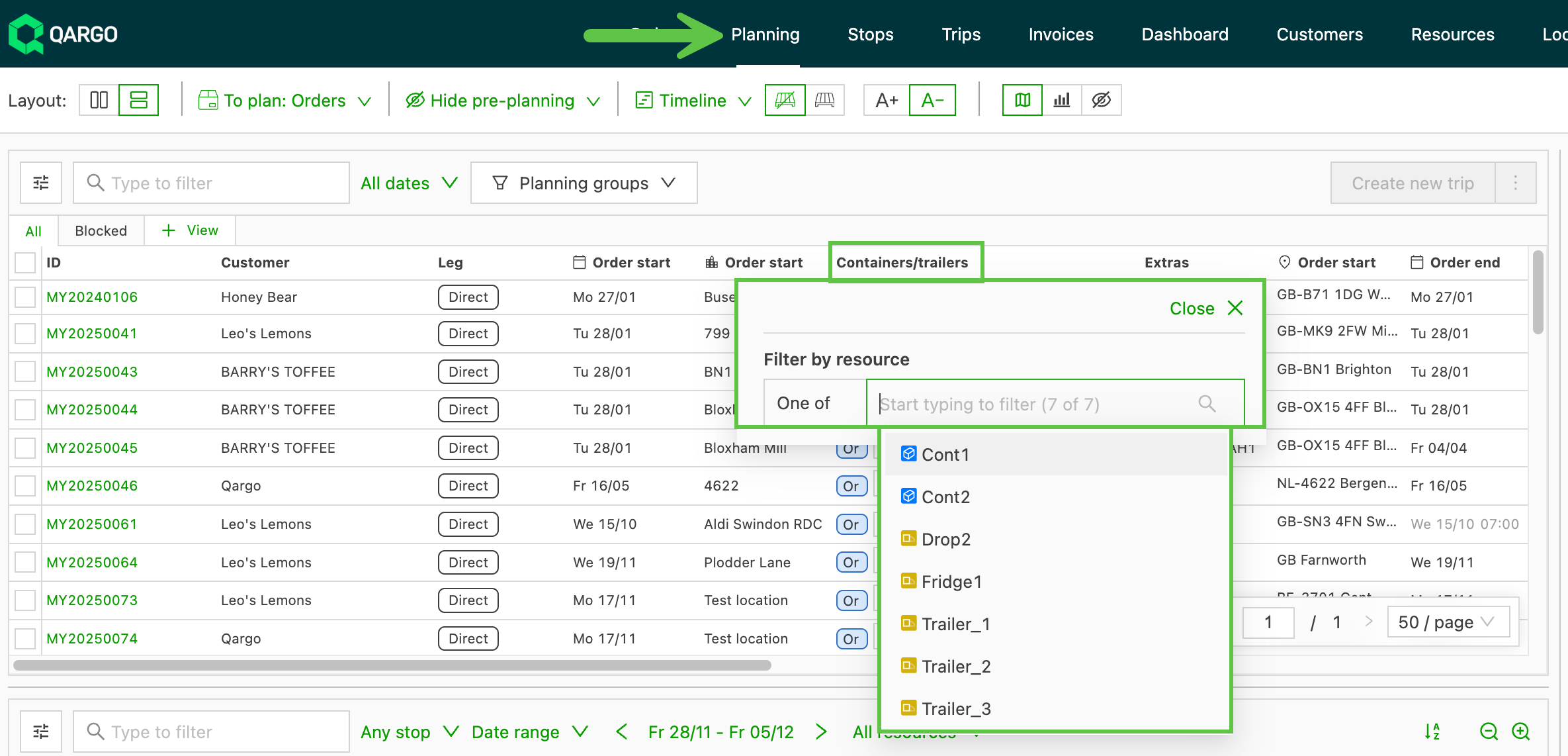
Planners can quickly focus on the right trailer or container type, speeding up equipment allocation and eliminating the need to manually scan long order lists.
🧰 To use this filter, Order secondary resources must be enabled in the organization settings (Qargo Admin).
🤖 AI document scanning – Improved company name matching
A powerful new feature significantly improves customer recognition and matching accuracy during document ingestion, especially when critical identification data is missing.
This update ensures that documents are reliably assigned to the correct customer, even when a tax number is absent.
What’s new
- AI-powered name matching: When the system scans a document and no tax number is present, it now uses advanced AI to detect and match the customer based on their name or legal name.
- Alias creation for consistency: After a successful new AI match, there is now an option to create an alias directly on the customer’s record. This ensures that any future documents containing that specific spelling or name variation automatically and consistently match the same customer.
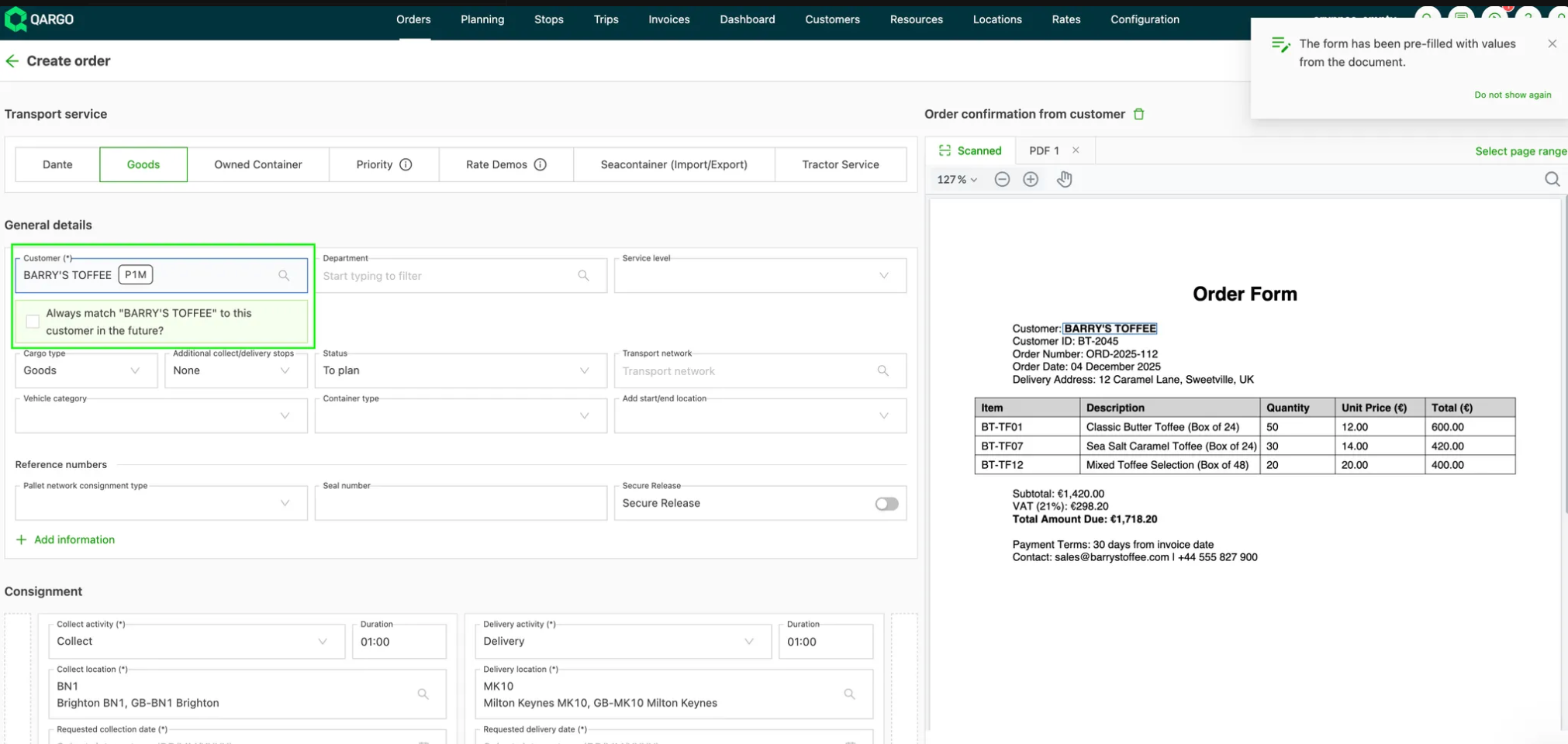
Accuracy improves as AI identifies customers that traditional matching misses, while less manual effort is spent correcting misassigned records.
Week 3

Pallet network – Hazchem delivery image visibility
To improve data exchange and give Hazchem greater visibility into shipment operations, delivery images and the Customer Owned Paperwork (COP) uploaded to a Hazchem shipment are automatically sent to Hazchem via their API.
Summary:
- Delivery image and COP uploads are now sent via the Hazchem API.
- POD uploads can also be sent via the API.
- Images are automatically compressed to meet Hazchem’s file-size requirements.
- Only the unsigned customer paperwork flow is supported.
- Only the requesting/pickup terminal can upload customer paperwork via the API.
This update streamlines Hazchem document uploads, reduces file handling errors and ensures compliance with file-size requirements.
Rates – ZIP code-based route charge calculation
Charges for order routes can now be calculated based on ZIP code location as an alternative to exact location routing.
- Ideal for container transportation to ports, where predictable rating for an entire port is preferred over variable charges from exact terminal locations.
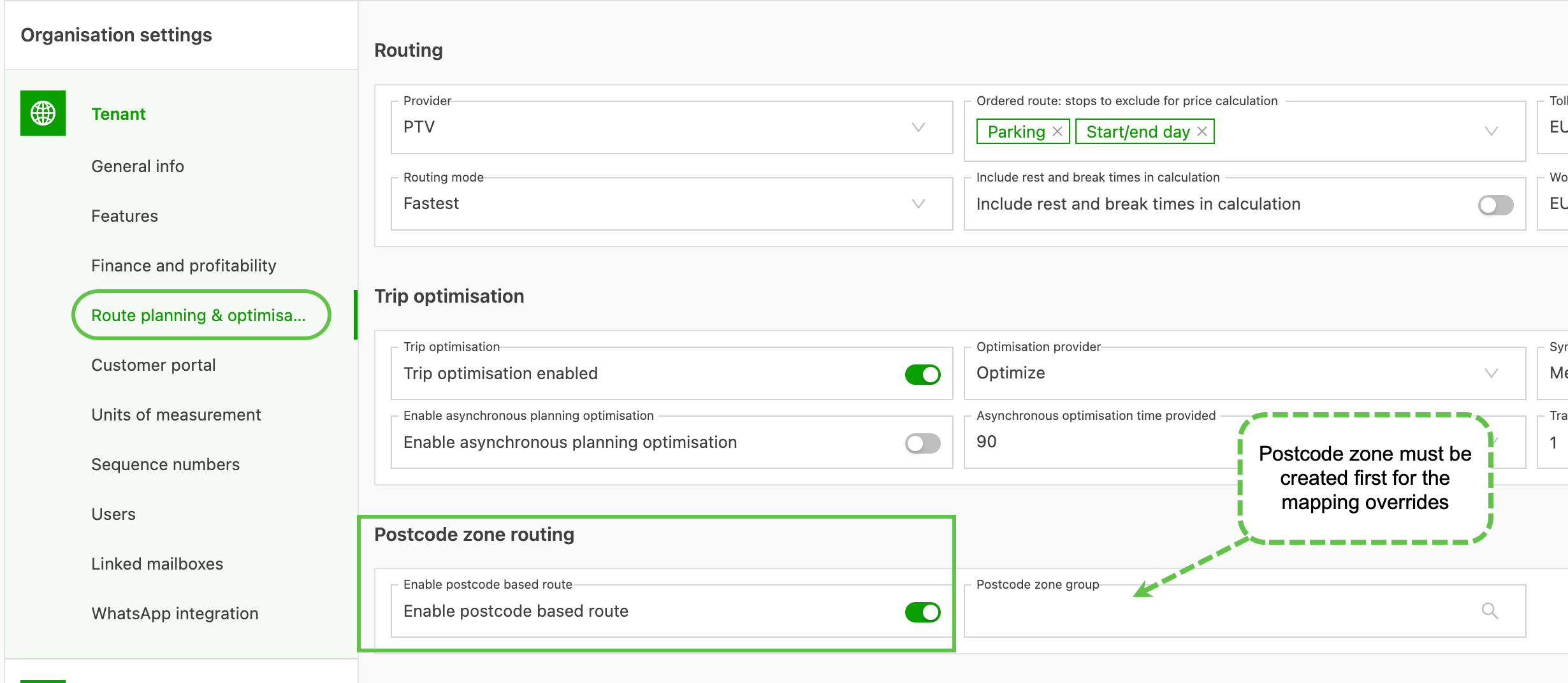
Summary:
- Charges calculated using ZIP code distances.
- Support for overrides via ZIP code zone mapping.
- The feature can be enabled and configured under Configuration > Organization settings > Route planning & optimization.
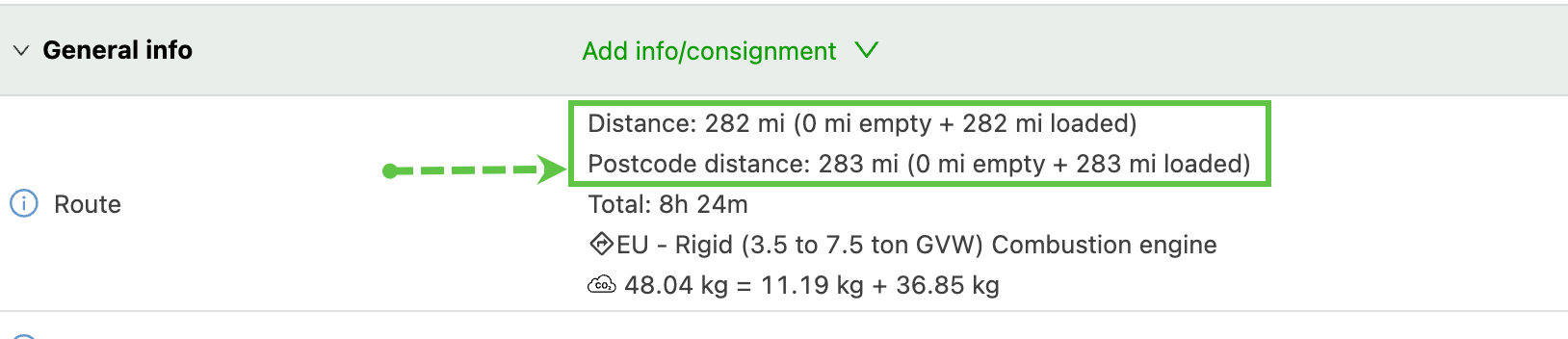
Important:
- ZIP code zone mapping overrides only support valid ZIP codes.
- Overrides are limited to the same country.
More information on how this feature works👇
Rates – ZIP code-based route calculations
Rates – Consolidate by same pickup/delivery on the same load
A powerful new consolidation option gives more flexibility when planning and rating loads. Orders can be consolidated when their pickups or deliveries are planned on the same load, even if the locations are different.
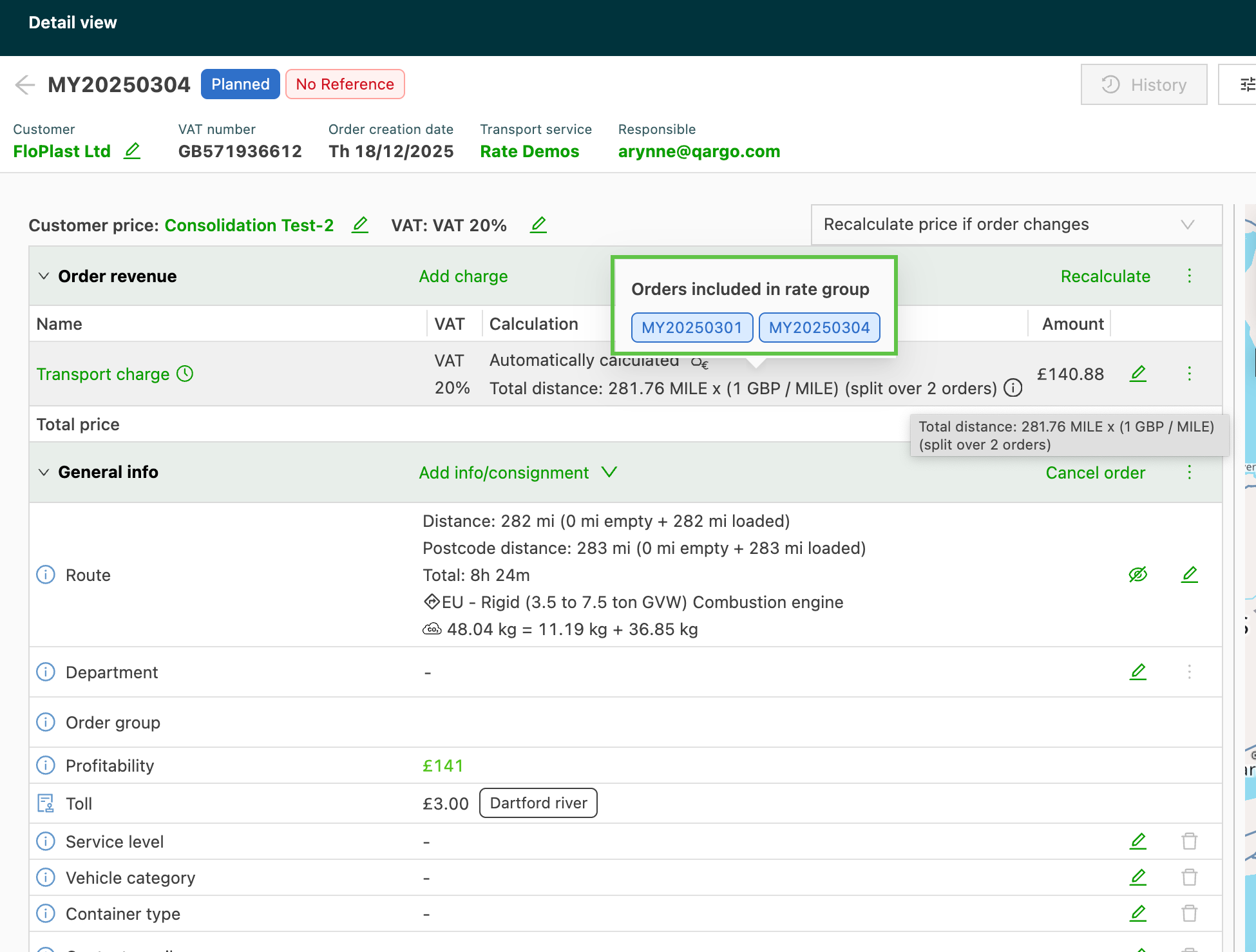
This option is available alongside existing consolidation rules and is designed to better reflect how loads are actually carried out.
- Share costs across multiple orders that are picked up or delivered on the same load, making charge allocation fairer and more accurate.
- Carrier-planned operations that bill based on the total driver hours and kilometers completed during the day, allowing charges to be fairly consolidated across all orders on the same load.
- Consolidate orders with different pickup or delivery locations, as long as they’re planned on the same load. This wasn’t possible with options like “Pickup address & same load”.
This update gives greater control over consolidation and rating, especially for multi-stop loads, helping costs align more closely with real-world operations.
More information on how this feature works👇