
Invoices: Auto-fill booking date on carrier invoices (what, why and how)
Set a default that auto-fills the booking date on new carrier invoices (such as the load start date or today's date) to eliminate manual entry and ensure correct accounting period allocation.
Table of contents
Summary
What is auto-fill booking date on carrier invoices?
- A configurable default that automatically prefills the Booking date field when a new carrier invoice is created from a load.
- The setting is in Configuration > Organization settings > Billing entity.
Why does it exist?
- Previously, the booking date on carrier invoices always defaulted to the invoice date and had to be edited manually on every invoice. At high volumes, this was not feasible.
How does it work?
- A new Default booking date (carrier invoices) setting is configured once at the tenant level. Qargo then prefills that date automatically on every new carrier invoice. The field stays fully editable per invoice.
Prerequisites
- The Booking date additional field must be active.
- Enable it under Configuration > Additional fields > Booking date. If the field is not active, the auto-fill setting has no effect.
Use cases
- Finance teams that process high volumes of carrier invoices per day: the configured default removes the need to update the booking date manually on every invoice.
- Organizations that need carrier invoice booking dates to reflect the actual transport date (e.g., load start or end) so that invoices land in the correct accounting period.
Terminology
| Term | Definition |
|---|---|
| Booking date | The date used to determine which accounting period an invoice is booked in when it is exported to accounting. See FAQ - What do the dates on the invoices list mean? for a full explanation. |
| Billing proposal | A batch flow for creating multiple carrier invoices at once from the Loads to bill list. |
| Finance & company configuration | Tenant-level configuration section under Configuration > Organization settings. |
Configuring the default booking date
Setting up the default
-
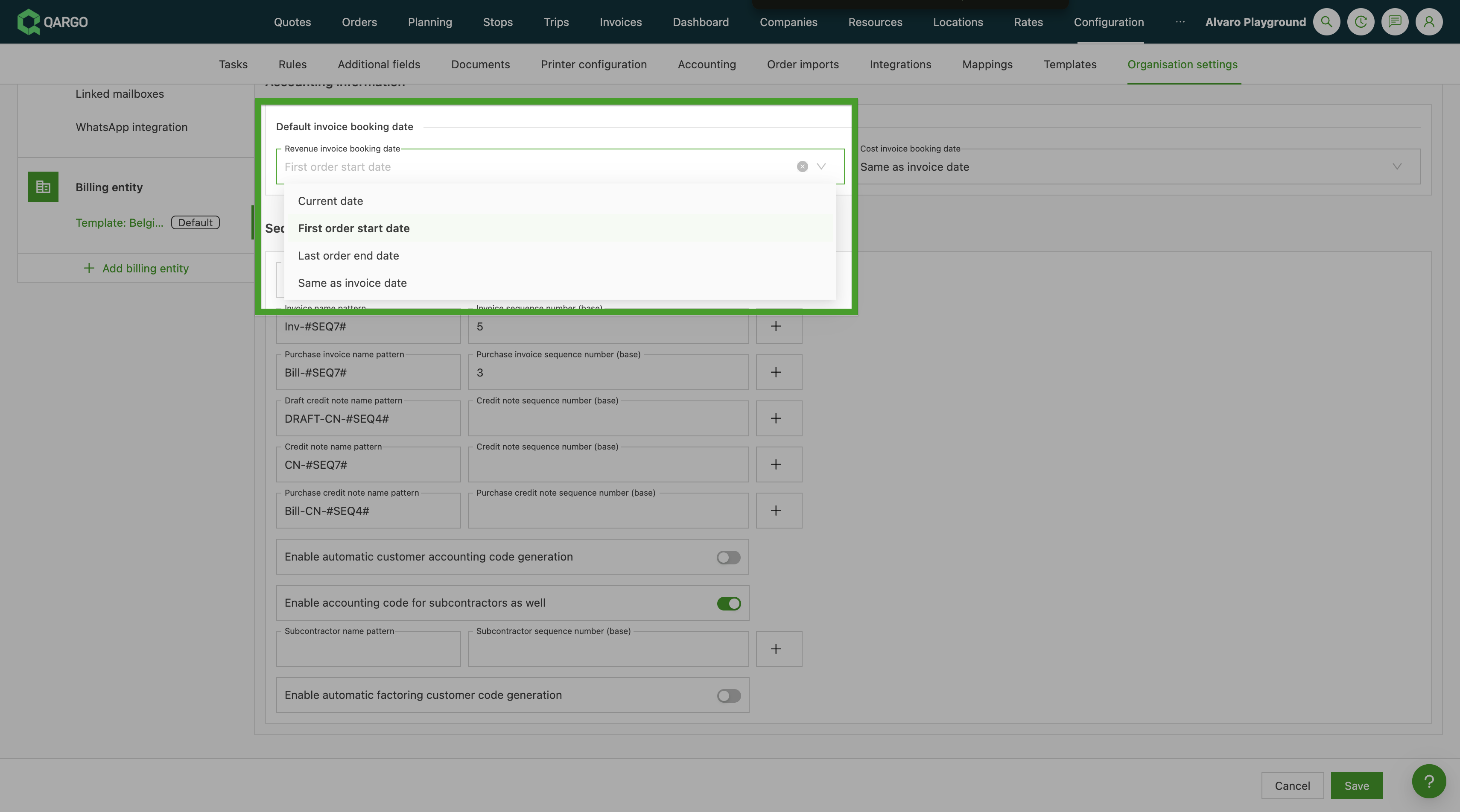
Navigate to Configuration > Organization settings > Billing entity.
-
Locate the Default invoice booking date dropdown.
-
Select the preferred default:
- Current date
- Same as invoice date
- First order start date
- Last order end date
-
Save the setting.
How auto-fill works in invoice creation flows
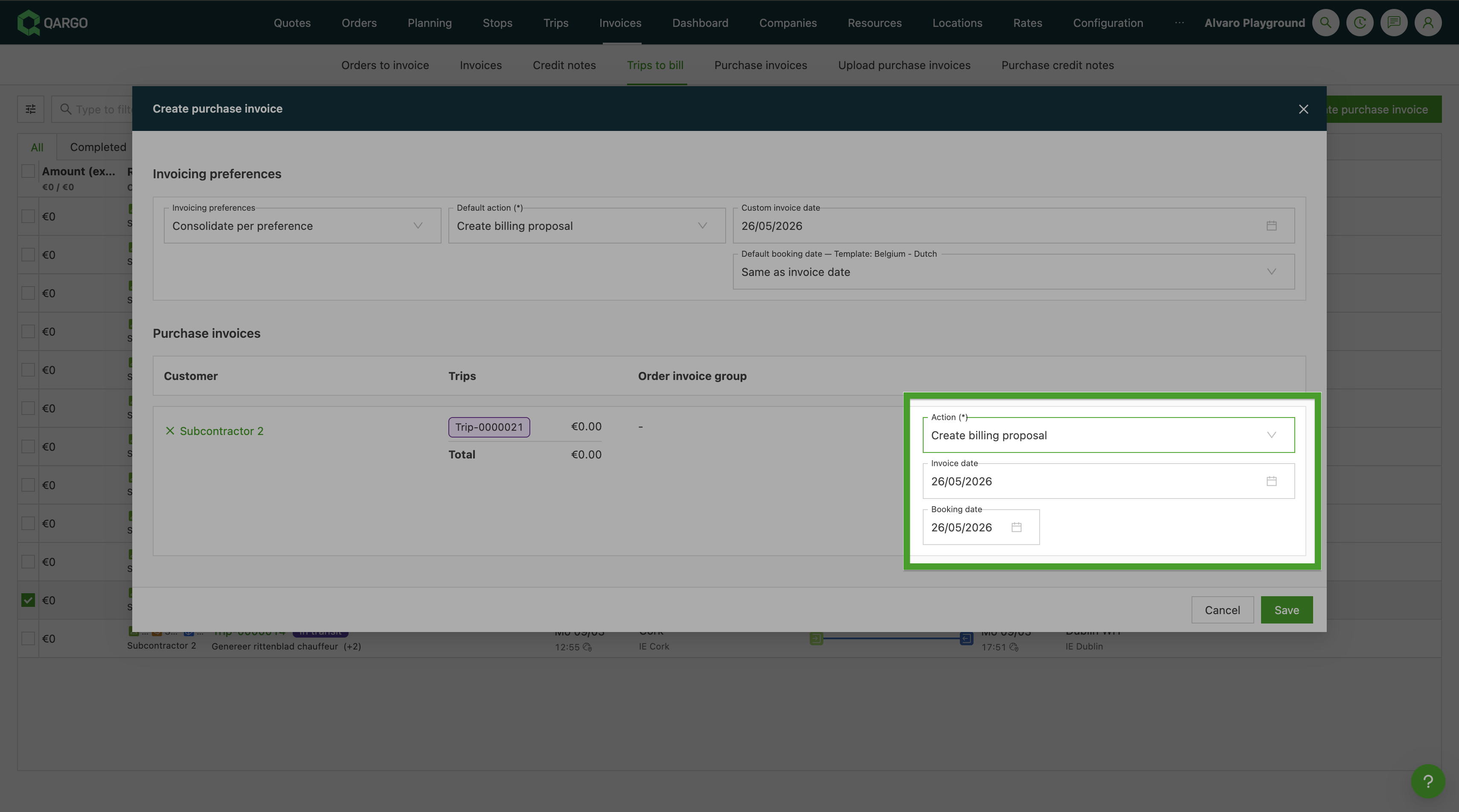
Once the default is configured, the booking date is prefilled automatically in all carrier invoice creation flows. The field remains editable: the date can be changed per invoice before or after saving.
Single load invoice
When a carrier invoice is created from Invoices > Loads to bill > Create carrier invoice, the booking date field is prefilled with the configured default.
Billing proposal
When a billing proposal is created via Invoices > Loads to bill > Create carrier invoice > Create billing proposal, the booking date is prefilled for all invoices in the batch.
Add to existing carrier invoice
When a load is added to an existing carrier invoice via Add to existing carrier invoice, the same configured default applies.
Troubleshooting
| Issue | Resolution |
|---|---|
| The Default booking date (carrier invoices) setting is not visible | Confirm that the Booking date additional field is enabled under Configuration > Additional fields > Invoices. |
| The booking date is not prefilled on new invoices | Check that a default other than Same as invoice date is selected and that the Booking date additional field is active. |
| The Earliest/Latest charge date options are not available | These options are only available for select tenants. Contact the Qargo Account Manager for more information. |
| The booking date is not auto-filled on scanned or Peppol-imported invoices | Auto-fill is not supported in the document scan/upload flow or in Peppol import. These flows do not link to a load at creation time. |