
Intermodal: weight fields on bookings (tare, freight and VGM): what, why and how.
Three weight fields on the intermodal booking (Tare weight, Freight weight and VGM) with auto-calculation, override support, rate card metrics and dispatch to ferry and rail partners.
Table of contents
Summary
-
What is this feature?
- Every intermodal booking has three new first-class fields: Tare weight, Freight weight and VGM (Verified Gross Mass). VGM is auto-calculated as Tare + Freight, and the value can be overridden manually. The same three values are available as cost-side rate metrics. They are also included in outbound booking dispatch to supported ferry and rail partners.
-
Why does it matter?
- SOLAS regulations require VGM on every loaded container shipped by sea. Modern intermodal booking messages (c-web, EDIGES) expect tare, freight and VGM as separate fields. Without dedicated fields, planners and customer service never saw weight data. This blocked SOLAS-compliant ferry bookings and broke rail integrations that required the values up front. It also prevented weight-based rating for tank intermodal customers.
-
How does it work?
- When an intermodal booking is created or updated, Tare weight is read from the resource (container or vehicle). Freight weight is the sum of goods weight across all linked orders, and VGM is calculated as Tare + Freight. The values are visible on the intermodal booking list and on the intermodal leg hover card. They can be used in cost-side rate calculations and are sent automatically in supported outbound integrations.
Prerequisites
-
A Tare weight must be set on the relevant resource (container, trailer or vehicle) for the auto-calculation to populate correctly. Bookings on resources without a tare weight show a blank or zero value for Tare weight and VGM until the resource is updated.
-
Goods on the orders linked to the intermodal booking must have a weight set so that Freight weight can be summed.
- The calculation uses the actual loaded weight when available and falls back to the ordered weight. This way, the value is populated for planning, not only after loading.
-
For the values to flow into outbound bookings, the relevant integration must already be configured (c-web for CLdN, P&O, SeaTruck or EDIGES).
Use cases
- SOLAS-compliant ferry dispatch: ferry operators require VGM to be transmitted with every loaded container booking. Tare, Freight and VGM are now separate fields on the booking. Dispatch payloads to c-web (CLdN), P&O and SeaTruck therefore carry the values directly instead of reverse-engineering them. This removes a category of booking rejections caused by missing or incorrect weight data.
- EDIGES rail bookings: rail operators using EDIGES expect VGM, freight weight and tare weight in the booking payload. The new fields are populated automatically and included in outbound EDIGES messages. Bookings no longer need to be completed manually in partner portals.
- Tank intermodal rating: liquid bulk operators price by tank tare + goods weight, where the tare differs per tank. Tare weight, freight weight and VGM are available as cost-side rate metrics. These rating rules can therefore be configured directly in Qargo instead of being maintained outside the system.
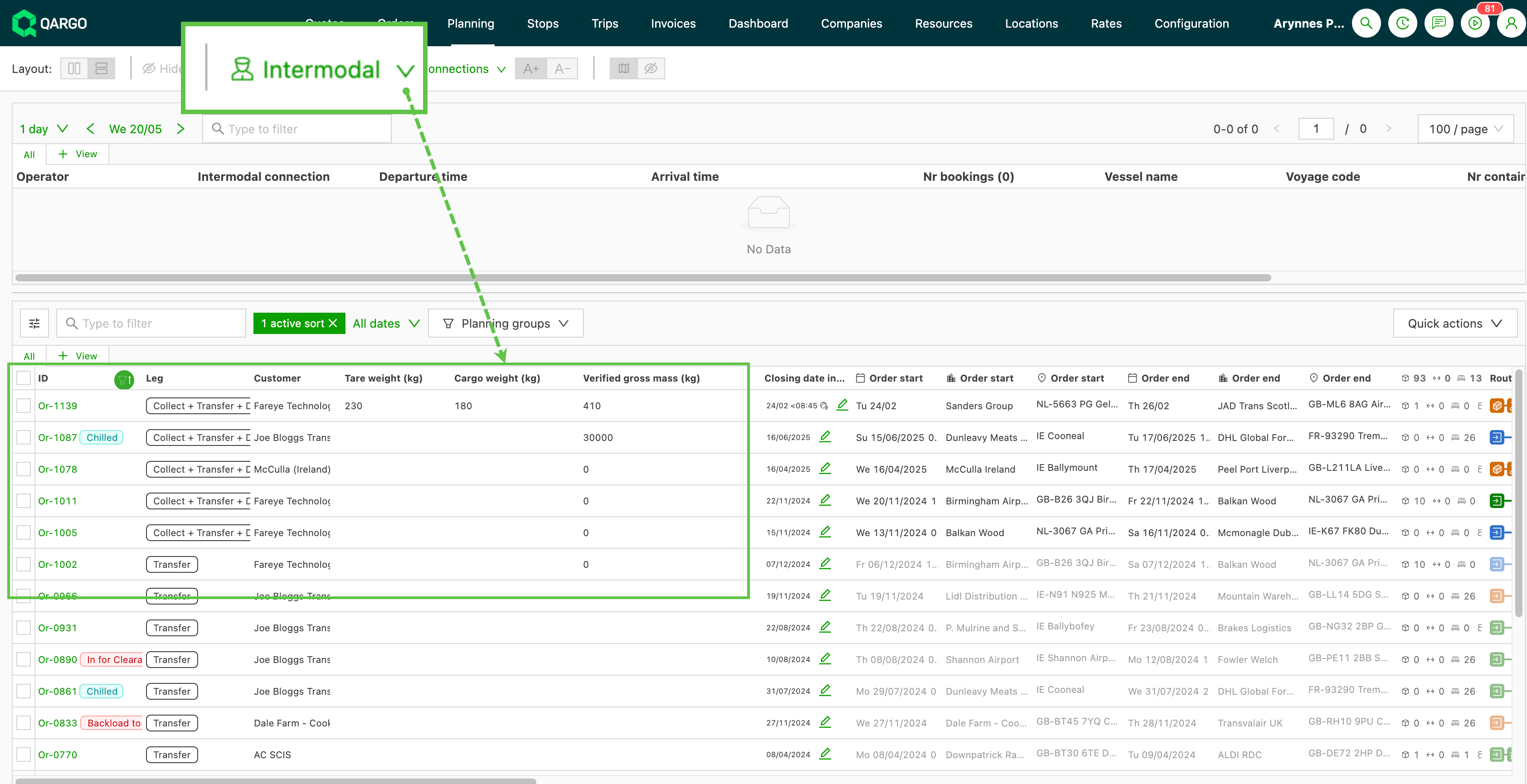
- Customer service visibility before dispatch: planners and customer service teams can now add the three weight columns to the intermodal booking list. The values are also visible on the intermodal leg hover card. This makes it possible to spot bookings with missing or zero weight data before they are sent to the operator.
Terminology
| Term | Definition |
|---|---|
| Tare weight | The empty weight of the container, trailer or vehicle assigned to the booking. Read from the resource record. |
| Freight weight | The total weight of the goods on the orders linked to the intermodal booking. Calculated from the actual loaded weight where available, otherwise from the ordered weight. |
| VGM (Verified Gross Mass) | The verified total weight of a loaded container: Tare weight + Freight weight. Required by SOLAS regulations for vessel loading on ferry connections. |
| Intermodal booking | The booking record that represents the intermodal leg of a transport, typically a ferry or rail movement managed by an external operator. |
| EDIGES | A standardized electronic booking message format used by several European rail operators (Hupac, Kombiverkehr, Samskip, Novatrans, T3M, Mercitalia). |
| c-web | The booking integration used by CLdN for ferry bookings. |
Visualizing the new fields
On the intermodal booking
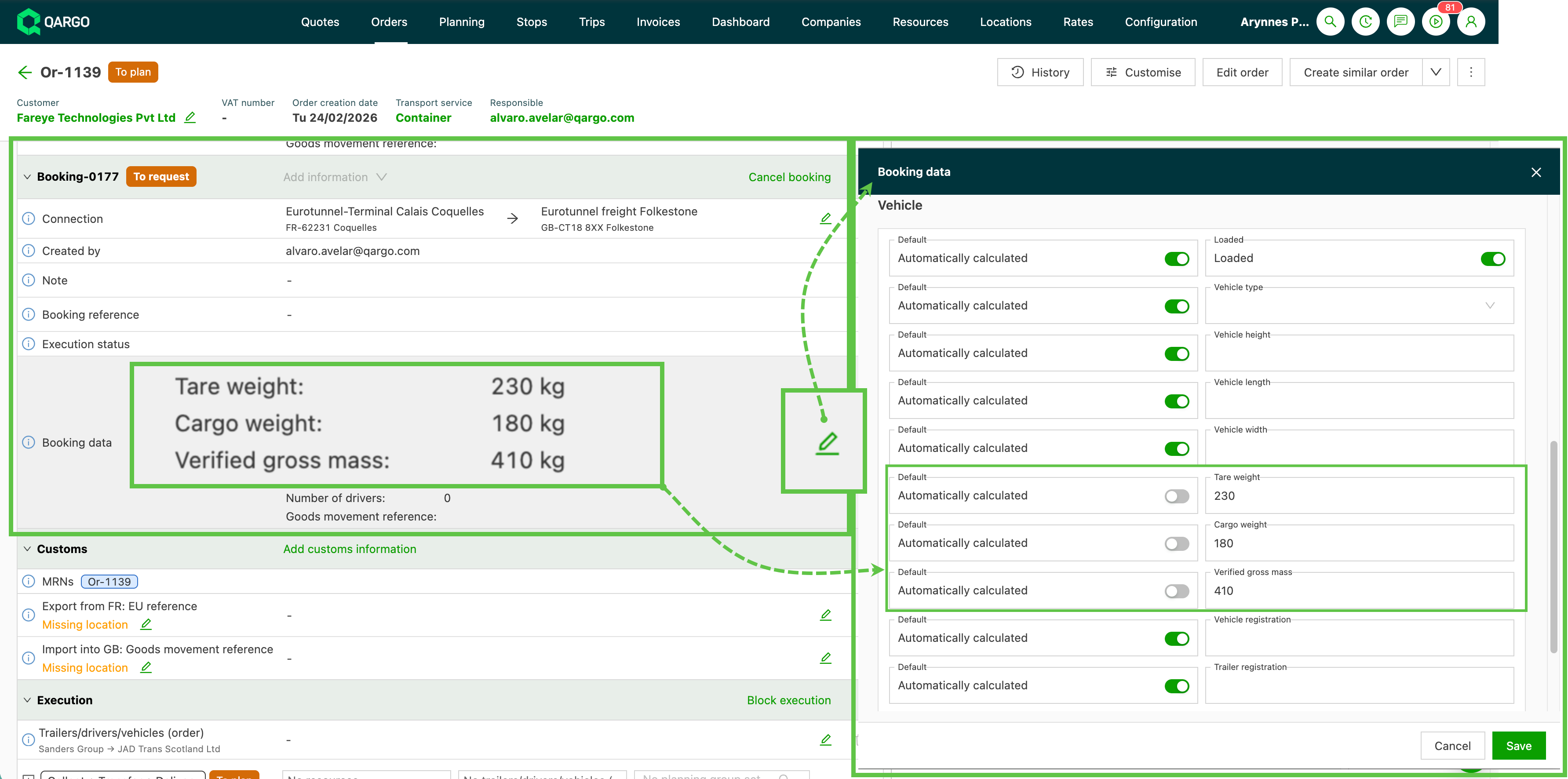
The three new fields appear on every intermodal booking. They are populated automatically when the booking is created or updated:
- Open the intermodal booking from Planning > Container booking, or from the intermodal leg on an order.
- View the Tare weight, Freight weight and VGM values in the booking detail panel. Tare weight is read from the assigned resource. Freight weight is the sum of goods weight across the orders on the booking, and VGM is calculated as Tare + Freight.
- Override the VGM value manually if the actual weighed VGM differs from the calculated value (for example, after physical weighing at a port). The override is preserved even if the underlying tare or freight values change later.
On the intermodal booking list
The three values are shown as columns on the intermodal booking list
On the intermodal leg hover card
The same three values are displayed on the intermodal leg hover card. This card appears when hovering over an intermodal leg on the order table. The values are therefore visible without opening the booking itself.
Cost-side rate metrics
The three values are available as metrics in cost-side rate calculations, alongside the existing weight and dimension metrics.
Available metrics
Three new metrics are available in the metric picker on cost-side rate table dimensions and formula calculations:
- Tare weight: the tare value from the booking.
- Freight weight: the summed goods weight from the booking.
- Verified gross mass: the VGM value (auto-calculated or overridden) from the booking.
These metrics can be used to configure brackets (for example, up to 8 t / up to 36.5 t for VGM) or to drive formula-based cost calculations. The new metrics are added in the same way as the existing weight metrics already used in cost rate cards.
Outbound integration dispatch
When an intermodal booking is dispatched to a supported partner, the three new fields are included in outbound updates automatically.
Supported integrations
- c-web (CLdN): maps directly to the existing
<tareWeight>,<cargoWeight>and<vgm>elements in the c-web booking message. - P&O: the three fields are included in the booking dispatch payload.
- SeaTruck: the Freight weight field is used directly.
- EDIGES: the three fields are included in the EDIGES booking payload mappings.
External API
Three new optional, read-only fields are available on BookingDimensions in the External API:
BookingDimensions.tare_weightBookingDimensions.cargo_weightBookingDimensions.verified_gross_mass
Qargo’s calculation populates these fields; they are not accepted as input.
Troubleshooting
| Issue | What to check |
|---|---|
| Tare weight is blank or zero on the booking | Confirm that the resource (container, trailer or vehicle) assigned to the booking has a Tare weight configured on the resource record. The booking reads this value directly from the resource. |
| Freight weight is blank or zero | Confirm that the goods on the orders linked to the booking have a weight set. The system uses the actual loaded weight when available and falls back to the ordered weight. If neither is populated, the freight weight cannot be summed. |
| VGM does not match the expected value after editing goods or resource | If the VGM was manually overridden, it does not recalculate when the underlying values change. The manual-override indicator on the VGM cell signals this state. Clearing the override allows the value to recalculate. |
| Tare / Freight / VGM columns not visible on the booking list | The columns are not visible by default. Open Edit columns on the intermodal booking list and enable them per saved view. |
| Sorting or filtering on the new columns has no effect | Filtering and sorting on Tare weight, Freight weight and VGM are not available in v1. At this stage, the columns are for display only. |
| Outbound booking still missing weight data at the partner | Confirm that the booking has tare and freight populated in Qargo (see the checks above). Also confirm that the partner integration in use is one of the supported integrations listed in Outbound integration dispatch. |