
Resources — Container standard sizes — Overview
Overview of the standard size options available for container resources in Qargo, covering where sizes are configured, available values, intermodal ferry booking behavior, dimension prefill rules, and data import compatibility.
Table of contents
Summary
-
What: The Standard Size field on a container resource defines the physical length category of the container. It determines the intermodal booking vehicle type used when booking ferry space. It also controls whether dimension fields are auto-filled or must be entered manually.
-
Why: Accurate standard size data ensures that intermodal ferry bookings use the correct commercial vehicle category. It also ensures that container master data imports are accepted without validation errors.
-
How: The Standard Size is set on the container resource profile under Resources > Containers > Vehicle Capacity, via the container master data import template, or through the external API.
Use cases
- Operators managing mixed fleets that include 23 ft, 24 ft, or 26 ft swap-body tank containers can represent each container accurately without assigning an incorrect size.
- Onboarding managers importing a container fleet in bulk can use
Feet_23,Feet_24, orFeet_26in thestandard_sizecolumn of the import template. - Planners booking intermodal ferry legs for swap-body containers (23 ft, 24 ft, 26 ft) do not need any additional configuration. Qargo automatically routes these containers under the 20 ft booking category.
Terminology
| Term | Definition |
|---|---|
| Standard size | The physical length category of a container, expressed in feet. Set on the container resource profile. |
| Swap body | A container form factor where the tank or body protrudes outside the frame. 23 ft, 24 ft, and 26 ft containers fall into this category, in contrast to 20 ft containers where the tank sits inside the frame. |
| Intermodal booking vehicle type | The commercial category used when booking ferry space for a container leg (e.g., CONTAINER_20FT). Qargo maps each standard size to a vehicle type before transmitting the booking to the ferry operator. |
| Dimension prefill | Automatic population of tare weight, interior/exterior length, and interior volume when a standard size is selected. Available for 20 ft, 30 ft, and 40 ft; manual entry is required for all other sizes. |
Available standard sizes
The following sizes are available in the Standard Size dropdown (Resources > Containers > Vehicle Capacity):
| Standard size | Dimension prefill | Intermodal booking behavior |
|---|---|---|
| 20 ft | Auto-filled | Booked as CONTAINER_20FT |
| 23 ft | Manual entry required | Booked as CONTAINER_20FT |
| 24 ft | Manual entry required | Booked as CONTAINER_20FT |
| 25 ft | Manual entry required | Booked as CONTAINER_20FT |
| 26 ft | Manual entry required | Booked as CONTAINER_20FT |
| 30 ft | Auto-filled | Booked as CONTAINER_30FT |
| 35 ft | Manual entry required | Booked as CONTAINER_35FT |
| 40 ft | Auto-filled | Booked as CONTAINER_40FT |
Configuring the standard size
In the Qargo interface
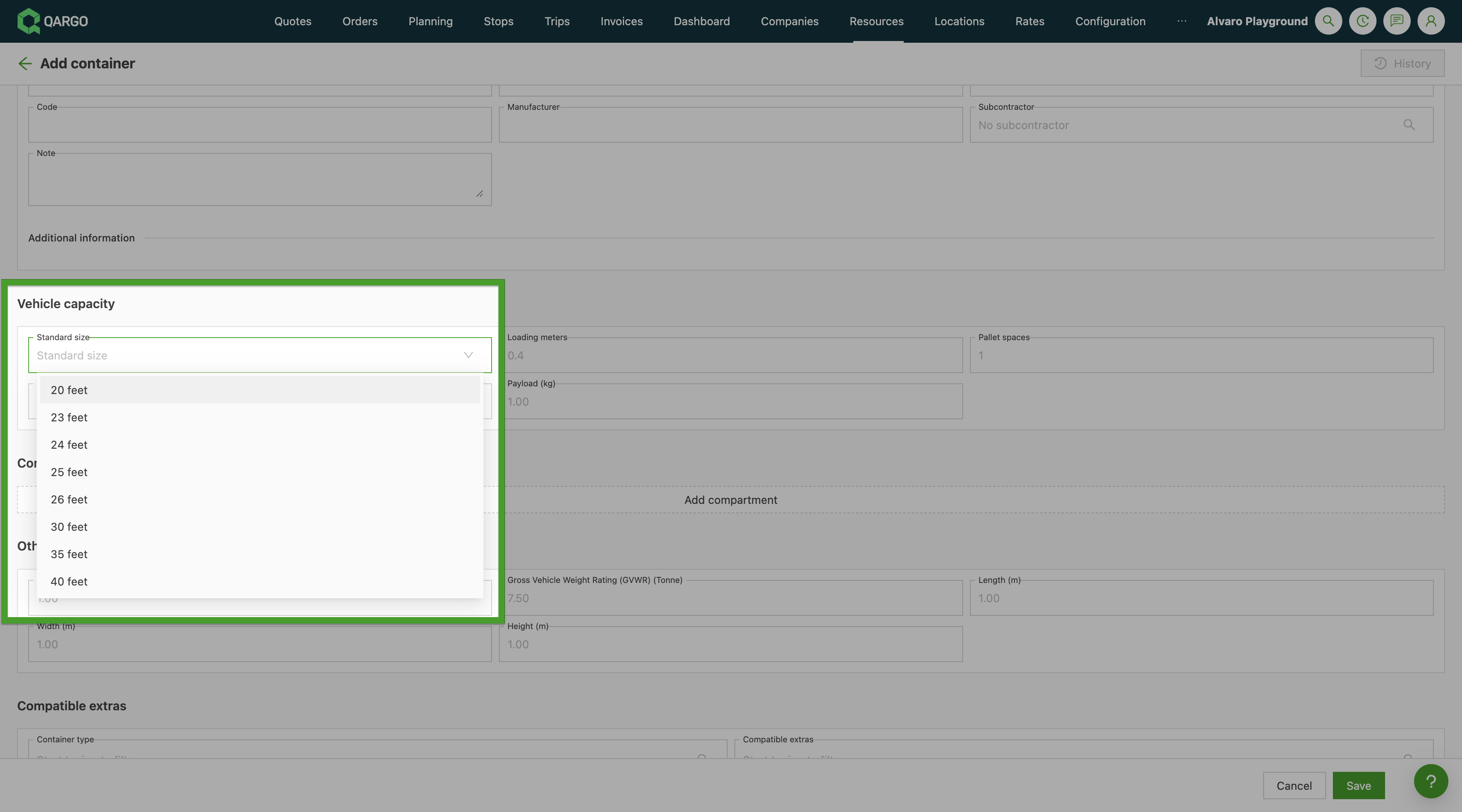
- Navigate to Resources > Containers.
- Open an existing container record or click Add container.
- Scroll to the Vehicle Capacity section.
- Select the appropriate value from the Standard Size dropdown.
- If the selected size does not support dimension prefill, enter tare weight, interior length, exterior length, and interior volume manually.
- Click Save.
In the master data import
Use the standard_size column in the container import template. Accepted values:
| Column value | Displayed size |
|---|---|
Feet_20 |
20 ft |
Feet_23 |
23 ft |
Feet_24 |
24 ft |
Feet_25 |
25 ft |
Feet_26 |
26 ft |
Feet_30 |
30 ft |
Feet_35 |
35 ft |
Feet_40 |
40 ft |
Via the external API
The standard_size field on container resource endpoints accepts the same string values as the import template (Feet_20, Feet_23, Feet_24, Feet_25, Feet_26, Feet_30, Feet_35, Feet_40).
Troubleshooting
| Issue | Cause | Resolution |
|---|---|---|
| Dimension fields are not auto-filled after selecting a size | Dimension prefill is only available for 20 ft, 30 ft, and 40 ft | Enter tare weight, interior length, exterior length, and interior volume manually |
Container import fails on the standard_size column |
The value does not match an accepted format (e.g., 23ft instead of Feet_23) |
Use the exact values from the accepted values table above |
| A container size is not available in the dropdown | The size is not supported in the current version | Contact Qargo support to confirm availability |