
Fuel surcharge dashboard: what, why, and how
The fuel surcharge dashboard gives transport teams a real-time, consolidated view of fuel surcharge data across all customers: by customer, by time period, and at order level.
Table of contents
Summary
-
What is the fuel surcharge dashboard?
- A reporting dashboard in Qargo that consolidates fuel surcharge (FSC) data across all customers into a single, filterable view
- The dashboard shows which customers have FSC applied, the amounts charged, and how FSC compares to total transport charges, broken down by customer, by time period, and per order
-
Why does it exist?
- Previously, Qargo had no consolidated view of fuel surcharge data. Transport teams had to navigate individual rate cards or process bulk exports to see which customers had FSC configured and what amounts were being charged
- The dashboard replaces those manual processes with a real-time, filterable report available directly in Qargo’s reporting section
-
How does it work?
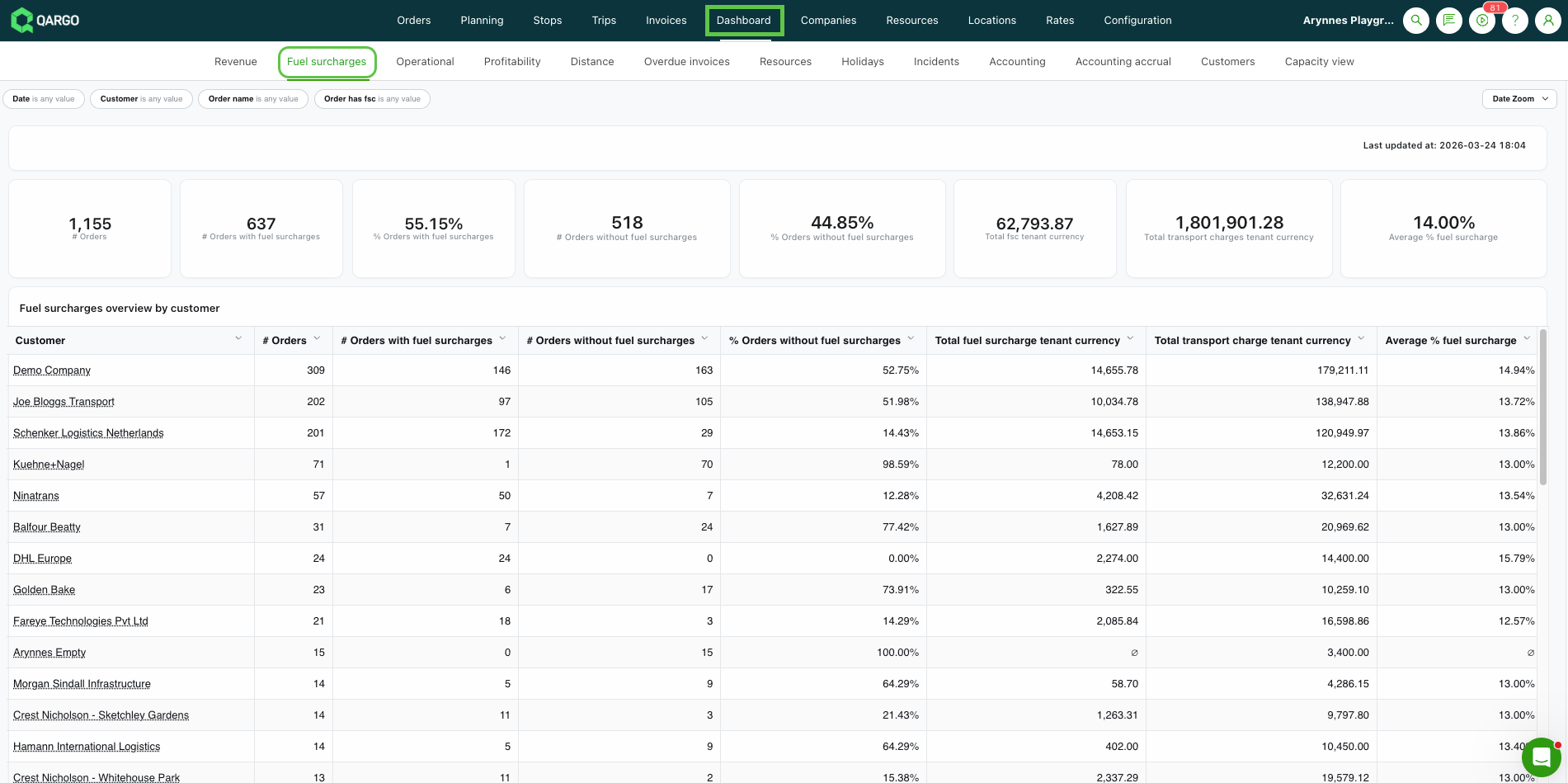
- Open the Fuel Surcharge dashboard from Qargo’s reporting section
- Apply the Date and Customer filters to scope the data
- Review the three data tables (by customer, by time unit, and at order level) alongside the summary KPIs at the top of the page
Terminology
| Term | Definition |
|---|---|
| Fuel surcharge (FSC) | An additional charge applied to orders to cover fuel costs, calculated as a percentage of the transport charge or based on a price index |
| Surcharge index | The add-on type used for fuel surcharges linked to a price index. The fuel surcharge dashboard only covers charges of this type |
| KPI | Key performance indicator: a summary metric shown at the top of the dashboard that updates dynamically based on the active filters |
| Time unit | The period used to group rows in the By time table. Determined by the unit selected in the Date filter (e.g., days, weeks, months) |
| Avg FSC % | The average of the FSC amount divided by the transport charge, calculated across orders where FSC is present |
Navigating to the dashboard
The fuel surcharge dashboard is located in the Dashboards section of Qargo.
- Open the Dashboards section from the main navigation
- Select Fuel Surcharge from the list of available dashboards
Filters
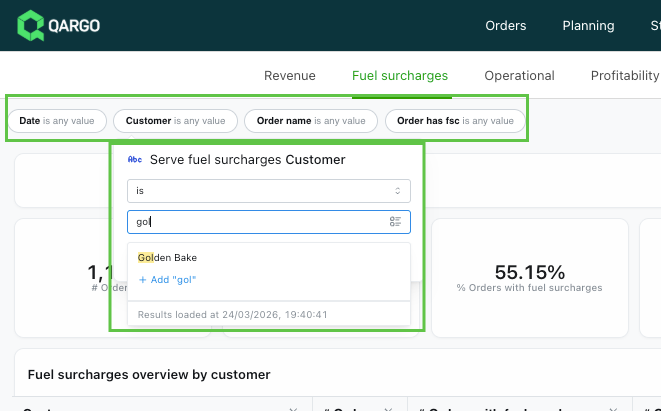
The dashboard includes four filters that control all the data displayed, including the summary KPIs and all three tables.
- Date: A rolling window filter using the format “in the last [N] [unit]”. The unit can be set to days, weeks, completed weeks, months, completed months, quarters, completed quarters, years, or completed years. Selecting a completed unit excludes the current partial period (e.g., completed months excludes the current month in progress). The selected time unit also determines how rows are grouped in the By time table.
- Customer: Filters all tables to a single customer account. When applied, the By customer table shows a single row for that customer.
- Order name: Filters the Order overview table to a specific order.
- Has FSC: A toggle to show only orders with FSC applied, or only orders without FSC.
Summary KPIs
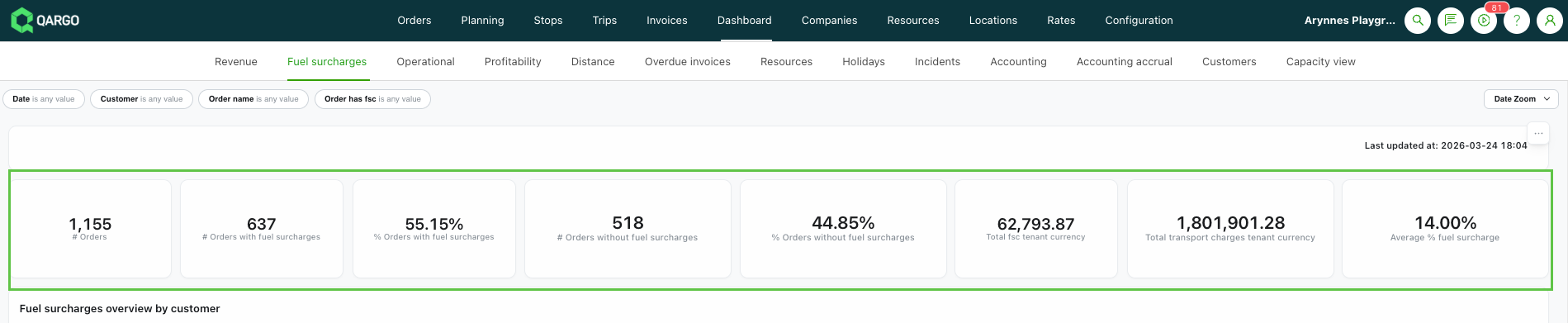
At the top of the dashboard, a row of summary metrics gives an at-a-glance view of the selected period. All values update dynamically when the filters change.
- Total orders: The total number of orders in the selected period
- Orders with FSC: The count and percentage of orders where a fuel surcharge add-on is present
- Orders without FSC: The count and percentage of orders where no fuel surcharge add-on is present
- Average FSC amount: The average fuel surcharge amount (€) across orders where FSC is present
- Average FSC %: The average FSC as a percentage of the transport charge, across orders where FSC is present
By customer table
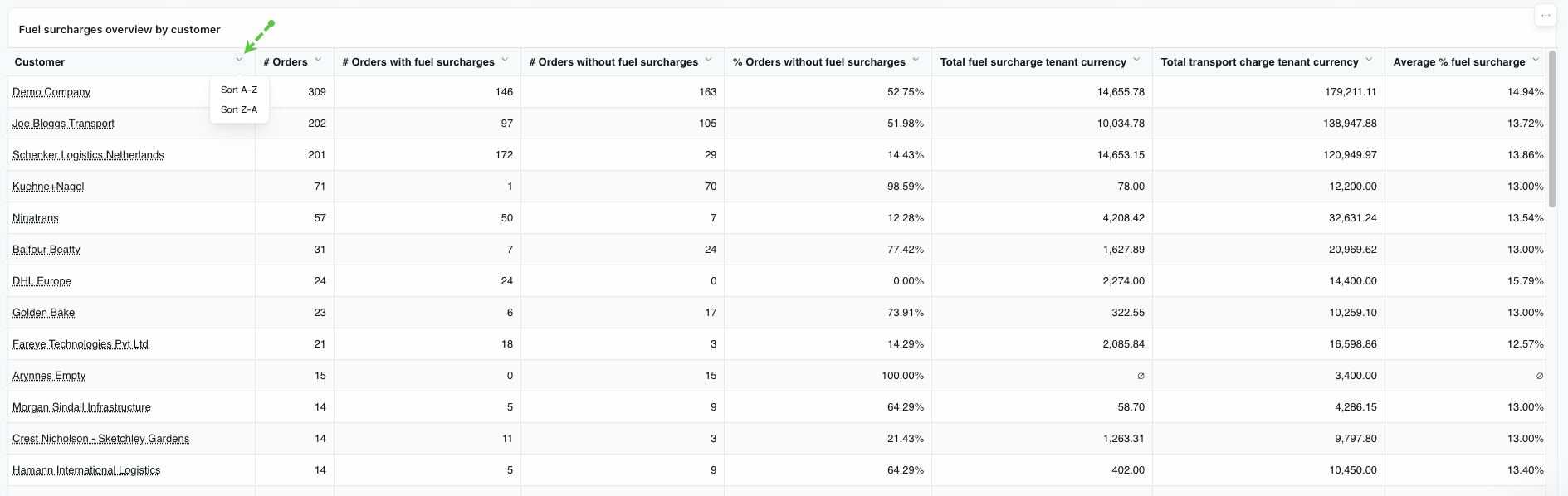
The By customer table shows one row per customer and consolidates all order data for the selected period. All columns are sortable.
| Column | Description |
|---|---|
| Customer | The customer account name |
| Total orders | Total number of orders for this customer in the selected period |
| Orders with FSC | Count and percentage of the customer’s orders where FSC is applied |
| Orders without FSC | Count and percentage of the customer’s orders where no FSC is applied |
| Total transport charge | Sum of all transport charges across the customer’s orders |
| Total FSC amount | Sum of all fuel surcharge amounts across the customer’s orders with FSC |
| Avg FSC % | Average of FSC amount ÷ transport charge, across the customer’s orders with FSC |
Click any column header to sort the table by that column.
By time table
The By time table groups the same data by time period rather than by customer, showing consolidated totals across all customers per period. The table title and first column header update dynamically to reflect the active date unit.
- Rows represent individual time periods within the selected date range (e.g., four rows for “in the last 4 weeks”)
- Rows are displayed newest first
- The columns are identical to those in the By customer table, with the first column showing the time period label instead of a customer name
Order overview table
The Order overview table provides order-level detail, with one row per order.
| Column | Description |
|---|---|
| Order name | The unique order identifier |
| Customer | The customer account associated with the order |
| Transport charge | The transport charge amount for the order |
| FSC amount | The fuel surcharge amount applied to the order (blank if no FSC is present) |
Limitations
- The fuel surcharge dashboard only covers surcharges of type SURCHARGE_INDEX. Charges linked to SURCHARGE_GENERAL add-ons are not included in the dashboard data
Troubleshooting
| Issue | Likely cause | What to check |
|---|---|---|
| A customer does not appear in the By customer table | No orders exist for that customer in the selected date range, or no orders were picked up/delivered in that period | Widen the Date filter or verify that the customer has orders in the selected period |
| FSC amounts are unexpectedly low or missing | The customer’s fuel surcharge may be configured as SURCHARGE_GENERAL rather than SURCHARGE_INDEX | Check the add-on type on the customer’s rate card. Only SURCHARGE_INDEX charges are included in this dashboard |
| The By time table shows fewer rows than expected | Completed period units exclude the current partial period | Switch from a completed unit (e.g., completed months) to a standard unit (e.g., months) to include the current period |
| KPI totals don’t match the sum of the table rows | A filter is applied that scopes the visible table but still affects the KPIs | Check all active filters and reset them to All to see unfiltered totals |