
FAQ - How to manage invoices created by mistake in Qargo, including cancellation and number reuse
Table of contents
Managing invoices created by mistake in Qargo
In Qargo, invoices are central to accurate financial records, so invoices created by mistake must be handled carefully. Users cannot permanently delete invoices. However, Qargo offers alternatives, such as canceling or repurposing an invoice, to maintain traceability and sequence integrity.
Key points to know
- Invoices cannot be permanently deleted: To ensure traceability, Qargo does not allow invoices to be completely removed from the records.
- Two main alternatives: Cancel the invoice to preserve traceability, or repurpose it to reuse the invoice number while adjusting its details.
Canceling an invoice
To cancel an invoice:
- Open the invoice in question.
- Click the three-dot (“more”) menu on the invoice.
- Select “Cancel invoice.”
Once canceled, the invoice is no longer valid for billing purposes but remains in the system for audit and traceability purposes. This ensures that any transactions or activity linked to the invoice can be referenced later if needed.
Linked orders are detached and return to Ready to invoice.
Repurposing an invoice
If an invoice was created by mistake but the invoice number must stay in sequence, the invoice can be repurposed instead of canceled:
- Open the invoice.
- Change the customer on the invoice to the correct one.
- Remove any existing charges (e.g., zero-value lines).
- Add or allocate the correct charges for the correct customer.
This approach keeps the invoice number sequence intact while correcting the content of the invoice.
Handling zero-value invoices
For invoices containing only zero-value lines, the choice between repurposing and cancellation depends on the intent:
- Cancel if the invoice is no longer required.
- Repurpose if the number needs to be reused for a valid transaction.
Replacing an invoice that has a wrong number
Use this procedure when the invoice number itself is wrong. A common cause is year-based numbering that was not updated at the year-end cutover.
Before starting
Steps
- Go to Invoices > Invoices to open the main invoice list.
- Click the invoice whose number needs fixing.
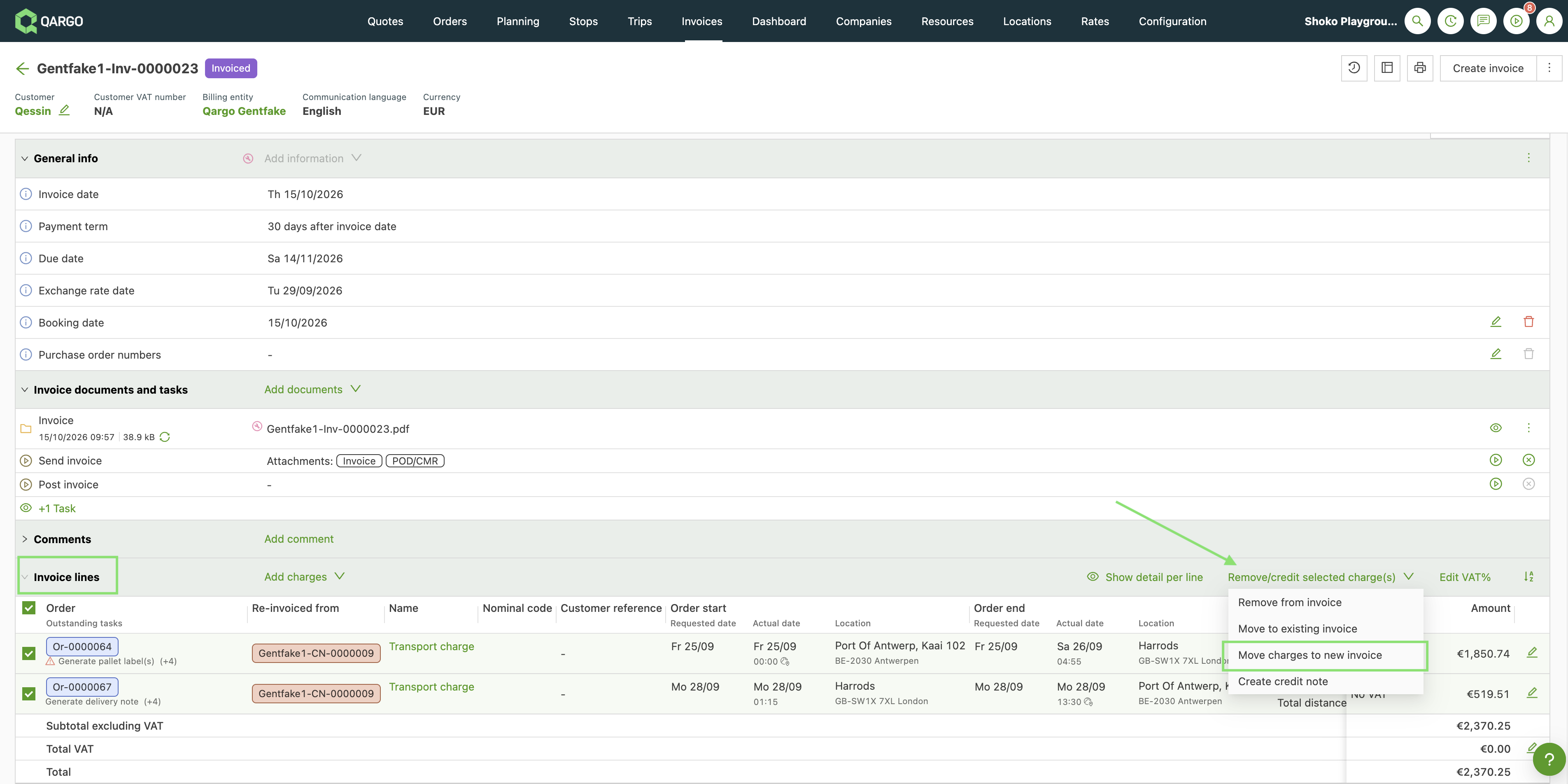
- In the Invoice lines panel, select the charges to move.
- On the right, open Remove/credit selected charge(s) and choose Move charges to new invoice.
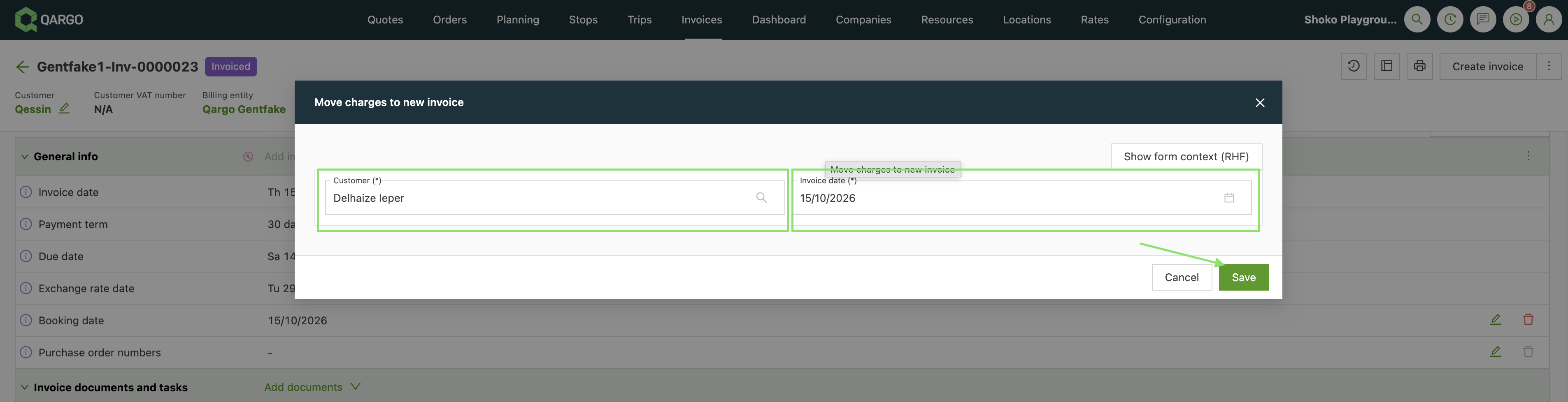
- Select the customer and the invoice date, then click Save.
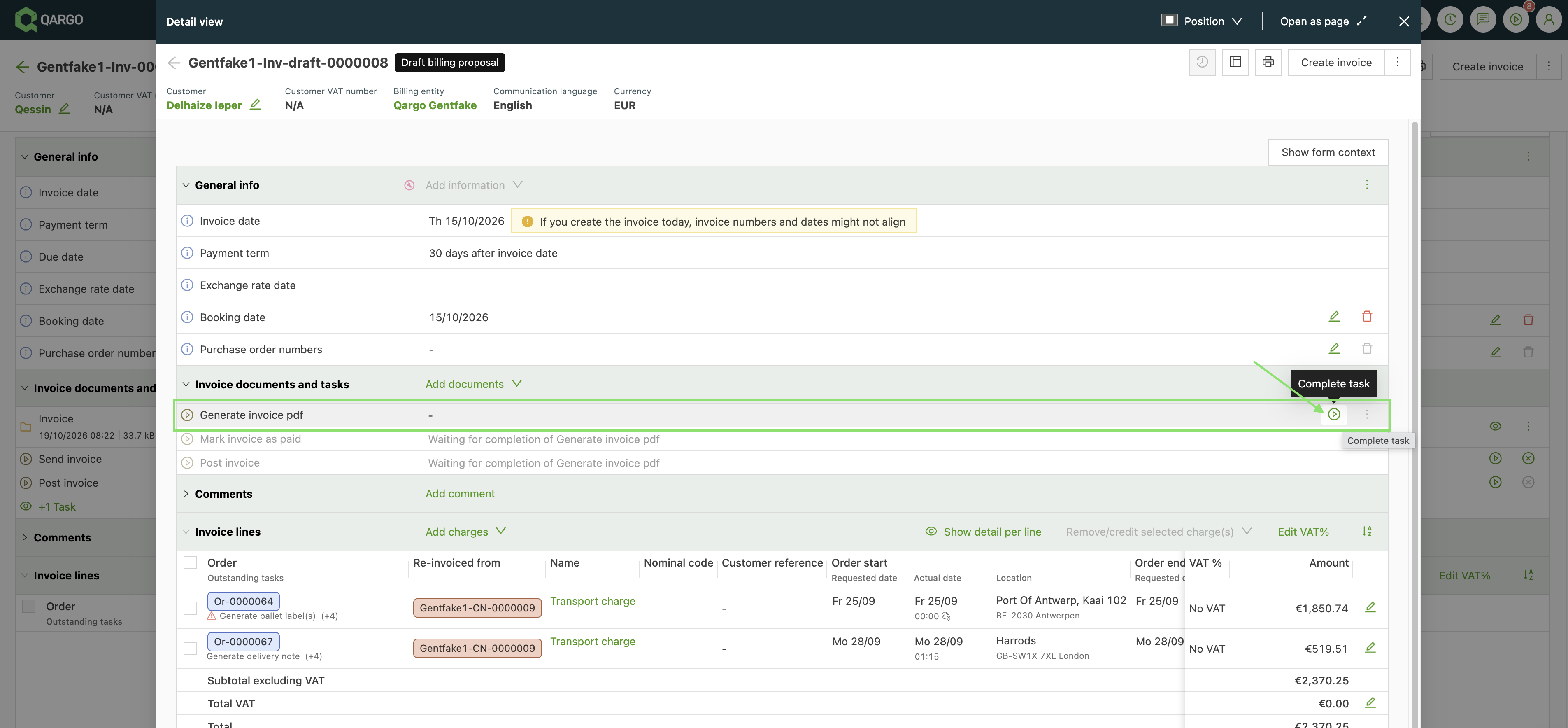
- Check the new invoice, then click Generate invoice PDF to create it.
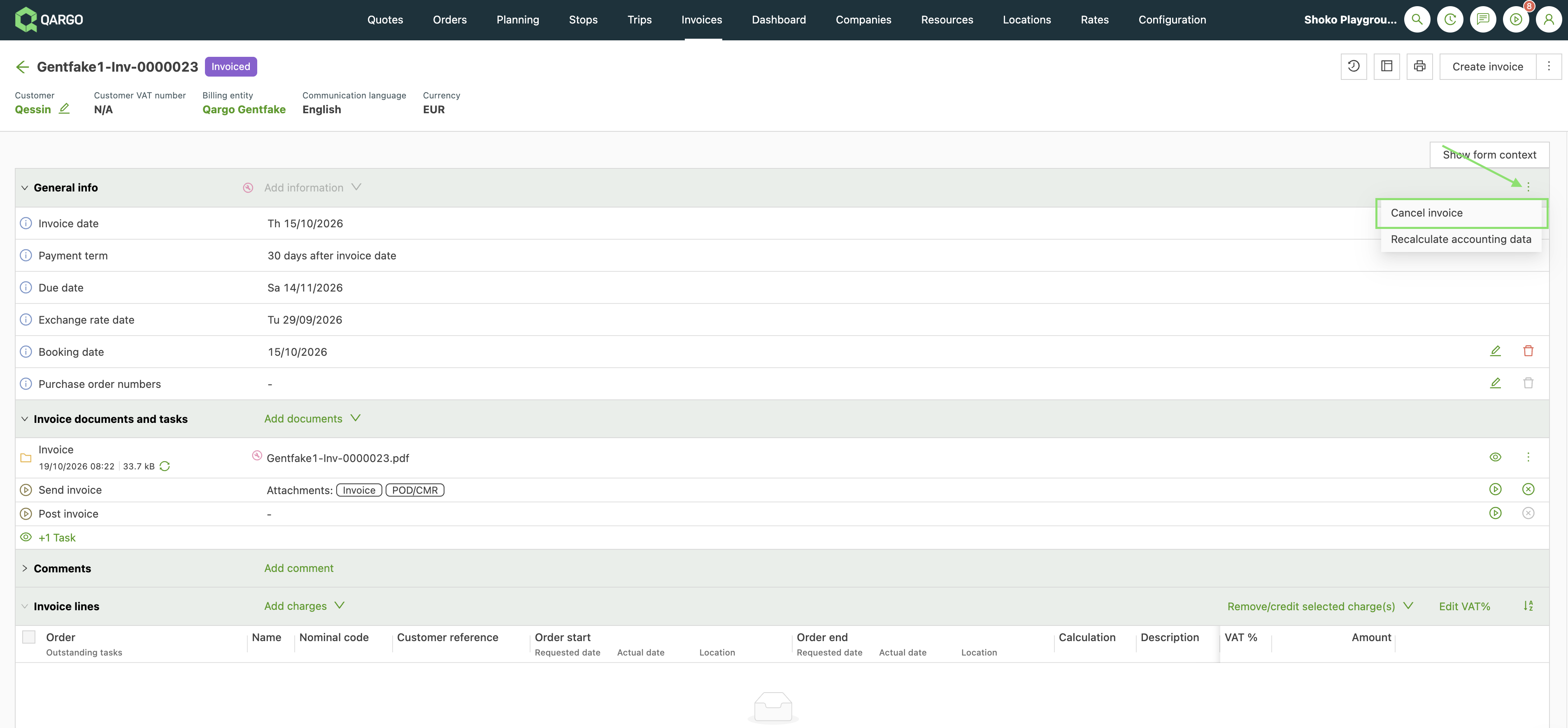
- If the original invoice is not needed, open the three-dot menu (top right) and select Cancel invoice. Click Yes to confirm. The status changes to Canceled.
- Go to Invoices > Invoices and open the posted invoice.
- In the Invoice lines panel, select all charges.
- Open Remove/credit selected charge(s) and choose Create credit memo.
- Choose Create credit memo (or Create draft credit memo). If a draft was created, click Generate credit memo PDF.
- Open the credit memo (Invoices > Credit memos). In the Credit memo lines panel, select the charges.
- Open Remove/invoice selected charges and choose Re-invoice charges.
- In the Create invoice(s) window, check the billing preferences, the invoice date, the booking date and the exchange rate date, then click Save. The customer is taken from the charges.
- Open the new invoice, check the details and click Generate invoice PDF. The new invoice receives the next number in the corrected sequence.
- Continue with accounting. The credit memo and the new invoice are linked: the invoice shows the credit memo under Re-invoiced from, and the credit memo shows the invoice under Re-invoiced on.
The credit memo balances the original invoice. Qargo does not allow invoices with negative totals, so a credit memo is how a posted invoice is reversed.
If the customer is wrong, change the bill-to on the order or charges before re-invoicing.
The credit memo balances the original invoice. Qargo does not allow invoices with negative totals, so a credit memo is the way to reverse an invoice.
Related FAQs
Q: Why can’t an invoice be permanently deleted?
A: Deleting invoices could disrupt financial records and audit trails. To maintain traceable and accurate records, Qargo ensures that all issued invoices are either canceled or corrected and reused rather than removed.
Q: Is cancellation final?
A: No. Canceled invoices remain in the system for traceability. If an invoice is canceled by mistake, it can still be referenced or recovered.
To undo a cancellation, open the invoice under the Canceled tab and click Uncancel invoice.
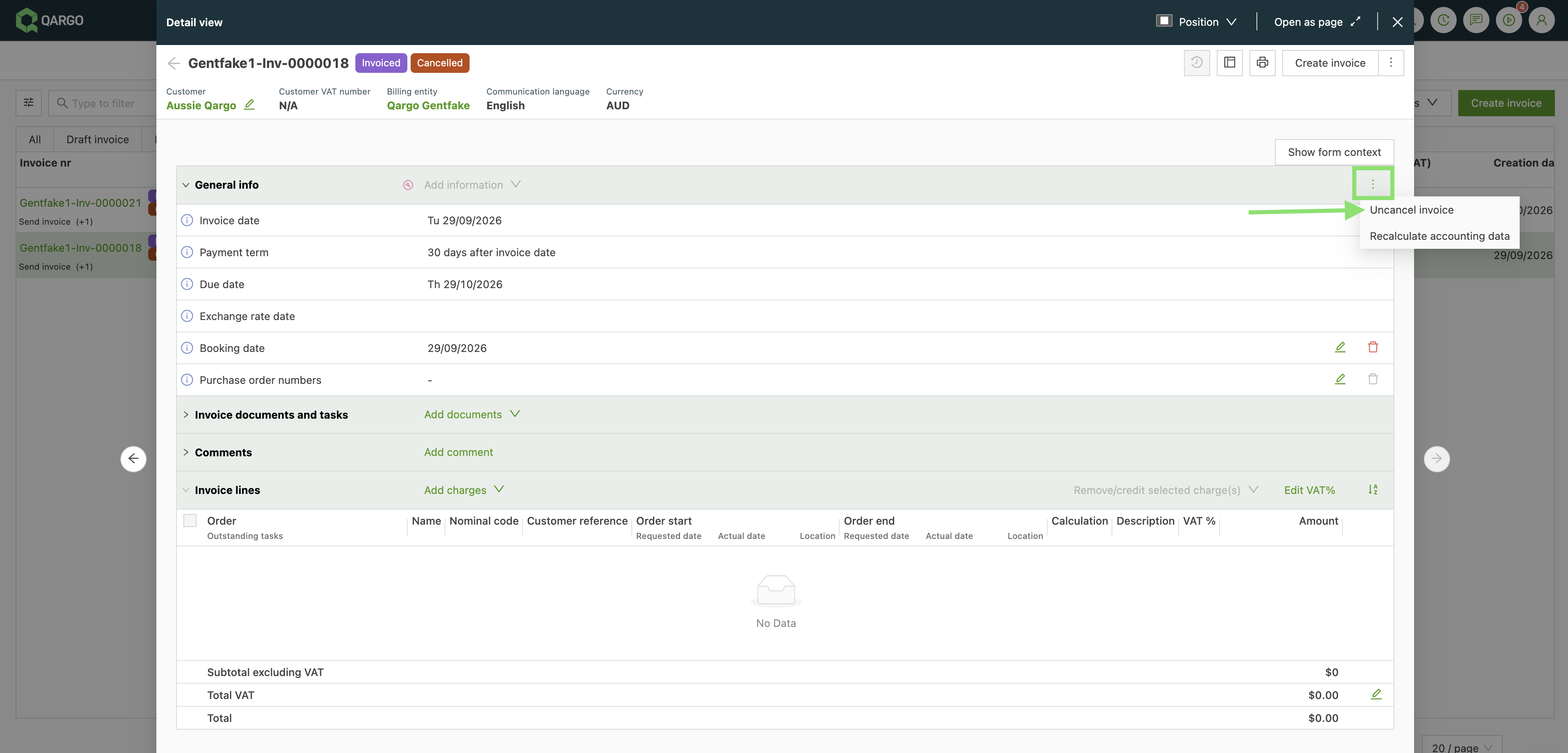
Q: Can a canceled invoice number be reused?
A: Yes. If the invoice is already canceled, the cancellation can be undone to bring the number back, but the orders that were attached before canceling are not reattached. They remain at Ready to invoice and need to be added to the invoice again. If invoice number integrity is critical and the invoice is still live, consider repurposing the invoice instead. Following the steps and guidelines above makes it possible to manage invoices created in error effectively, ensuring compliance and accuracy in the financial records.
Q: Can the invoice number of a posted invoice be edited?
**A: No.** Posted invoices are already in the accounting package. The charges can be credited, then invoiced again. Follow the steps above.