
FAQ – Retrigger tasks and dispatches
How to retrigger a task (for example, to regenerate a document), and when Qargo automatically retriggers a dispatch when information changes.
Table of contents
Q: How can a task be retriggered?
Once a task has been initiated, users can trigger it again at any time. For example, a user created a load sheet, and later the itinerary for that load is updated. Retrigger the task to generate a new load sheet that reflects the most up-to-date information in Qargo.
Retrigger a task at stop level
Documents created at stop level show on the shipment itself. To retrigger the document generation, go to the Stops documents and tasks section of Operations.
-
Find and expand the stops.
-
Click +tasks to expand tasks that have already been executed.
-
Locate the tasks available for those stops. The option to retrigger is shown there.
Bulk actions on failed tasks
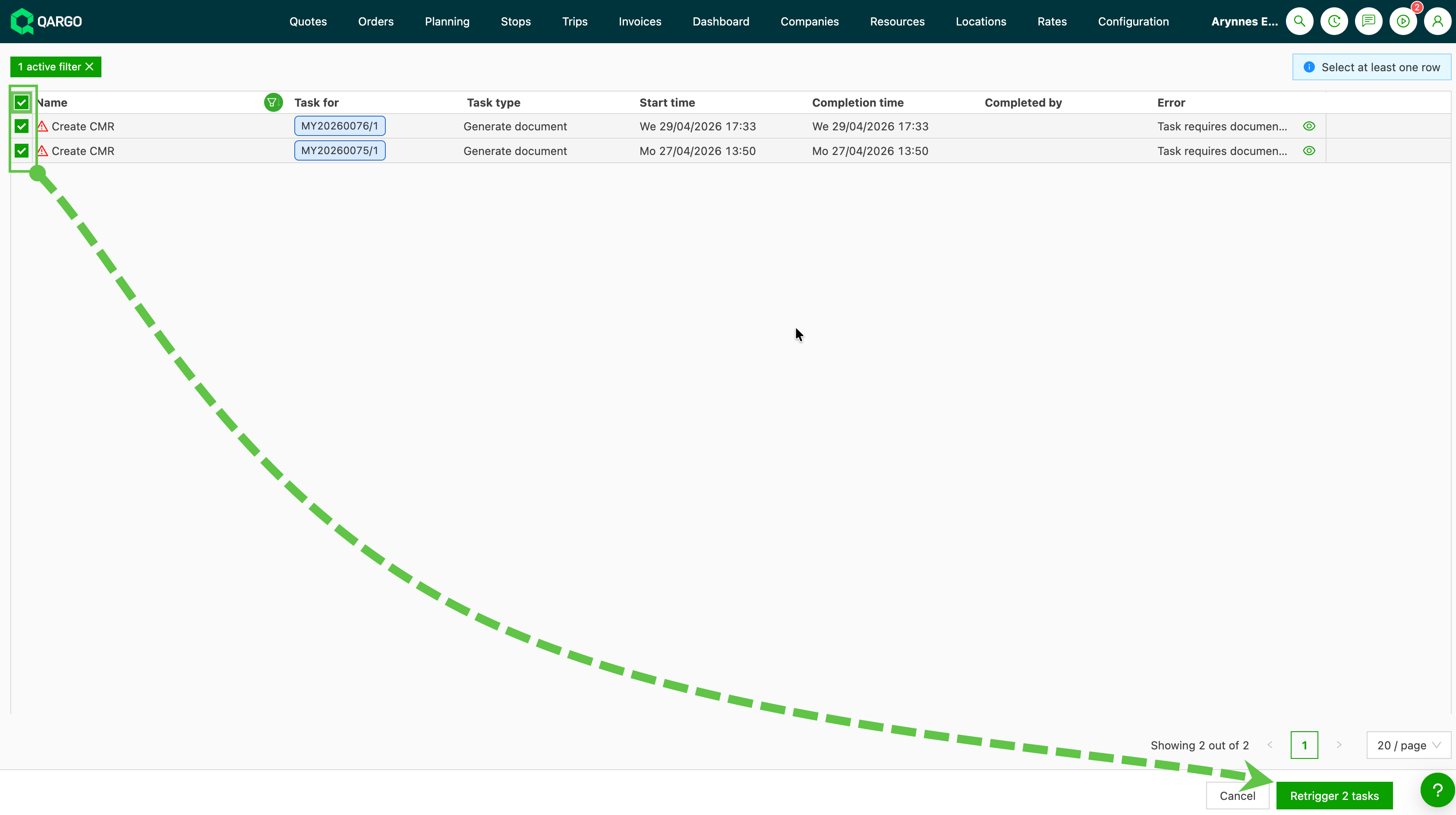
When many tasks have failed at once (for example, after an integration issue or a bulk import error), the Failed Tasks page supports bulk Re-trigger, Reset and Skip in a single operation.

How to open the Failed Tasks page
- Click the action button in the top right corner of the navigation bar. It shows a red notification badge when there are failed or in-progress tasks.
- In the dropdown that opens, click the eye icon next to failed tasks.
- The Failed Tasks page opens.
How to retrigger in bulk
-
Select the checkbox for all the tasks to retrigger.
-
Click Re-trigger.
Q: When is a dispatch retriggered?
This section gives an overview of what happens when information on a load is updated, who is informed and how.
Q. If a load is dispatched and something is updated, such as a phone number or a reference, how is the information updated?
A. Most loads today have some element of integration with other services, customers and communication systems. Information flows constantly between these parties and is typically “set” at the point of dispatch. Many data points, such as a customer reference number or a contact phone number, are used by other functions and by any of the parties in the order.
When information is updated in Qargo, a redispatch is triggered that includes the updated information.
Redispatch triggers: stop update
All updates below are sent to FMS / Mobile app / Pallet networks.
Update performed
Date
Estimated start
Actual start
Actual end
Location
Any field related to ‘Addon’
Note
Reference number
Any additional field linked to stops
Stop type
Skip dispatch
Phone number
Cell number
CMR reference number
Any additional field linked to receiver
eCMR
Redispatch triggers: shipment update
All updates below are sent to Container / Intermodal booking.
Update performed
Description
Quantity
Total weight
Total volume
Weight unit of measurement
Volume unit of measurement
Any additional field linked to goods
Total loading meters
Total pallet spaces
Packaging
Commodity name
Actual loaded quantity
Actual total weight
Minimum temperature
Maximum temperature
specific_gravity
Any field related to add-ons
Redispatch triggers: order update
All updates below are sent to FMS / Mobile app / Pallet network.
Update performed
CMR reference number
Container no.
Customer reference number
Any additional field linked to orders
Name
Any field related to add-ons
Redispatch triggers: container / intermodal booking update
| Update performed | Redispatch / update sent to |
|---|---|
| Most changes in information on the container handling / container booking / intermodal booking | FMS / Mobile app / Pallet network, Container / Intermodal booking dispatch, Container handling dispatch |