
Rate card FAQ: how to use a Between filter for a range of values
Using a Between filter (end exclusive / end inclusive) in a rate table affects how ranges are applied.
Q: A rate table was created using a range of values (or tiers), and it does not rate as expected. The ranges are off or missing altogether. Why?
A: Check how the rate table ‘Between’ filters have been set up in the table.
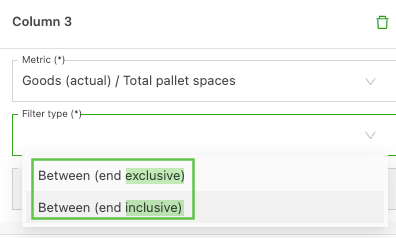
When a range of values is used to build a rate table, there are 2 ‘Between’ filter options to choose from. Ranges can represent anything from a ZIP code to a quantity or distance value. When available, the 2 filter options show as ‘Between (end exclusive)’ and ‘Between (end inclusive)’.
-
End exclusive: This excludes the end value entered in the range
-
Example
- 0–700 = 0–699
- 701–1400 = 700–1399
-
-
End inclusive: This includes the end value entered in the range
-
Example
- 0–700 = 0–700
- 701–1400 = 700–1400
-
Q: How are the ‘Between’ filters used if the values include decimal points?
A: To avoid decimal gaps, determine which tier the value should fall into and use the appropriate ‘Between’ filter to accommodate it.
Example:
-
If 700 needs to fall into the first tier:
End inclusive
0–700
700–1400 -
If 700 needs to fall into the second tier:
End exclusive
0–700
700–1400