
Qi – Document intelligence
Qargo Intelligence automates document data extraction, validating references, weights, times & addresses with AI-powered summaries & tags.
Introduction:
Transport company operations generate a large volume of paperwork that often requires some form of manual interaction. For instance, editing arrival and departure times, weights or quantities on a CMR, or adding container or seal numbers to an order. Not only can this be time-consuming, but as with any manual process, there is the possibility of missing or incorrect data entry.
Qargo Intelligence goes a long way toward mitigating some of these issues. AI-generated summaries reduce the task of data entry. Only data validation is required, plus edits or updates if additional clarification is needed.
Key features
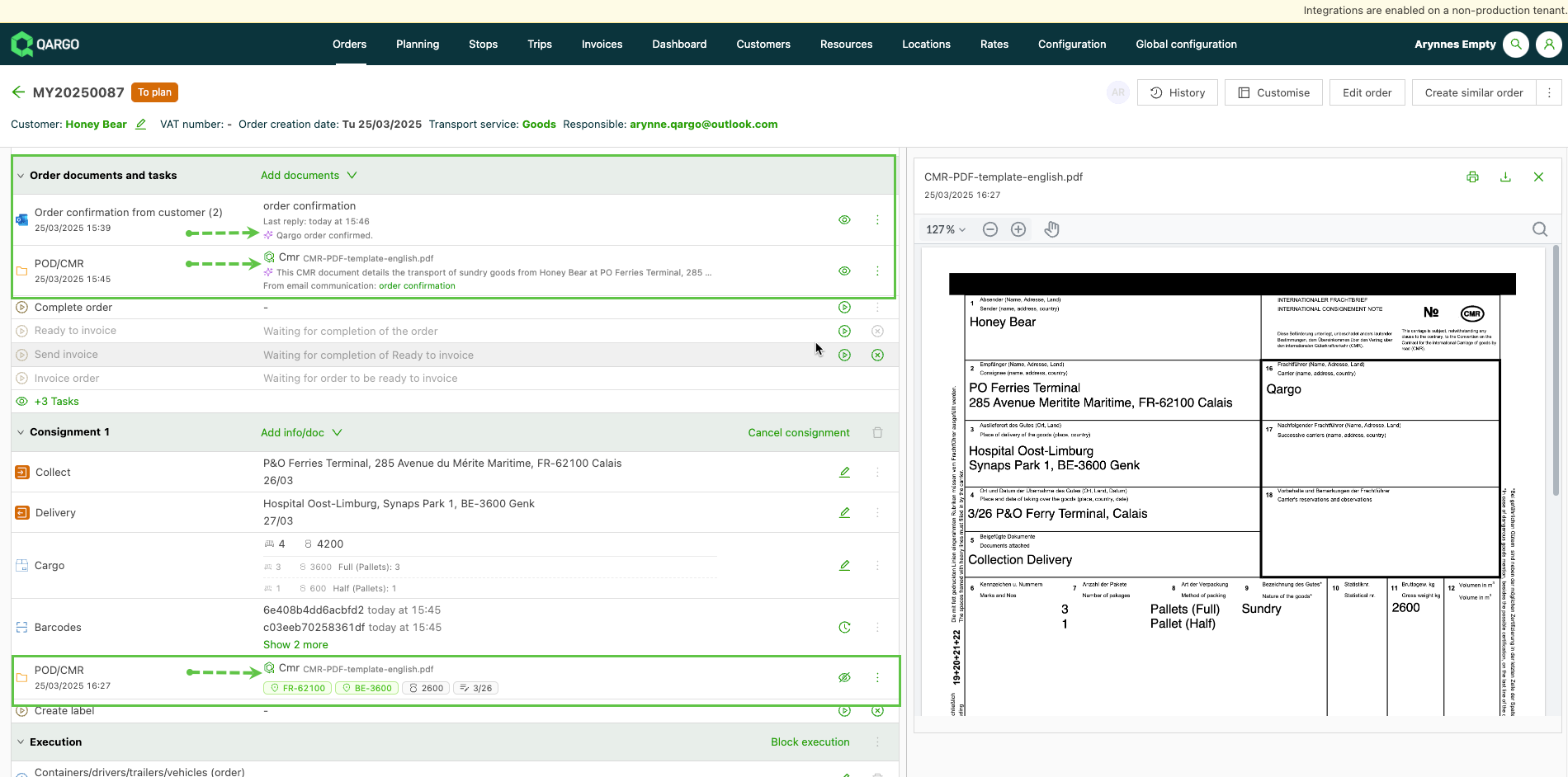
- AI-generated summaries based on documents that are uploaded to an order, including email attachments.
- Summaries are expandable by clicking into the row .
- The “Predicted” document type shows on the left side of the row, under the document type.
- Quality indicator: a color-coded Qargo icon indicates Good (Green) / Questionable (Orange).
- If the summary is not accurate, it can be deleted using the menu on the right side of the row.
Terminology
| Term | Definition in Qargo / Qi context | Practical note for logistics / trucking users |
|---|---|---|
| Document intelligence | The capability by which Qi analyzes documents — scans, PDFs, photos — to extract structured data (fields, reference numbers, signatures) | In trucking, this means Qi can read a POD (proof of delivery), CMR, invoice, etc., and auto-fill or validate against system records. |
| Field extraction | The process of detecting and extracting specific data points (e.g., container ID, seal number, weight, reference) from documents | Qi reads these values and maps them into the correct fields in the order / load record. |
| Signature detection | The automated determination of whether a document includes a valid signature (and who signed) | Qi flags documents with or without signatures, helping finance and compliance teams speed up verification. |
| Document matching / linking | Associating an uploaded document (e.g., POD) with the correct order or load in the system | Avoids manual searches: Qi attempts to match based on reference numbers, dates and route info. |
| Quality control (RAG system) | A red / amber / green grading system Qi uses to flag document legibility or completeness issues | Green = all good, Amber = slight discrepancy or missing field, Red = major issue. Qi surfaces only the alerts for human review. |
| Alerts / flagging | Documents or extracted records that Qi identifies as needing human attention (e.g., mismatches, missing data, unreadable entries) | These are what planners, operations or finance review manually. |
| Signature / signatory metadata | Additional data Qi may detect about the signature (who signed, when, location) | Provides auditing and compliance traceability. |
| Alert workflow*\ | ||
| (*based on customer workflow) | The internal process triggered when Qi flags a document as needing manual review, refraining from automatic processing | Ensures errors are caught before they have a financial or operational impact. |
Document data extraction and validation
A powerful AI functionality when adding documents to orders.
Key features include:
-
Automated data scanning & validation
- AI scans uploaded documents for references, weights, times, and addresses.
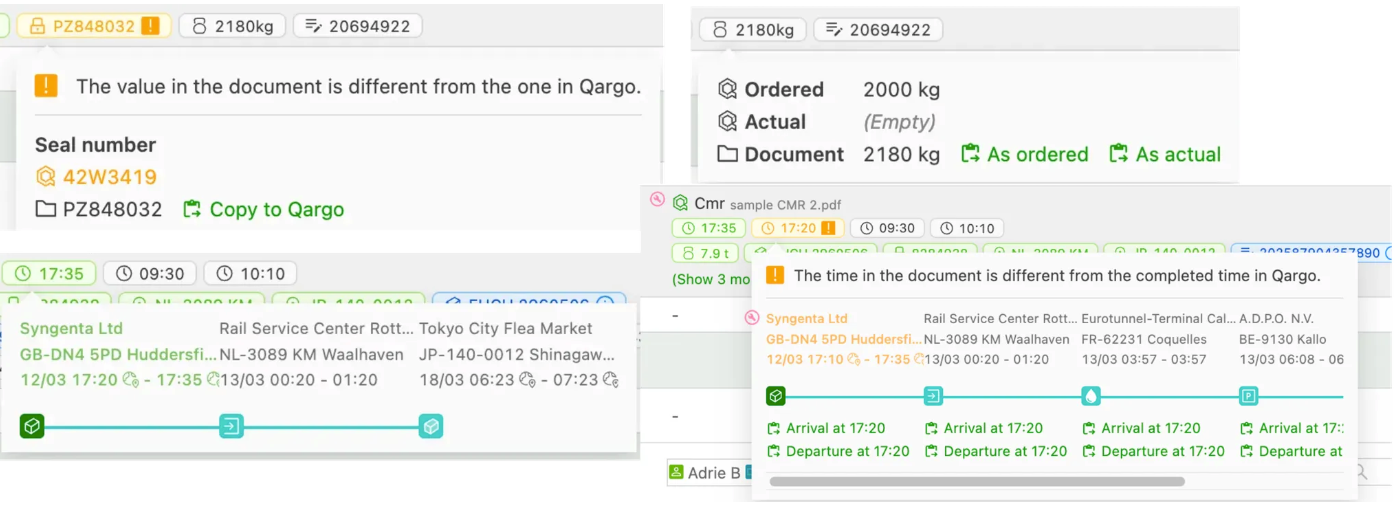
- The extracted values are validated against the order information, identifying matches, conflicts and new data.
-
Color-coded tags for quick identification
- Green: Values match the order.
- Orange: Conflicting values detected.
- Blue: New values found that can be added to the order.
-
Streamlined display with expandable tags
-
Tags with no available actions or a green/orange status are collapsed to reduce clutter.
-
Click “Show … more” to reveal additional values as needed.

-
-
Actionable data with popover details
-
Hovering over a value provides additional details and available actions:
-
Amend a reference number using the value from the document.
-
Copy a weight found on the document.
-
Copy a time as the arrival or departure time of a stop.
-
If a detected time is within 20 minutes of a stop’s scheduled time, a warning is displayed.
-
-
-
Supported document types
-
This feature is enabled for the following documents:
- CMRs/PODs
- Proof of pickup
- Container releases
- Photos of containers
- Photos of container seals
-
Managing order data has never been easier! Qi offers a smarter way to extract and validate document details, ensuring accuracy and efficiency in the workflow.