
FMS / mobile app stop updates: cutoff configuration
It is possible to configure how early or late updates entered by a driver are handled when they relate to a stop.
It is now possible to configure how the cutoff time is handled for the Qargo mobile app or a similar fleet management system (FMS) integration that updates stop times.
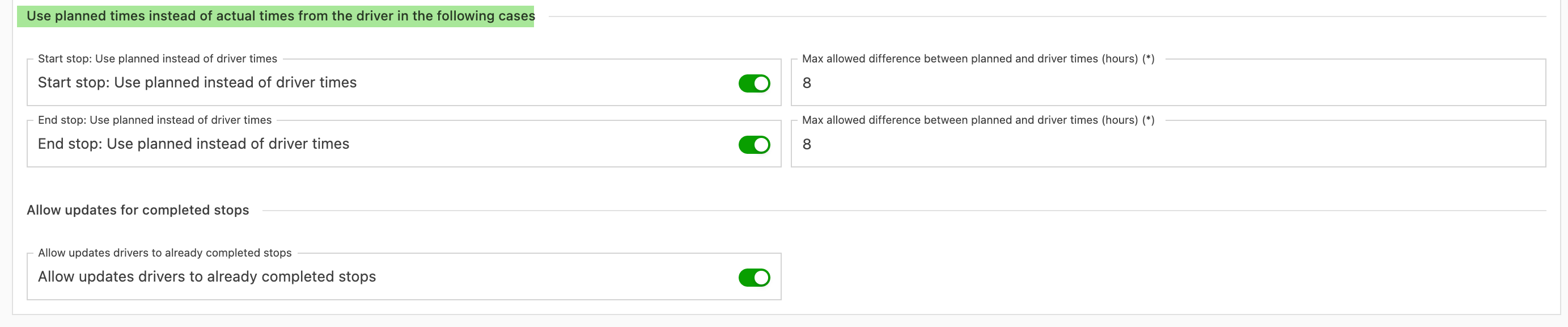
In the Use planned times section, it is possible to configure how updates are handled, depending on when the driver performs the update. This cutoff window helps account for stops that are updated early or late, which affects visibility on the planning board.
-
Enable start timestamp correction: This toggle enables or disables the start timestamp correction.
- If it’s enabled, the user can choose the threshold: the number of hours between the start timestamp of the stop in Qargo and the actual start timestamp update from the FMS that triggers the correction logic. The default is 8 hours.
- Example: A stop is planned for 1:00 PM, and an update from the FMS tries to set the start timestamp to 10:00 PM (+9 h). The correction logic treats this as a faulty update and keeps the planned timestamps.
- ❕A cutoff time of 0 hours means the correction logic is always triggered.
-
Enable end timestamp correction: This toggle enables or disables the start timestamp correction.
- If it’s enabled, the user can choose the threshold: the number of hours between the start timestamp of the stop in Qargo and the actual end timestamp update from the FMS that triggers the correction logic. The default is 8 hours.
- Example: A driver starts a stop at 8:00 PM in the FMS and then goes home for the day. The next day, the driver finally completes the stop at 8:00 AM, so the update is 12 hours late. This triggers the correction logic, and the end timestamp of the stop is set to 8:00 PM on the previous day instead.
- ❕A cutoff time of 0 hours means the correction logic is always triggered.
-
Allow timestamp updates to completed stops:
- This determines whether timestamp updates are applied to stops that are already completed. Other types of updates still go through regardless.
- Example: If the planner has already completed the stops in Qargo, stop updates from the FMS can no longer disrupt the planning.
More examples:
- A stop starts at 6:00 AM, the cutoff is set to 3 hours, and the current time is 10:00 AM. The stop is now completed in Transics (4 h > 3 h). Only the stop status is updated, and the planned times are kept on the stop.
- Allow timestamp updates to completed stops is turned off. A stop was completed by the planner at 7:00 PM. The cutoff is 3 hours, and the stop is completed in Transics at 8:00 PM. The times on the stop are not updated.