
INTEGRATION - Portbase Secure Chain
This article explains how Secure Chain works in Qargo, how to recognise a Secure Chain shipment, and how to create or delegate a booking when Secure Chain applies.
Table of contents
Using Portbase Secure Chain in Qargo
Secure Chain ensures that only authorised companies can pick up or deliver a container at Dutch sea terminals. Qargo fully supports receiving and delegating these permissions so your workflows remain smooth and compliant.
What is Secure Chain?
Secure Chain is a security process in Portbase that gives specific companies the right to:
- Create a pre-notification
- Pick up or drop off a container
Two actions are possible:
- Receiving Secure Chain permission
→ Another party nominates your company to handle a container. - Delegating Secure Chain permission
→ You transfer your permission to a subcontractor.
Qargo helps automate these steps where possible.
1. Enabling Secure Chain in Qargo
Secure Chain shipments in Qargo are identified with the Secure Release checkbox on the order.
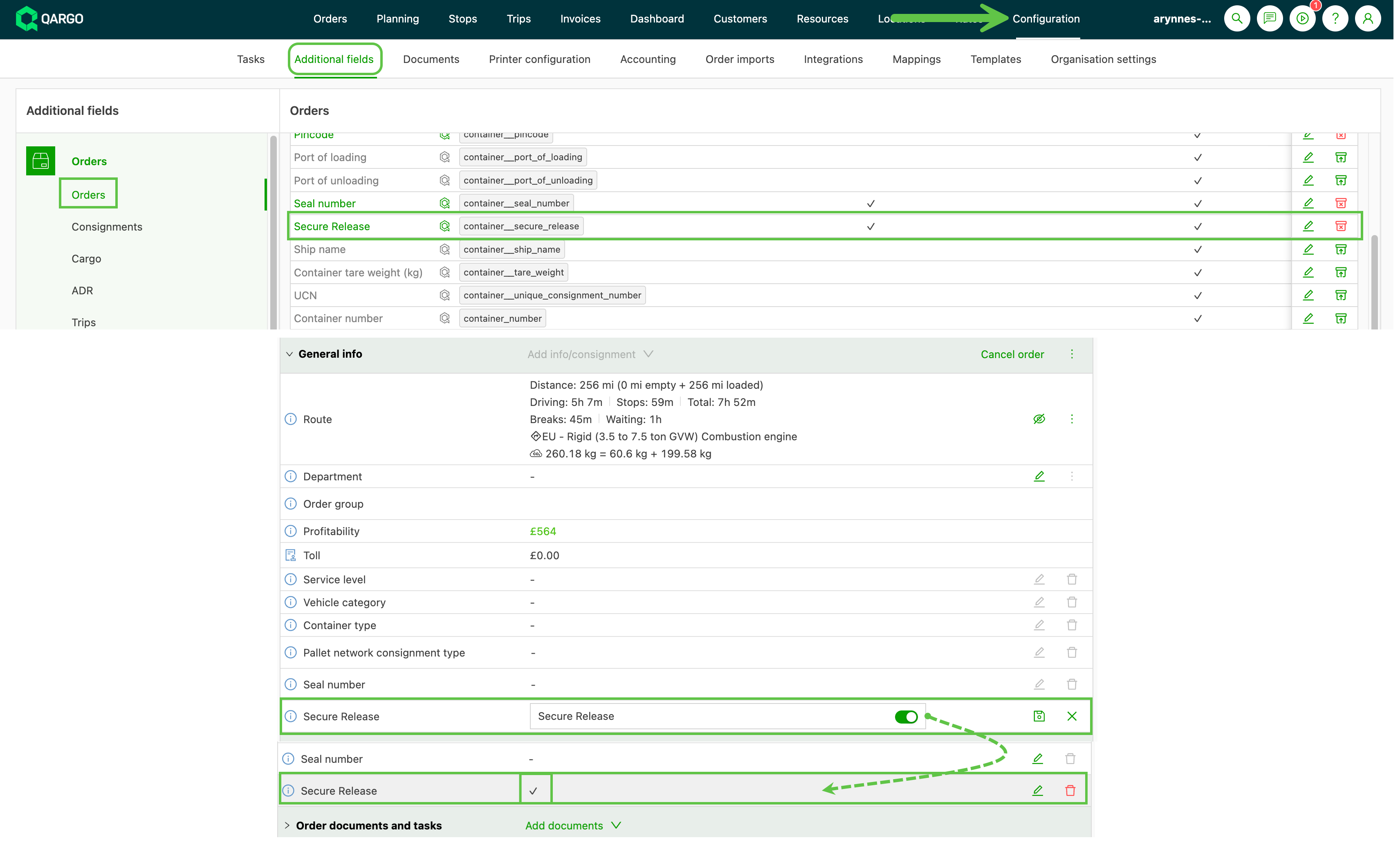
This field can be:
- Set automatically when a Secure Chain nomination arrives from Portbase
- Set via order import or API
- Checked manually if needed
Important:
If you know the container is a Secure Chain shipment but the Secure Release box is not checked, it means Qargo has not yet received the nomination from Portbase. You can check it manually to ensure correct processing.
2. Receiving Secure Chain Permission
When another party nominates you in Portbase:
- A Portbase user nominates your company for a specific container.
- Qargo receives the nomination with the shipment ID and container details.
- Qargo automatically matches it to the correct order.
- The Secure Release checkbox is automatically enabled.
How this affects the Status Request task
When you run a status request:
| If Secure Release is… | Qargo will… |
|---|---|
| Checked | Skip creating a pre-notification (already handled by the nomination). |
| Not checked | Create the pre-notification normally. |
This ensures you don’t create duplicate pre-notifications in Portbase.
3. Creating a Booking (No Delegation)
For normal bookings where you keep the pickup rights:
- Create a booking in Qargo.
- Run the task Create Container Booking to Portbase.
- Qargo sends the booking to Portbase using the Secure Chain shipment details.
- Portbase returns the booking confirmation.
This flow works the same as a regular Portbase booking, except Secure Chain ensures your permissions are valid before pickup.
4. Delegating Secure Chain Permission
You can delegate your permission to a subcontractor in two ways.
Delegating from Qargo
- Create a booking in Qargo.
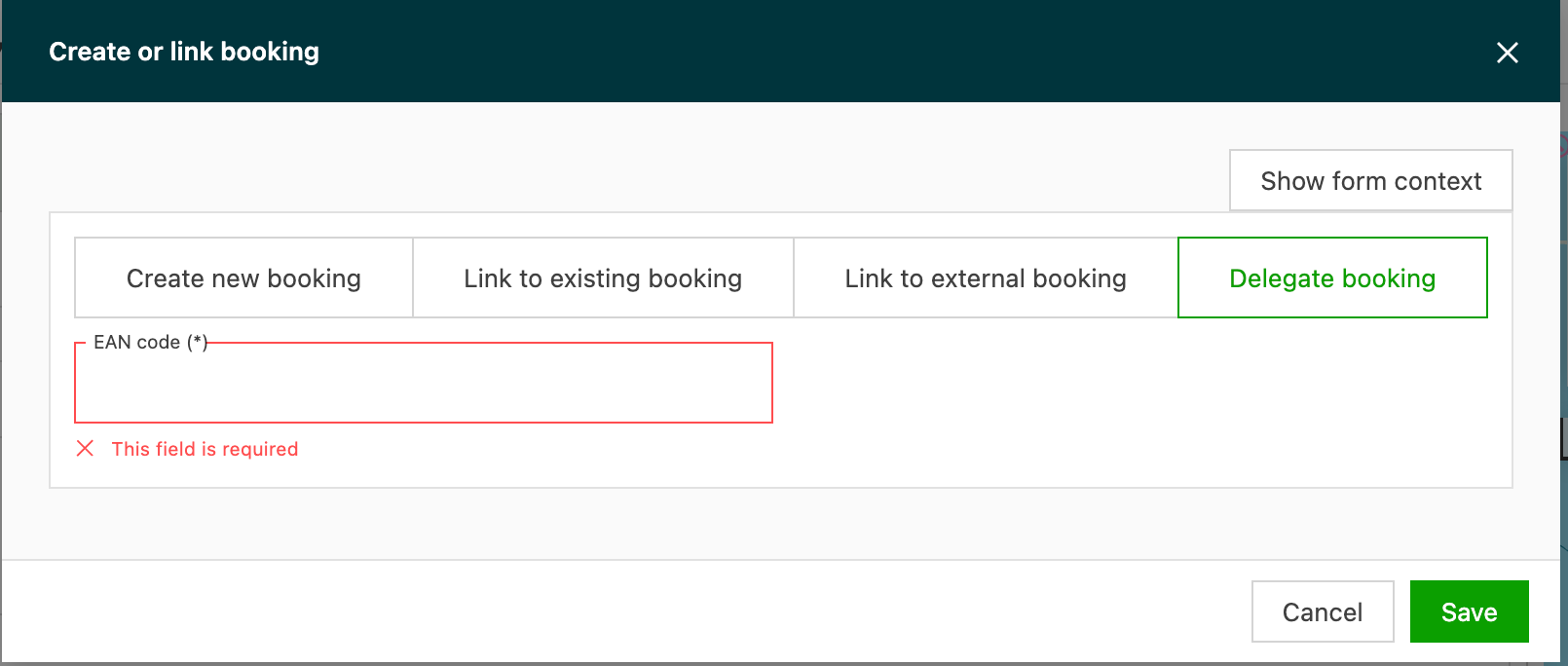
- Select Delegate to subcontractor and enter the subcontractor’s EAN reference.
-
Run Create Container Booking to Portbase.
-
Qargo automatically:
- Confirms the shipment was found
- Checks that Secure Chain applies
- Sends the delegation command to Portbase
The subcontractor now receives the rights to pick up the container.
Delegating via Portbase UI
Alternatively, delegation can happen directly in Portbase:
- A Portbase user delegates the container to the subcontractor.
- Portbase sends the update to Qargo.
- Qargo continues to show pickup status, even after delegation, so you can monitor progress.
5. Timeslots and Portbase
Portbase does not provide an API to share available or updated timeslots.
This means:
-
Timeslots in Qargo do not update automatically after changes made in Portbase.
-
If Portbase assigns or changes a slot, you need to manually verify and update the timeslot:
- On the stop in Qargo
- Or in the Portbase booking view in Qargo
Best practice
Always double-check the confirmed timeslot when:
- First creating the booking
- Receiving updates from Portbase
- A subcontractor has been delegated rights
Summary
Qargo makes Secure Chain simple by:
- Automatically detecting and handling Secure Chain nominations
- Skipping unnecessary pre-notifications
- Allowing easy delegation to subcontractors
- Tracking pickup status even after delegation
If you need help configuring Secure Chain, adjusting your imports, or troubleshooting a Portbase flow, our support team is happy to assist.