
Invoices – Peppol in Qargo (NL)
Peppol functionality is available from Q3 2025. This functionality makes it possible to send and receive invoices directly through the Peppol network.
Table of contents
What is Peppol?
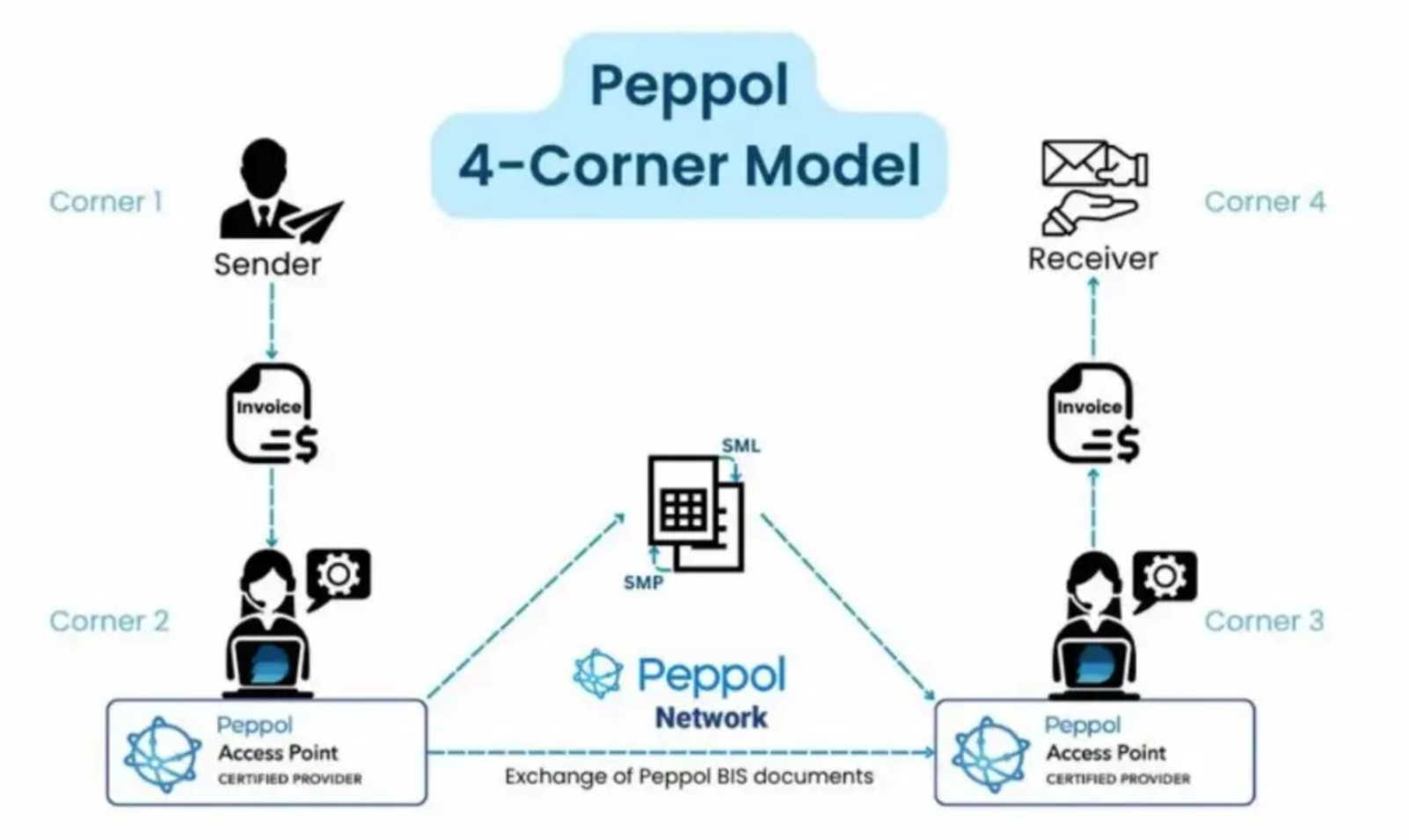
Peppol is a digital infrastructure that connects different e-procurement systems through a standardized network. It works on a four-corner model: both the sender and the receiver use their own access point providers to handle the technical aspects of document exchange.
Setup requirements
Before the Peppol functionality can be used, the following setup requirements must be completed:
- Peppol identifier: The company’s unique Peppol identifier must be provided during setup. This identifier is based on the company’s VAT number, DUNS number or another qualifying company identifier.
- Configuration support: The Qargo administrator handles all technical configuration as part of the setup process. No additional technical effort is required from the customer.
- Account integration updates: For existing account integrations, the Qargo Onboarding Manager coordinates any necessary updates to ensure seamless operation.
Technical implementation details
The Peppol integration includes several technical components that work automatically once configured:
- Preconfigured task: The new ‘Send to Peppol’ task is preconfigured in the tenant and ready to use immediately after setup.
- Accounting system integration: If an accounting system is already in place, the ‘Send to Peppol’ task is automatically linked to it.
- Standard implementation: No additional engineering is required for the standard implementation. Once the configuration for ‘send invoices’ is complete, the functionality is activated.
- Error handling: The system provides clear error messages for unsuccessful transactions, so the necessary corrections can be made quickly.
- Standard features: All standard task features remain available, including quick actions and label features.
How Peppol works in Qargo
Sales invoice workflow (outgoing invoices)
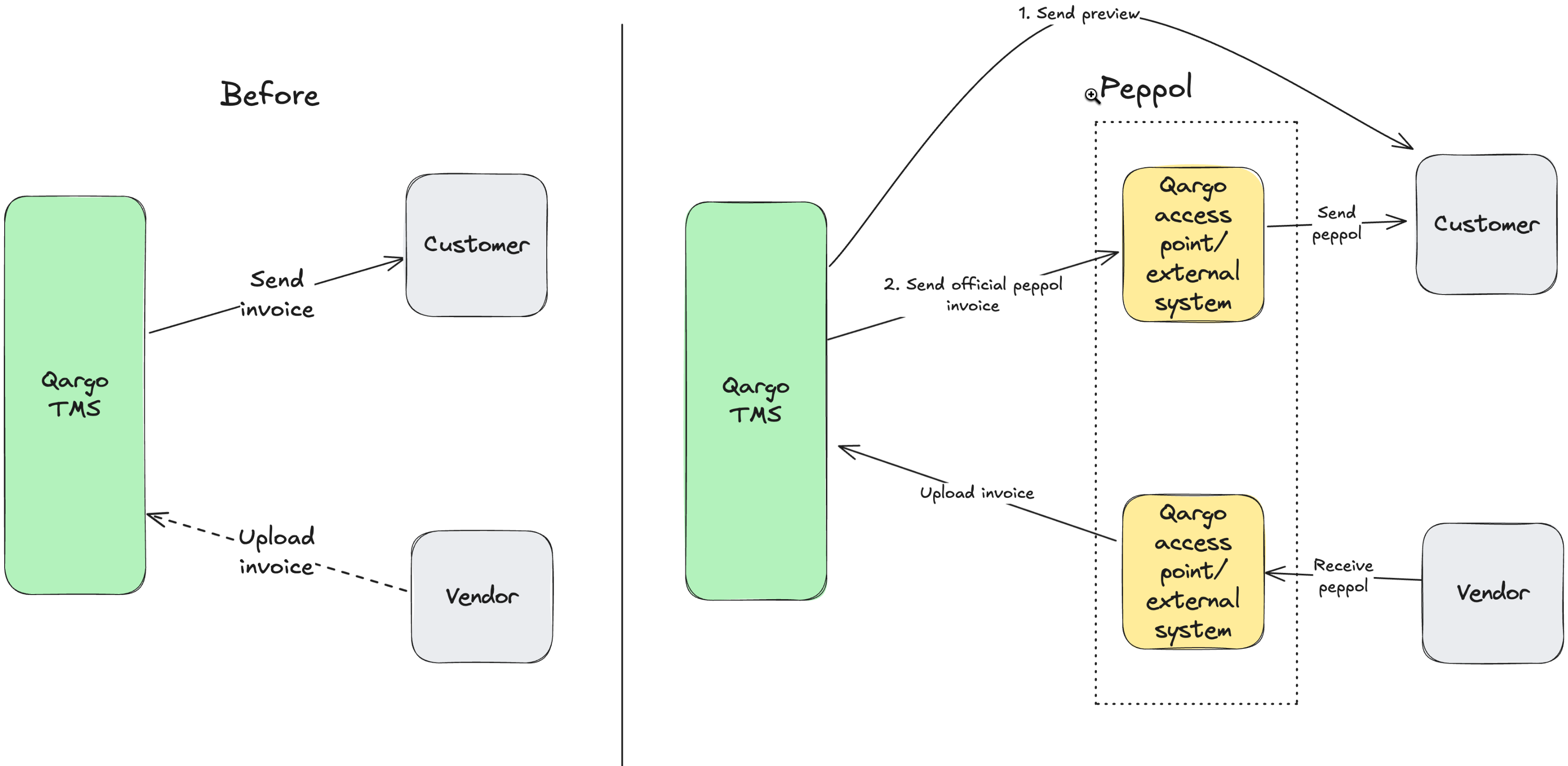
The sales invoice workflow makes it possible to send invoices through the Peppol network in the following steps:
-
Create the invoice: Create the Qargo sales invoice following the existing business process.
- Generate the invoice PDF
-
Post the invoice: Post the invoice as part of the invoice workflow.
- Note: The ‘Send to accounting’ task must be completed before the invoice or credit note can be sent to Peppol.
- A fixed (hard-coded) check is built in to verify that this has happened.
-
Send to Peppol: Submit the invoice to Peppol using the new ‘Send to Peppol’ task.
- If customer approval is needed first, a pro forma invoice can be used to obtain approval before sending through Peppol.
Purchase invoice workflow (incoming invoices)
Qargo offers a choice of flexible options for processing purchase invoices. These invoices can come from multiple sources and are not necessarily linked to a specific trip (for example, invoices for office supplies). This creates a more complex workflow, but these new options can handle that level of complexity and offer more streamlined workflow options.
Option 1: Qargo as the central access point
-
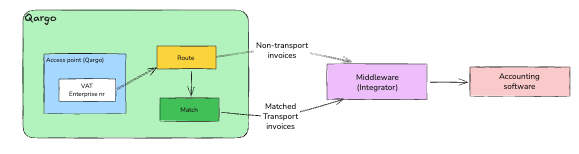
Qargo registers as the official access point.
-
All incoming purchase invoices, including non-transport purchase invoices, are processed through the Qargo access point.
-
Qargo Intelligence (Qi) processes purchase invoices:
- Transport-related purchase invoices are linked to trips and sent to the accounting system.
- Non-transport purchase invoices are sent to the accounting system.
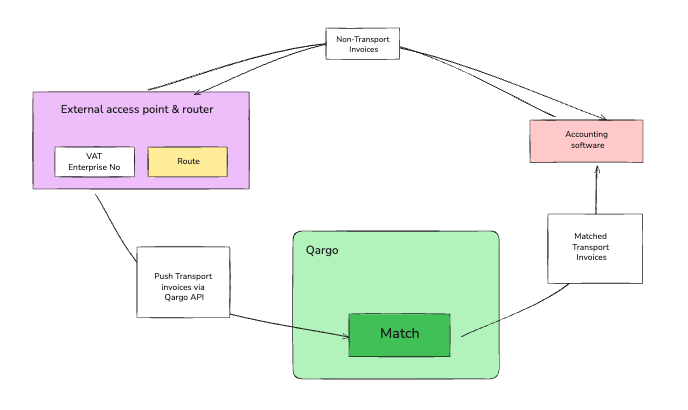
Option 2: External access point with API to Qargo
-
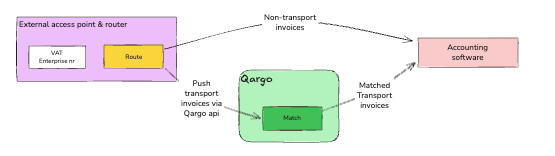
An external application acts as the official access point and router.
-
The external application receives all incoming purchase invoices, filters out the transport-related purchase invoices and sends them to the Qargo API.
- Qargo Intelligence (Qi) matches and processes purchase invoices for cost allocation.
- Processed purchase invoices can be sent to the accounting system through a manual or integrated workflow, depending on what is available.
- Non-transport purchase invoices are sent directly to the accounting system.
-
Option: A third party can send transport-related purchase invoices directly to the accounting system. These transactions are then returned through the access point and routed back to Qargo to ensure consistent recording.
Option 3: Integration through supported accounting platforms
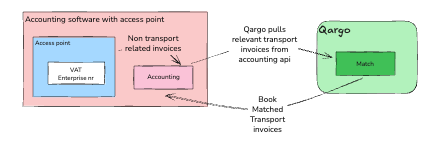
- Supported accounting platforms (such as Adsolut, Adfinity, Exact Online) can act as the Peppol access point.
- These systems receive incoming transport-related purchase invoices and automatically integrate them with Qargo.
Option 4: Semi-manual workflow
-
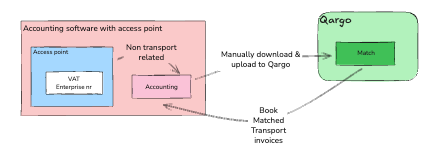
For accounting systems that do not support Peppol, a semi-manual workflow can be used:
- Download invoices from the accounting system.
- Upload them to Qargo.
- Let Qi match transport costs.
- Export the processed results back to the accounting software.